










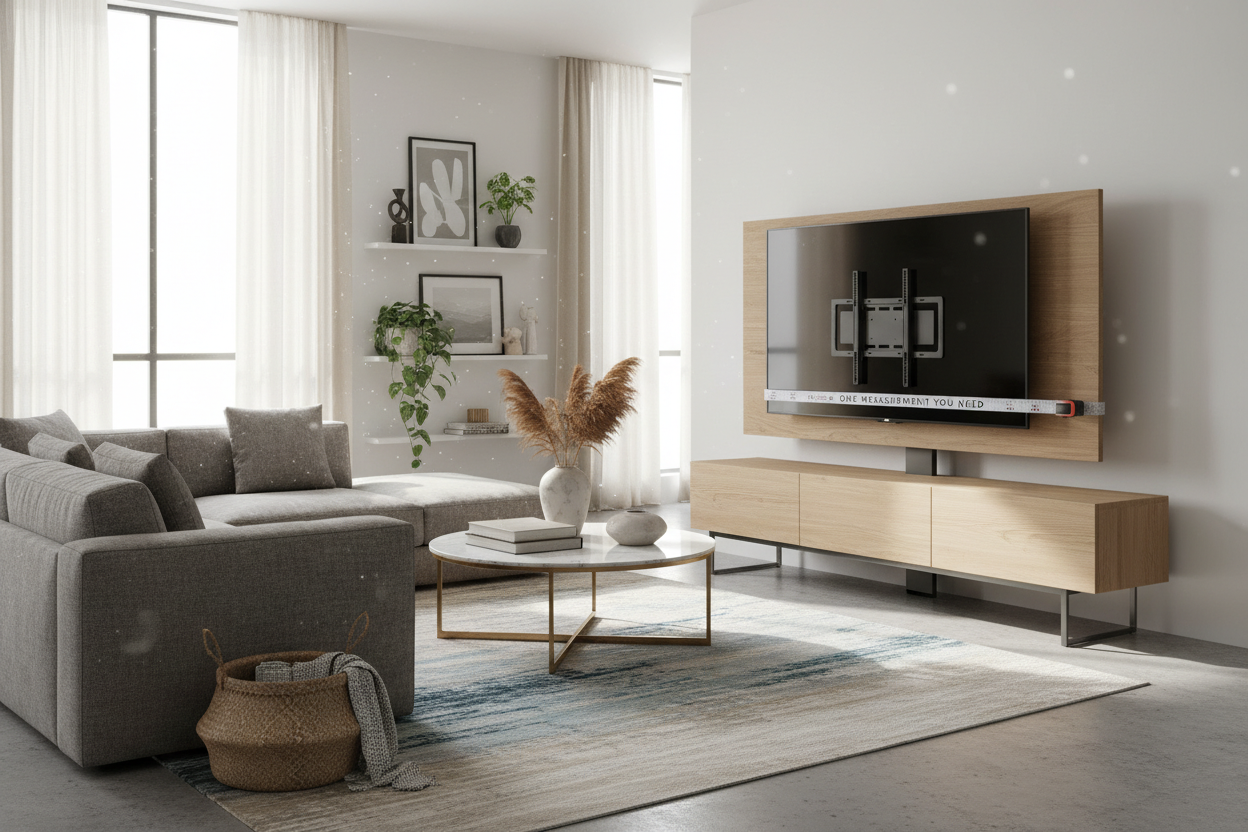
I spent three weeks scouring Craigslist for a mid-century credenza, finally found 'the one,' only to realize my new 65-inch TV had 'chicken feet' legs that were exactly two inches wider than the wood surface. It was a disaster. I was staring at a thousand-dollar screen balanced precariously on the edge of a vintage dream, wondering if a stiff breeze would end it all. That is when I discovered the tv stand vesa mount, and honestly, it changed how I look at living room layouts forever.
Quick Takeaways
- Factory TV legs are usually placed at the extreme edges, making them incompatible with narrow furniture.
- A VESA mount uses the standard hole pattern on the back of your TV to provide a stable, center-based support.
- Measuring your hole pattern in millimeters is the only way to ensure a proper fit.
- VESA stands are the ultimate hack for renters who cannot drill into walls.
The 'Wide Legs' Problem (And Why Factory TV Bases Suck)
Modern TVs are getting bigger, but the stands they come with are getting dumber. Most manufacturers have ditched the heavy center pedestals for these flimsy plastic feet tucked at the far corners of the screen. Unless you own standard TV stands that are nearly as wide as a sofa, your screen is going to overhang or, worse, not fit at all.
It is a frustrating design flaw. You buy a sleek 55-inch or 65-inch screen and suddenly your favorite heirloom dresser is 'too small' because of four inches of plastic. It looks cheap, it feels unstable, and it creates a massive footprint that eats up your entire tabletop. I hated the look of my TV hanging off the sides like an oversized sweater.
Enter the VESA Stand for TV: A Renter's Best Friend
This is where a vesa stand for tv saves your security deposit. VESA stands for Video Electronics Standards Association, but all you really need to know is that it refers to those four threaded holes on the back of your screen. By using a tv stand with vesa mount, you ditch the wide factory legs for a heavy-duty center pedestal that fits on almost any surface.
It is the best workaround for those moments when my wall studs betrayed me and I realized I could not safely bolt anything to my apartment's crumbly drywall. A vesa stand tv gives you that 'floating' wall-mounted look without the power tools or the holes in the wall. You get the height you want and the stability you need, all centered on your existing furniture.
How to Find Your Magic Number Without Doing Real Math
Before you hit 'buy,' you need one measurement. Flip your TV around and look at the four holes. Grab a metric tape measure—not inches, millimeters. Measure the distance horizontally between the holes, then vertically. If they are 400mm apart each way, you have a VESA 400x400 pattern.
Most vesa tv stand mount options are 'universal,' meaning they have a plate with multiple slots to accommodate different sizes. However, always double-check the weight rating. A 75-inch TV is a lot of glass and metal; you want a tv vesa mount stand that is rated for at least 20% more than your TV actually weighs. Safety first, because nobody wants a shattered screen on a Tuesday night.
Upgrading Your Setup: Built-In Mounts vs. Tabletop Solutions
You have two paths here. If you love your current furniture, a tabletop vesa tv stand mount is a heavy glass or steel base that replaces the factory feet. It is a quick, 15-minute assembly job. But if you are starting from scratch, I highly recommend looking into a TV stand with mount and shelves. These integrated units have a 'spine' that holds the TV up, leaving the entire surface of the stand free for a soundbar or decor.
If you prefer a cleaner, more hidden look, a modern TV stand with cabinets paired with a pedestal mount allows you to hide all the cable clutter inside. The integrated mount approach is great because it usually includes cable management clips behind the central pole, so you don't have a 'rat's nest' of black wires hanging down behind your beautiful credenza.
Say Goodbye to the Dreaded Screen Wobble
There is a specific kind of anxiety that comes with a top-heavy TV resting on thin plastic legs. One bump from a vacuum or a curious cat, and it is game over. Bolting your screen to a solid steel vesa stand tv base feels infinitely more secure. It lowers the center of gravity and gives the whole setup a professional, 'built-in' vibe.
Beyond the safety, it just looks better. Elevating the screen a few inches off the console surface creates breathing room. You can actually see the wood grain of your furniture again. It turns a piece of technology into a deliberate part of your interior design rather than a giant black box occupying every square inch of your living room.
Personal Experience: The 'Block' Mistake
I once tried to 'hack' a wide-leg TV by putting small blocks of wood under the feet to bridge the gap on a narrow console. It looked terrible, and I spent every night terrified it would slide off. I eventually spent the $40 on a proper VESA pedestal and felt like an idiot for waiting so long. It took ten minutes to install and looked ten times more expensive than my DIY disaster.
FAQ
Will any VESA mount fit my TV?
Not necessarily. While most are adjustable, you must match the specific millimeter pattern (like 200x200 or 400x400) and ensure the mount is rated for your TV's weight. Check your TV's manual or the manufacturer's website first.
Do I need special screws?
Most VESA stands come with a 'hardware 'kit' containing various M6 and M8 bolts. However, if your TV has deep-set holes, you might need the specific spacers that came in the original TV box. Don't throw those away!
Can I adjust the height?
Yes, that is one of the best features. Unlike factory legs, most VESA pedestal stands have multiple height settings on the central pillar, allowing you to clear space for a large soundbar or center-channel speaker.

Leave a comment
This site is protected by hCaptcha and the hCaptcha Privacy Policy and Terms of Service apply.