










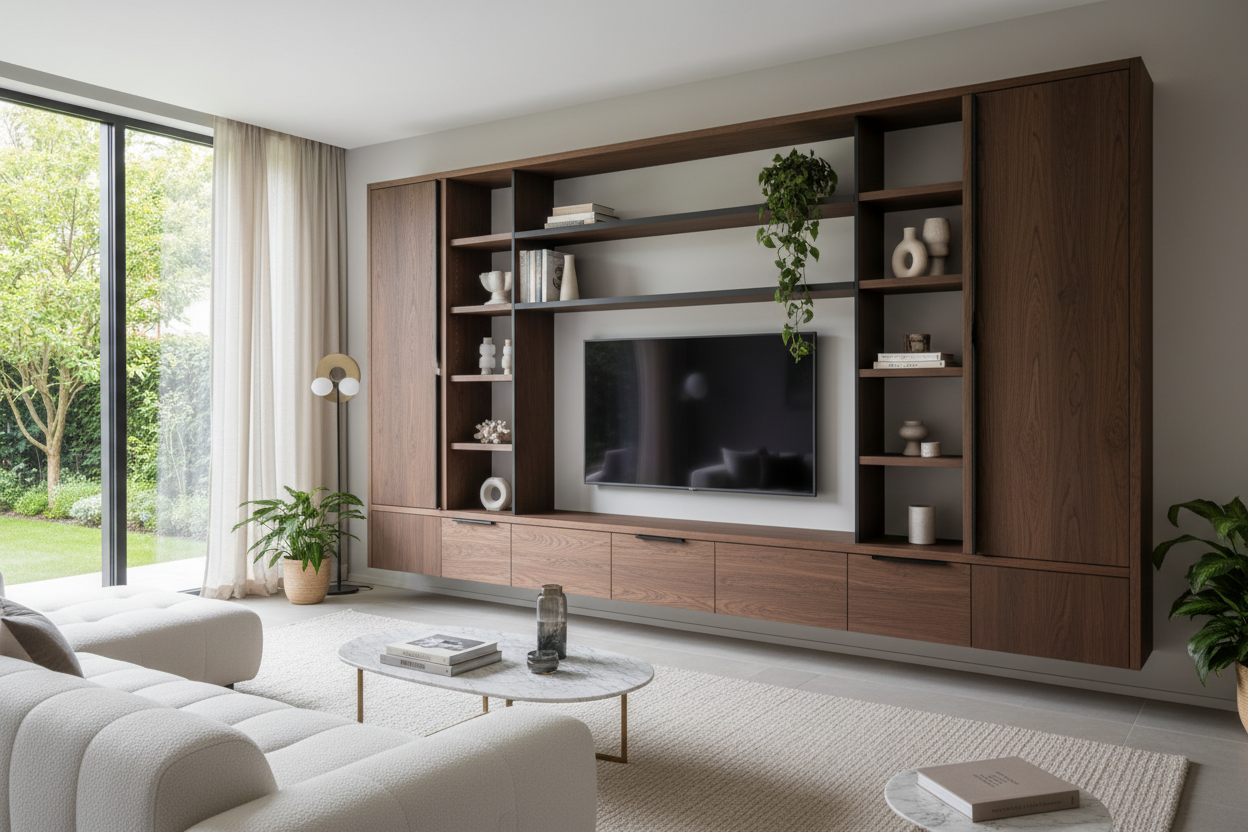
We have all been there. You mount a beautiful new flat screen to the wall, step back to admire it, and realize the space underneath looks completely unfinished. Cords are dangling, the cable box is sitting on a repurposed side table, and the room suddenly feels like a college dorm instead of a curated home. The solution is usually a tv entertainment storage unit, but finding one that actually complements your architecture rather than overwhelming it is harder than it looks.
Whether you are dealing with an open-concept suburban family room or a compact city apartment, the right piece does more than just hold electronics. It anchors the room, provides essential hidden storage, and balances the heavy visual weight of the television. In this guide, I will walk you through exactly what to look for—from proportions to hardware—so you can make a confident purchase.
Quick Decision Guide
- Width is crucial: Your unit should be at least 20 to 25 percent wider than your TV to avoid looking top-heavy.
- Mix open and closed storage: Aim for a 70/30 split. Hide the ugly routers and cables behind solid doors, and use open shelving for curated decor.
- Check depth for modern tech: Ensure the interior shelves are at least 15 inches deep to accommodate standard receivers and gaming consoles.
- Ventilation matters: Electronics run hot. Look for units with slotted backs or breathable door panels like cane or slatted wood.
Space Planning and Layout Rules
Getting the Proportions Right
The most common mistake I see in living rooms is pairing a massive 75-inch screen with a tiny, floating media console. It throws off the entire scale of the room. When selecting an entertainment unit with storage, the golden rule is the two-thirds ratio. Your console should extend well beyond the edges of the screen. If your TV is 60 inches wide, look for a unit that is at least 80 inches long. This negative space on either side gives your eye a place to rest and provides a surface for styling a table lamp or a tall vase.
Clearance and Flow
In North American homes, living rooms often serve as high-traffic thoroughfares. You need to leave a minimum of 36 inches of clear walkway between the front of your media unit and your coffee table. If you are working with a narrow room, opt for a piece with sliding doors rather than hinged ones. Sliding doors do not require an extra foot of clearance to open, making them a lifesaver in tight spaces.
Material and Build Quality
Solid Wood vs. Engineered Veneers
You do not necessarily need solid oak or walnut for a high-quality piece. High-grade MDF with a real wood veneer is often more stable in environments with fluctuating humidity, preventing the warping that can happen with solid slabs. However, pay close attention to the edge banding. Cheap laminates will peel at the corners within a year, especially if you have pets or a vacuum cleaner that constantly bumps the baseboard.
Hardware and Cord Management
Good entertainment storage lives and dies by its hardware. Soft-close hinges are a must if you have children. More importantly, inspect the back panel. A premium unit will have dedicated, rubber-grommeted cutouts for cable routing, not just a flimsy piece of cardboard with a perforated hole punched in the center.
Designer's Honest Take
Over the last 15 years, I have specified hundreds of media consoles, and I will share a hard truth: push-to-open doors are incredibly frustrating in high-use areas. I once designed a beautiful custom matte black unit for a client's family room. It looked incredibly sleek without visible pulls. But after two months of kids opening it to grab gaming controllers, the matte finish was covered in greasy fingerprints, and the push-latches started sticking. We ended up retrofitting it with low-profile edge pulls.
Another caveat: be wary of ultra-low profile units if you have tall baseboards. A console that sits flush to the floor looks incredibly modern, but if it has a straight back, it will leave an awkward gap against the wall where your baseboard prevents it from sitting flush. Always check for baseboard cutouts or opt for a unit with inset legs.
Frequently Asked Questions
How deep should a media console be?
Most standard units range from 15 to 20 inches deep. If you only stream and use a soundbar, a shallow 15-inch depth saves floor space. If you have bulky gaming consoles or vintage audio receivers, you will need a depth of at least 18 to 20 inches.
Can I mount my TV above the unit or should it sit on top?
Both work, but wall-mounting the TV about 4 to 6 inches above the surface creates a cleaner look and frees up the top of the console for styling. If you rent and cannot drill into the wall, sitting it on the unit is perfectly fine—just ensure the console's weight capacity can handle it.
How do I hide cables if my unit has open shelving?
If your unit features open shelves, use decorative woven baskets or structured leather boxes to corral loose cables, remotes, and controllers. You can also run a paintable cord channel along the wall to camouflage the primary power strip.

Leave a comment
This site is protected by hCaptcha and the hCaptcha Privacy Policy and Terms of Service apply.