










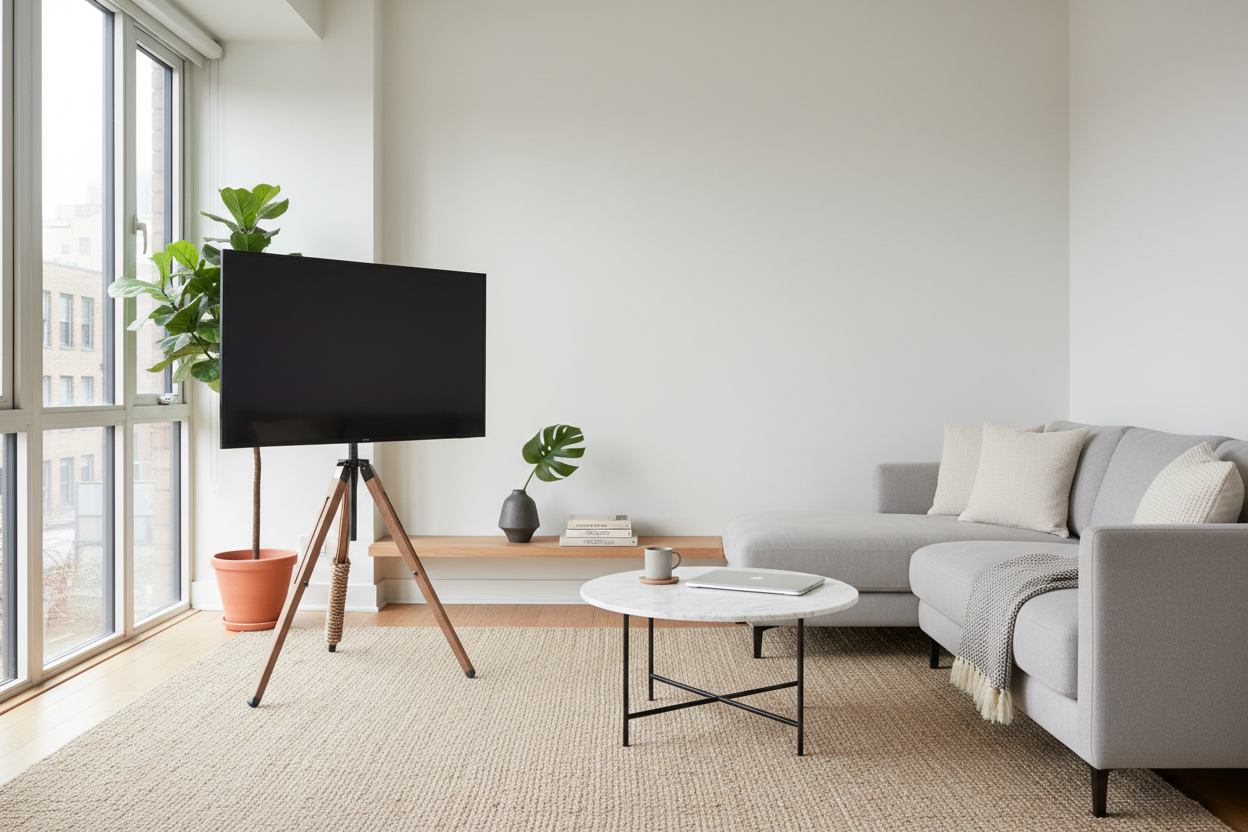
I spent three years living in a studio where my 55-inch TV sat on a bulky particle-board dresser. It felt like the tech owned the room, not me. Every time I looked at it, I saw a giant black rectangle eating up four square feet of floor space I desperately needed for a rug or a plant. It was a classic small-apartment standoff.
Eventually, I hit a breaking point. I realized I didn't need a heavy piece of furniture just to hold up a screen that weighs less than my dog. That is when I discovered the television tripod stand. It was a total visual reset that made my living room feel five feet wider overnight and finally made my screen look like a choice rather than a necessity.
- Floor space: You get your square footage back immediately without drilling into walls.
- Flexibility: You can tuck your TV into corners that a rectangular console could never fit.
- Aesthetics: It turns a flat screen into a piece of art on an easel, perfect for minimalist homes.
- Cable Management: It takes a little effort with Velcro, but the floating look is worth the ten minutes of cable routing.
The 'Big Black Box' Problem
We have been conditioned to think a TV requires a massive piece of cabinetry. While traditional TV stands are great if you have a mountain of DVDs or a vintage stereo system, they often feel like a heavy anchor in a small room. They collect dust underneath and dictate exactly where your sofa has to go. If your room is awkward, a standard console usually makes it worse.
I once tried a heavy carved wood TV stand because I loved the craftsmanship, but in my 600-square-foot apartment, it looked like a boulder in a pond. It commanded the center of the room and left no space for traffic flow. Ditching the bulk for a tripod tv floor stand was the only way to breathe again and regain my floor plan.
Enter the Easel: My First Television Tripod Stand
When I finally bought a tripod tv mount, the shift was immediate. Suddenly, my tv on tripod stand looked less like a piece of equipment and more like something you would find in a gallery. It has a mid-century, minimalist vibe that works whether you are going for 'industrial loft' or 'cozy scandi.' Some might call it a tripod teevee setup, but I just call it a relief.
The best part? I could finally move the TV into that awkward 45-degree corner by the window. Most tripod tv stands allow for a 360-degree swivel, meaning I can point the screen toward the kitchen while I am cooking and then swing it back toward the sofa for a movie. It is the kind of mobility you just don't get with a fixed credenza. It is easily the best tv tripod stand decision I have made for my layout.
Wait, Is It Actually Safe for a Giant Screen?
This was my biggest fear. I was convinced my cat would knock the whole thing over during a midnight zoomie session. But a well-made tv tripod is surprisingly stable. The physics of a tripod tv stand wood design are solid; the center of gravity is lower than you think, and the legs are weighted to prevent tipping. Most include a safety cable you can screw into the wall if you are extra paranoid.
If you are worried about a larger screen, you can find a tv tripod stand 75 inch rated. These heavy-duty versions use reinforced steel and wider leg spreads to handle the weight. I have personally tested a flat screen tv tripod stand with a 65-inch OLED, and even with the occasional bump from a vacuum, it stayed rock solid. Just make sure the VESA mount matches your screen's specs.
How to Style It Without Looking Like a Boardroom
To avoid the 'office conference room' look, I always recommend a wood tripod tv stand. The natural grain of a wood tv tripod adds a layer of warmth that softens the harsh black glass of the screen. It makes the setup feel like furniture rather than just a functional tv mount for tripod. I paired mine with a few floor plants to help the legs blend into the room's decor.
If you want a moodier look, you can match the legs to a black wood TV stand aesthetic for a high-end gallery vibe. The trick to making it look intentional is cable management. Use the clips that come with most tripod tv stand wood models to run your power cord down the back leg. If you have multiple cables, wrap them in a mesh sleeve that matches your wall color so they disappear from sight.
The Verdict: Who Should (and Shouldn't) Buy One
A tripod tv stand 32 inch or even a massive 75-inch version is perfect for minimalists and people with weird room layouts. However, it is not for everyone. If you have a PlayStation, an Xbox, a cable box, and a soundbar, you are going to have a hard time hiding all those wires. You could get a tripod tv stand with shelf attachments, but it starts to look cluttered quickly. If you need to move it between rooms often, a tripod tv stand with wheels is an option, but it loses some of that 'furniture' feel.
If you have a lot of heavy gear, you are honestly better off with a stand with adjustable center shelf to house your electronics. But if you are a 'one-cord' person who mostly streams, the tv stand tripod wood look is the ultimate design hack. It changed how I use my living room, and I am never going back to a bulky console.
Can a tripod stand hold a 75-inch TV?
Yes, but you need to check the weight rating specifically. Many tripod models are built for smaller screens, but heavy-duty versions are designed for 75-inch sets. Always check the VESA pattern and the max load before buying to ensure your tv tripod mount can handle the weight.
How do you hide the wires on a tripod?
Most stands have clips on one of the legs. I use small Velcro ties to keep the power cord and HDMI cable tight against the back of the leg. If you have a white wall, a white cable sleeve makes the wires virtually disappear against the background.
Is it safe for households with kids or pets?
While they are stable, a tripod is easier to tip than a 200-pound dresser. If you have toddlers or very active large dogs, look for a model that includes a safety wall-tether kit. This gives you the minimalist look of a tripod tv with the safety of a wall-mounted set.

Leave a comment
This site is protected by hCaptcha and the hCaptcha Privacy Policy and Terms of Service apply.