










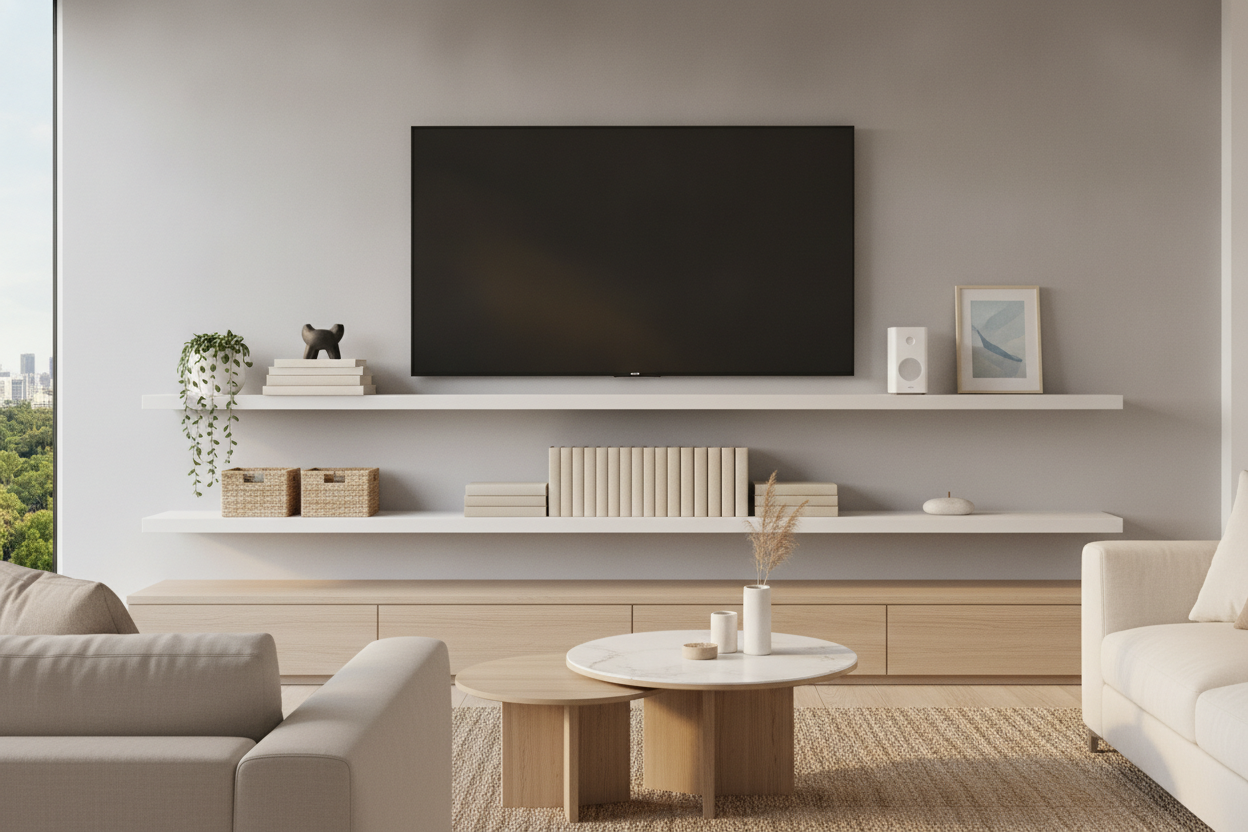
I remember the first time I mounted my 55-inch OLED. It looked sleek, expensive, and modern—for about ten minutes. Then I realized my cable box, PlayStation, and router were sitting on the floor like a pile of digital laundry. I rushed out and bought some floating shelves under tv, slapped them up, and somehow it looked even worse. It looked like a Best Buy clearance aisle had exploded in my living room.
We have all been there. You want that minimalist, 'floating' look you see in architectural magazines, but your reality involves six different power bricks and a tangled mess of HDMI cables. The gap between your screen and your furniture shouldn't be a dumping ground for electronics. It is prime real estate for design, and if you treat it like a server rack, you are killing the vibe of your entire living room.
Quick Takeaways:
- Follow the 70/30 rule: 70% decor, 30% tech.
- Stagger multiple small floating shelves under tv rather than using one long, heavy board.
- Cable management is not optional; hide your cords or the aesthetic is ruined.
- Choose matte finishes for under tv wall shelves to avoid distracting screen glare.
The 'Tech Graveyard' Epidemic
The biggest mistake I see in home tours is the 'Tech Graveyard.' This happens when someone installs a beautiful under tv floating shelf and immediately treats it like a storage locker. You have the router with its blinking green lights, the dusty Nintendo Switch dock, three different remotes, and maybe a stray controller or two. When all these items are shoved onto a shelf for under tv, your eye is pulled away from the screen and directly toward the clutter.
It is a visual nightmare. These gadgets are designed for function, not beauty. Most routers look like robotic spiders, and they have no business being the focal point of your wall. When you place a shelf for under tv on wall mounts, you are creating a display. If that display is just a collection of plastic boxes and tangled wires, you have essentially built a shrine to your internet provider. It makes the room feel smaller, messier, and completely uncoordinated.
To fix this, you have to be ruthless. If a device doesn't need to be in the line of sight for an IR remote, hide it. Mount the router behind the TV. Tuck the Apple TV box to the back of the screen with heavy-duty Velcro. Your floating shelves living room tv setup should be about curation, not just convenience. If you can't hide the tech, you have to balance it out, which leads us to the most important rule of styling.
Rule 1: The 70/30 Decor to Tech Ratio
If your shelf is 100% electronics, it is a utility rack. To make floating shelves and tv setups look intentional, you need to follow the 70/30 ratio. This means 70% of the visual space should be occupied by 'soft' or 'organic' items—books, plants, ceramics, or art—while only 30% is dedicated to your tech. This balance softens the hard edges of the screen and the plastic gadgets, making the wall feel like part of a home rather than a home office.
For example, if you have a soundbar on your shelf to mount under tv, don't just leave it there solo. Flank it with a couple of textured stoneware vases or a small stack of coffee table books. The goal is to break up the horizontal black line of the tech. I often suggest that if you have too much gear to follow this rule, you might be better off with a wall mounted media console entertainment center. A full console allows you to hide 100% of the ugly stuff behind doors, whereas open under tv shelves require constant styling discipline.
Think about height, too. Tech is usually short and flat. Use a small shelf under tv to hold a trailing plant like a Pothos. The vines breaking the plane of the shelf add a vertical element that distracts from the boxy shape of a gaming console. By mixing textures—the cold plastic of a console with the warm grain of a wood shelf and the organic shape of a plant—you create a layered look that feels professional.
Rule 2: Stop Using Just One Long Shelf
Most people default to buying one single, 48-inch or 60-inch large floating shelf for tv and centering it perfectly. While this can work, it often feels heavy and a bit unimaginative. It creates a rigid, symmetrical look that can feel dated. Instead, try staggering two or three mounted tv floating shelves at different heights. This creates a dynamic 'gallery' effect that draws the eye around the wall rather than just pinning it to the space directly below the screen.
Staggering small floating tv shelf units allows you to play with the negative space. You might have one shelf for under wall mounted tv slightly to the left, holding your soundbar, and another slightly lower and to the right for decor. This layout actually helps with the question of does a TV shelf floating on the wall actually save space because it utilizes more of the vertical wall area without the bulk of a floor-standing unit. It makes the ceiling feel higher and the room feel airier.
When you use wall mounted shelves under tv in a staggered pattern, you also gain more flexibility for cable management. You can run wires behind the wall or through a single channel that services multiple levels. It looks like a custom built-in rather than an afterthought. If you are working with a floating shelves for bedroom tv setup, this is especially helpful, as bedrooms often have less floor space for wide, singular pieces of furniture.
Rule 3: Hide the Ugly Cords (Seriously, Do It)
I am going to give you some tough love: if I can see a black power cord dangling six inches down your white wall, your hanging shelves tv project is a failure. It doesn't matter if you bought a $500 reclaimed wood floating shelf for under wall mounted tv; a messy cord will make it look cheap. Cable management is the difference between a 'Pinterest' home and a dorm room.
You have two real options here. The first is 'behind-the-wall' routing. You can buy a bridge kit that allows you to run power and HDMI through the drywall. It is easier than it sounds, though you should always check your local fire codes for in-wall rated cables. The second option is a paintable cable raceway. These are plastic channels that stick to the wall. You pop the cords inside and paint the cover the exact same color as your wall. From five feet away, they virtually disappear.
Don't forget the cords on the floating shelf for tv equipment itself. Use Velcro ties (never plastic zip ties—they are a pain to cut off later) to bundle excess cord length behind the devices. If you have a wall mount under tv shelf, you can even stick a small power strip to the underside of the shelf using Command strips. This keeps the 'brain' of your power supply off the floor and tucked out of sight. A clean under tv hanging shelf is a happy one.
What Actually Belongs on a Small Shelf Under TV
So, what should you actually put on a small shelf for under tv? You want items that have presence but don't compete with the screen. Avoid anything with a high-gloss finish or glass. I once put a beautiful silver bowl on a floating shelf under wall mounted tv, and every time an explosion happened in a movie, the bowl reflected a bright flash of light right into my eyes. Stick to matte ceramics, wood, and fabric-bound books.
Small stacks of books are perfect for under tv shelving. They provide a flat surface to elevate a smaller decor item and help hide the base of a floating shelf for under tv on wall. A small, low-light plant is also a winner. If you have a lot of 'ugly' tech that you simply can't hide, I recommend looking into adjustable shelf storage in a nearby cabinet or closet to house the overflow. Only the essentials should live on the floating wall shelf under tv.
Finally, consider the scale. A large floating shelves for tv setup can handle a substantial vase or a medium-sized sculpture. But if you have a hanging entertainment shelf that is only 24 inches wide, keep the items small and grouped in threes. Avoid 'lining things up' like soldiers; overlap them slightly to create depth. This makes the tv with floating shelf underneath look like a cohesive design choice rather than just a place to put your stuff.
Personal Experience: My 'Invisible' Shelf Disaster
A few years ago, I fell in love with the idea of a floating shelf under mounted tv made of clear acrylic. I thought it would look 'invisible' and ultra-modern. In reality, it was a disaster. Not only did it show every single fingerprint and speck of dust, but it also acted like a magnifying glass for the messy cables I had tried to hide behind it. The light from the TV would hit the edges of the acrylic and create a glowing halo that was incredibly distracting during night-time viewing. I eventually replaced it with a matte black wall mounted shelf for under tv, and the difference was night and day. The lesson? Texture and finish matter just as much as the shelf itself.
FAQ
How high should I mount a floating shelf under a TV?
Generally, aim for 4 to 6 inches below the bottom of the TV. This is enough space to prevent the wall from looking cramped, but close enough that the shelf and TV feel like a single visual unit. If you go too low, the shelf looks like it is 'floating away' from the screen.
Can a floating shelf hold a heavy soundbar?
Yes, provided you mount it into the wall studs. Never rely on drywall anchors for a floating shelf for tv equipment that will hold a heavy soundbar or a gaming console. Use a stud finder and 2.5-inch screws to ensure it can handle the weight without sagging over time.
Should the shelf be wider than the TV?
For the best proportions, your floating wall shelves under tv should be at least as wide as the screen, but ideally about 20% wider. A shelf that is narrower than the TV can make the setup look 'top-heavy' and unbalanced. If you have a 55-inch TV, look for a shelf that is at least 50 to 60 inches wide.


Leave a comment
This site is protected by hCaptcha and the hCaptcha Privacy Policy and Terms of Service apply.