










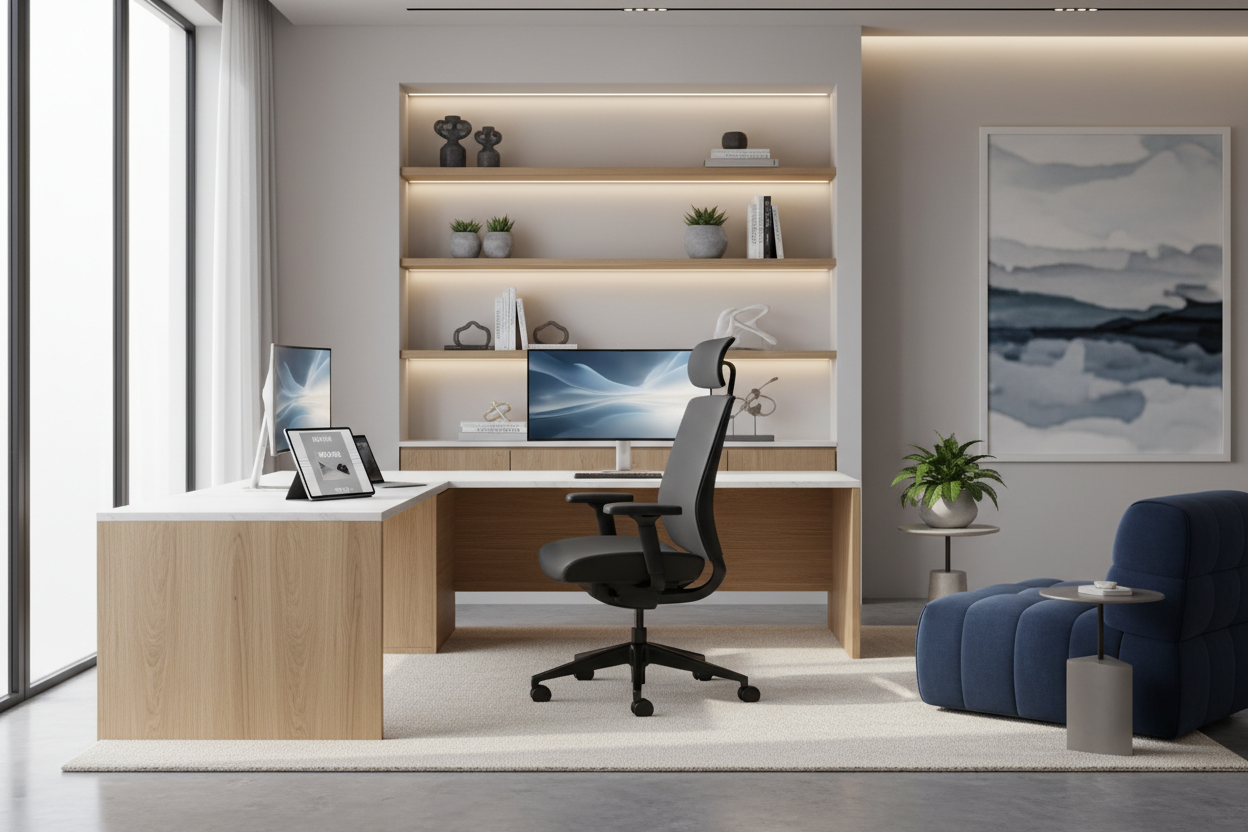
Many clients come to me in a panic right after their company approves their remote status. Submitting your application for work from home is often the easy part; figuring out where you will actually sit for eight hours a day without ruining your posture or your living room's aesthetic is the real challenge. A laptop on the sofa might work for a weekend catch-up, but a permanent remote setup requires intentional space planning, ergonomic focus, and a careful balance of visual weight.
Whether you are carving out a corner in a one-bedroom apartment or outfitting a dedicated spare room, the furniture you choose dictates how productive and comfortable you will be. Here is exactly how to build a workspace that supports your daily routine while still feeling like a home.
Quick Decision Guide
- Prioritize ergonomic seating over aesthetic dining chairs to prevent long-term lumbar and shoulder pain.
- Position your desk perpendicular to windows to reduce screen glare while maintaining natural light for video calls.
- Maintain at least 36 inches of clearance behind your desk so you can push your chair back comfortably.
- Invest in a solid wood or high-quality veneer work surface; hollow-core desks amplify typing noise and warp under the weight of dual monitors.
Space Planning: Finding the Right Work-From-Home Format
In North American homes, the most common mistake I see is oversized furniture stuffed into undersized alcoves. If your work-from-home format involves a bedroom corner or an open-concept living area, footprint is everything. A standard desk is 24 to 30 inches deep and 48 to 60 inches wide. If you are tight on square footage, do not compromise on depth—you need that distance for proper monitor viewing. Instead, compromise on width.
Visual separation is also critical. When your office shares a footprint with your relaxation space, use a textured area rug to anchor the desk, or install open shelving to create a permeable but distinct boundary. This signals to your brain that you are entering a workspace, which is a vital psychological boundary when your commute is only ten steps.
Comfort & Ergonomics: The Non-Negotiables
We need to talk about the dining chair. I understand the temptation to pull a mid-century modern wishbone chair up to your laptop, but it is a recipe for physical disaster. Ergonomic comfort relies on adjustability. Look for an office chair with a seat depth that leaves about two inches of space between the back of your knees and the seat edge.
Desk height is equally important. Standard desks sit at 29 to 30 inches high, which is actually too tall for many people to type comfortably without raising their shoulders. If you cannot invest in a height-adjustable desk, an adjustable chair paired with a solid footrest is the most practical workaround to keep your elbows at the recommended 90-degree angle.
Style & Coordination: Blending Work and Life
Your office furniture should not look like it was stolen from a corporate cubicle farm, especially if it sits in your living room. To blend the workspace into your existing decor, pay attention to silhouette and material. If your home leans transitional, a warm walnut desk with tapered legs and brass hardware feels like a deliberate design choice rather than an afterthought.
Cable management is the unsung hero of a cohesive look. A beautiful desk is instantly ruined by a tangled nest of black cords dropping down the back. Look for desks with built-in grommets or hidden cable trays. If you are retrofitting an older table, use adhesive cable clips along the back edge of the legs to route wires invisibly to the floor.
Designer's Honest Take: Lessons from My Own Projects
Early in my career, I designed a stunning home office for a client who had just finalized her working from home application. She insisted on a minimalist, glass-topped desk. It looked incredible in the initial portfolio photos—sleek, light, and modern.
Within a week, it was a disaster. Every fingerprint, dust speck, and coffee mug ring became a daily frustration. Worse, her optical mouse wouldn't track on the glass, forcing her to buy an ugly neoprene mousepad that ruined the minimalist aesthetic anyway. I learned the hard way that high-gloss or glass surfaces are a nightmare for daily, heavy use. Now, I strictly recommend matte finishes, linoleum inlays, or sealed solid wood for any primary work surface. They absorb light, hide micro-scratches, and feel much warmer under your wrists.
Frequently Asked Questions
What should I set up before submitting my application to work from home?
Many employers require proof of a dedicated, distraction-free workspace before approval. Setting up a quiet, ergonomically sound area—even a compact 5-by-7-foot footprint—shows you are prepared for the physical and technical demands of remote work.
Can I use my dining table as a permanent desk?
Short term, yes. Long term, standard dining tables are often too high for comfortable typing and lack the depth needed to push a monitor back to a safe viewing distance. You will eventually experience neck or shoulder strain.
How do I hide my monitors at the end of the day?
If your desk is in a multi-use room, consider a secretary desk with a fold-down front, or use a decorative folding screen. Alternatively, mount your monitors on adjustable gas-spring arms so you can push them flat against the wall when logging off.

Dejar un comentario
Este sitio está protegido por hCaptcha y se aplican la Política de privacidad de hCaptcha y los Términos del servicio.