











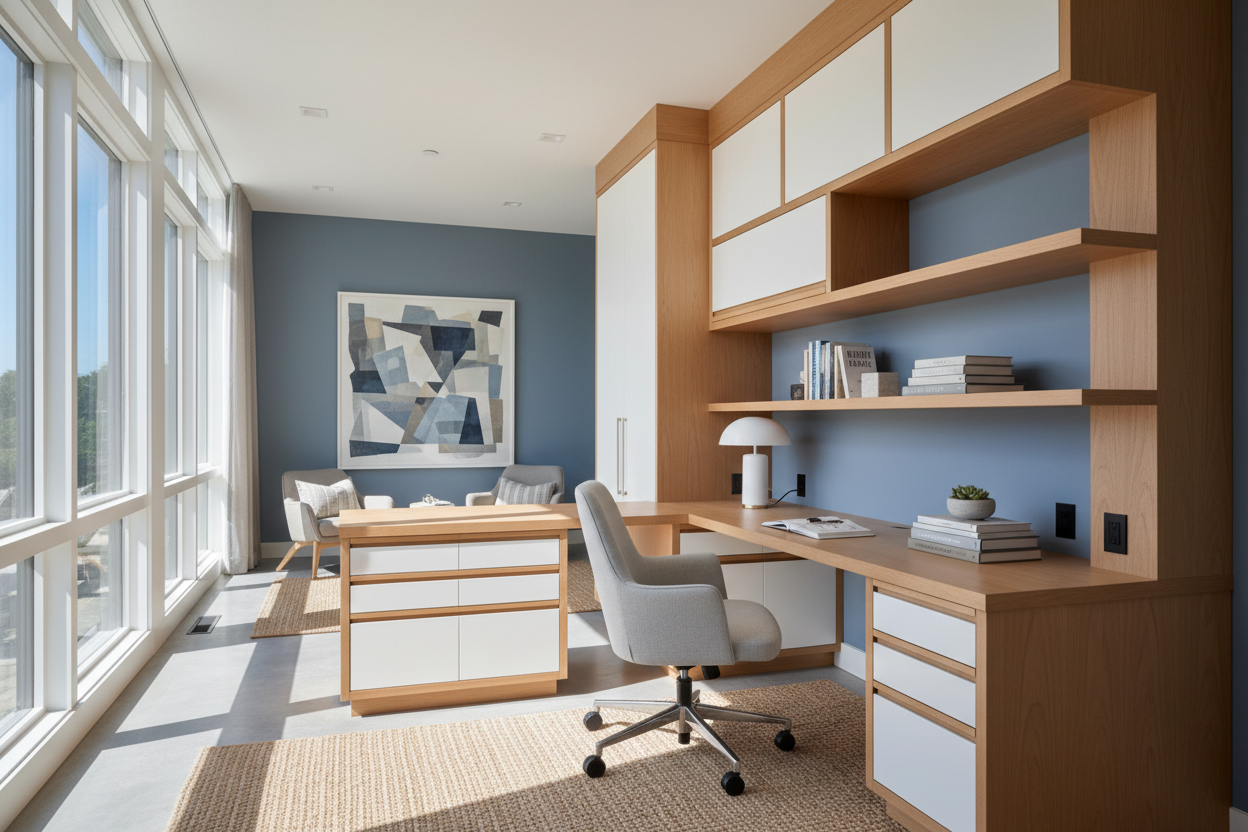
There is a distinct difference between simply placing a table against a wall and curating a workspace that feels architecturally integrated into your home. The standard freestanding desk often leaves awkward gaps and wasted square footage, creating visual clutter rather than a cohesive design. A custom **built-in desk** solves this by merging functionality with the permanent structure of the room, offering a seamless aesthetic that maximizes every inch of your floor plan.
Quick Decision Guide: Key Features to Look For
Before commissioning a carpenter or sketching your layout, consider these non-negotiable elements to ensure your investment pays off in both value and usability.
- Ergonomics & Depth: Ensure a minimum desktop depth of 24 inches to accommodate monitors without cramping your keyboard space.
- Material Durability: Opt for high-pressure laminate (HPL) or solid surface (like quartz) for the desktop if you write frequently; softer woods can dent.
- Cable Management: Plan for grommets and internal chases within the cabinetry to keep cords invisible.
- Lighting Integration: ample task lighting, such as under-cabinet LED strips, is essential for reducing eye strain.
- Storage Balance: A mix of concealed cabinets for paperwork and open shelving for decor creates visual relief.
Mastering the Layout and Flow
The success of a home office with built in desk relies heavily on placement. Unlike movable furniture, this is a permanent commitment. For smaller rooms, a wall built-in desk that spans the entire width of the room can actually make the space feel larger by drawing the eye to the perimeter.
The "Alcove" Advantage
If your room features architectural recesses, these are the ideal candidates for a built-in with desk configuration. By filling an alcove with a built in office table and floating shelves above, you turn dead space into a high-value asset. This approach is particularly effective for a built-in cabinet desk setup, where the lower cabinetry sits flush with the existing walls, creating a clean, custom look.
Storage Solutions: Cabinets vs. Drawers
A common dilemma is choosing between built-in office desk and cabinets versus focusing on drawers. In my professional opinion, you need both, but their placement matters.
Built-in desk drawers should be located immediately adjacent to the seating area—specifically, a shallow pencil drawer directly under the surface or a stack of drawers within arm's reach. This keeps essentials accessible without breaking your workflow. Conversely, cabinets for built in desk setups are best utilized for bulkier items like printers, shredders, or archival boxes. If you are designing office built-ins with desk components, consider "printer pull-outs"—shelves on heavy-duty slides hidden behind cabinet doors.
Materiality and Aesthetic Cohesion
To achieve a luxury look, the materials must harmonize with the rest of the home. A built-in desk with storage shouldn't look like a generic kitchen installation. If your home features traditional molding, ensure your built in home office desk incorporates similar baseboards and crown molding.
For a modern office with built in desk, consider a "waterfall" edge where the desktop material continues down the side to the floor. Mixing materials is also a sophisticated touch; for example, pairing painted built-in office cabinets with desk surfaces made of natural walnut or white oak adds warmth and texture to the room.
DIY vs. Professional Installation
While there are many diy built in desk ideas utilizing pre-fabricated kitchen base cabinets and butcher block tops, be mindful of the finish quality. A true high-end look requires "filler strips" or scribing pieces that close the gaps between the built in desks and cabinets and your uneven walls. If you choose the DIY route for your built-in desk and storage, investing in custom doors and high-quality hardware can elevate the final appearance significantly.
Lessons from My Own Projects: The "Ventilation" Oversight
I learned a hard lesson early in my career while designing a massive home office built in desk and cabinets for a client who was a tech enthusiast. We designed beautiful, flush-inset cabinetry to hide his massive computer tower and backup drives. It looked pristine—until the equipment started overheating a month later.
We hadn't accounted for active ventilation. I had to retroactively bring in a carpenter to cut discreet slots into the toe-kicks and install silent exhaust fans inside the cabinet with built in desk housing. Now, whenever I design built-in desks for home office use, I always ask about the hardware going inside the cabinets. If you are hiding electronics, mesh door inserts or hidden ventilation channels are not just optional; they are mandatory for the longevity of your devices.
Conclusion
Investing in built-in desks is about more than just storage; it is about creating a workspace that invites focus and calm. By carefully considering the ergonomics, selecting durable materials, and planning for technology integration, you create a built in office space that adds both function and significant value to your home.
Frequently Asked Questions
What is the ideal depth for a built-in desk?
While standard kitchen counters are 24 inches deep, a built-in office desk and shelves setup often benefits from a depth of 24 to 30 inches. This provides ample room for a monitor, keyboard, and spread-out paperwork without feeling cramped.
Can built-in desks be removed without damaging the room?
Generally, no. A true built-in desk is anchored to the wall studs and often caulked or painted to match the room. Removing it usually requires drywall repair and flooring patches, as the flooring often stops at the cabinet edge.
How do I handle lighting for a desk with upper cabinets?
If you have built-in office desk and cabinets overhead, you will create shadows on your workspace. It is crucial to install under-cabinet lighting. LED tape lights are the most seamless option, providing uniform, ambient light that reduces glare on screens.

Dejar un comentario
Este sitio está protegido por hCaptcha y se aplican la Política de privacidad de hCaptcha y los Términos del servicio.