










The living room dilemma is universal: you spend months curating the right sofa, layering textured rugs, and selecting art, only to have a massive 65-inch black rectangle dominate the room. Balancing modern technology with sophisticated interior design is a constant challenge in North American homes. Investing in an elegance tv stand bridges that gap, turning a purely functional necessity into a grounding architectural feature.
Instead of treating your media wall as an afterthought, you can use it to anchor the room's visual weight. In this breakdown, I will walk you through exactly how to select, size, and style a piece that complements your home rather than fighting it.
Quick Decision Guide
- The Width Rule: Your console should be at least 4 to 6 inches wider than your television on both sides to prevent the room from feeling top-heavy.
- Viewing Height: For standard sofas, the center of your screen should sit about 42 inches from the floor. Choose a stand height that accommodates this based on your TV size.
- Ventilation Matters: High-end audio-visual receivers generate heat. Look for designs with slatted doors or open back panels to prevent electronics from overheating.
- Signal Clearance: Solid wood or metal doors will block infrared remote signals. Ensure you either use Bluetooth remotes, install an IR repeater, or choose glass/mesh fronts.
Sizing and Proportion for North American Homes
Avoiding the Pyramid Effect
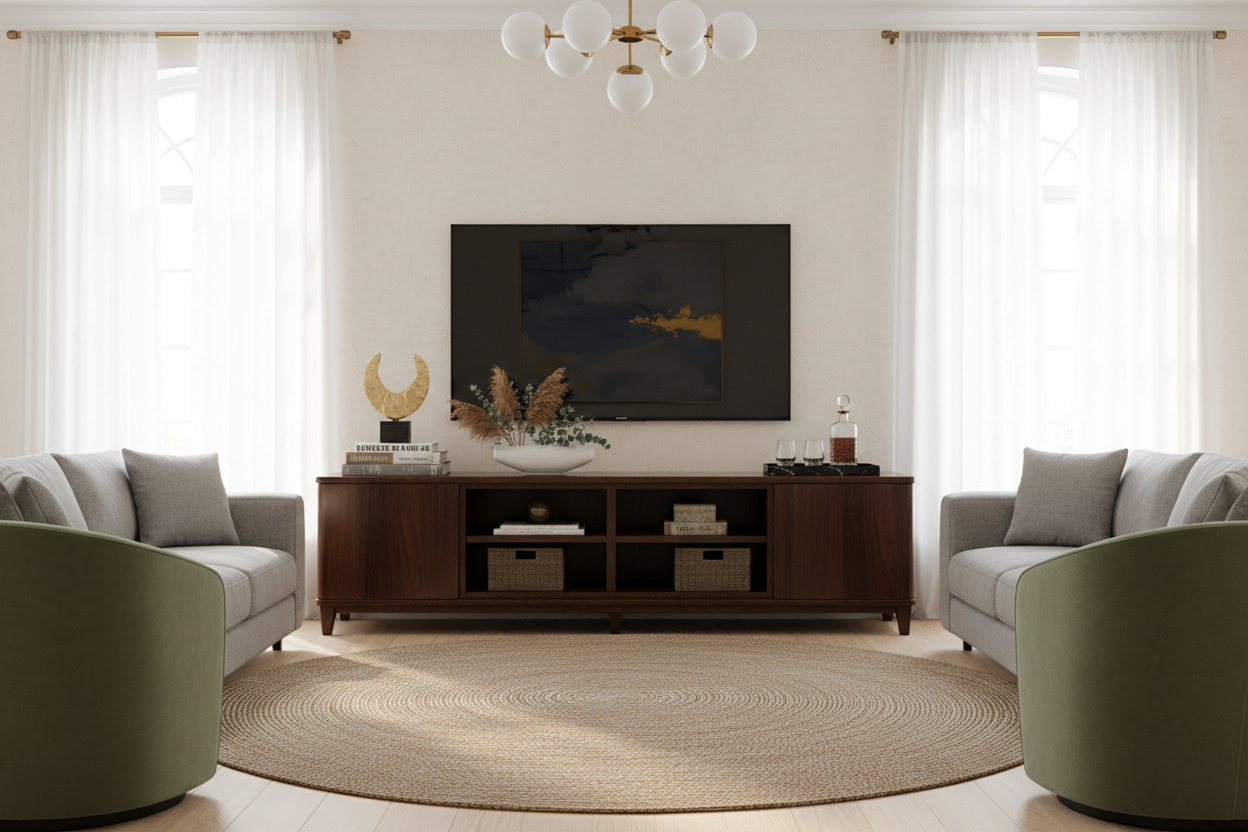
One of the most common mistakes I see in suburban family rooms is a massive television perched on a console that is too narrow. This creates a visual "pyramid effect" that makes the entire room feel unstable and cramped. If you have a 65-inch TV (which measures about 57 inches wide), you need an elegant media console that is at least 65 to 70 inches wide. This leaves negative space on either side, allowing the eye to rest and providing room for decorative objects like a structural vase or a stack of design books.
Depth and Walkways
In open-concept layouts or smaller apartments, depth is just as critical as width. Standard consoles run between 16 and 20 inches deep. If you are placing the unit in a high-traffic walkway, stick closer to 15 or 16 inches. You always want to maintain a minimum of 36 inches of clear walking space between the edge of the console and your coffee table or seating arrangement.
Materials That Age Gracefully
Wood, Stone, and Metal
When shopping for elegant tv stand furniture, material choice dictates both the longevity and the aesthetic of the piece. Solid walnut or white oak brings warmth and organic texture to a room, especially when featuring details like reeded or fluted drawer fronts. If you want a more modern, classy entertainment center, look for mixed materials: a matte black oak base topped with honed marble or travertine.
Be cautious with high-gloss veneers or overly polished metals if your home gets a lot of natural light, as they will highlight every speck of dust and fingerprint. Matte, brushed, or heavily textured finishes are much more forgiving in a busy household.
Lessons from My Own Projects
A few years ago, I sourced a stunning, custom burl wood and unlacquered brass media console for a client's main living area. It was a heavy, architectural piece that looked incredible in the final project photos. But I learned a hard lesson about high-maintenance finishes and daily life.
Within a week, the clients' toddler had covered the brass hardware in sticky fingerprints, which immediately started to oxidize the unlacquered metal unevenly. Worse, the beautiful, solid burl wood doors completely blocked the infrared signal for their cable box. Every time they wanted to change the channel, they had to leave the cabinet doors wide open, completely ruining the clean aesthetic we worked so hard to achieve. We ended up having to retrofit the cabinet with an IR repeater system and swap the hardware for a brushed bronze that hid smudges. It taught me that no matter how beautiful a piece is, it fails if it doesn't support the way a family actually watches TV.
Frequently Asked Questions
How do I hide messy cords and cables?
Look for a stand with built-in cable management cutouts in the back panel. For cords running up to a wall-mounted TV, use a paintable cord cover, or hire an electrician to run an in-wall power and HDMI cable kit for a truly seamless look.
Is a floating console better than a freestanding one?
Floating consoles are excellent for small spaces because exposing the floor underneath creates the illusion of more square footage. However, they require professional installation into wall studs to support the heavy weight of the furniture and electronics safely.
What should I put on the sides of my TV stand?
Keep styling minimal to avoid visual clutter around the screen. A single tall, sculptural object on one side (like a ceramic vase with dried branches) and a low, horizontal element on the other (like a decorative bowl or a stack of two books) creates an asymmetrical balance without distracting the eye.

Dejar un comentario
Este sitio está protegido por hCaptcha y se aplican la Política de privacidad de hCaptcha y los Términos del servicio.