










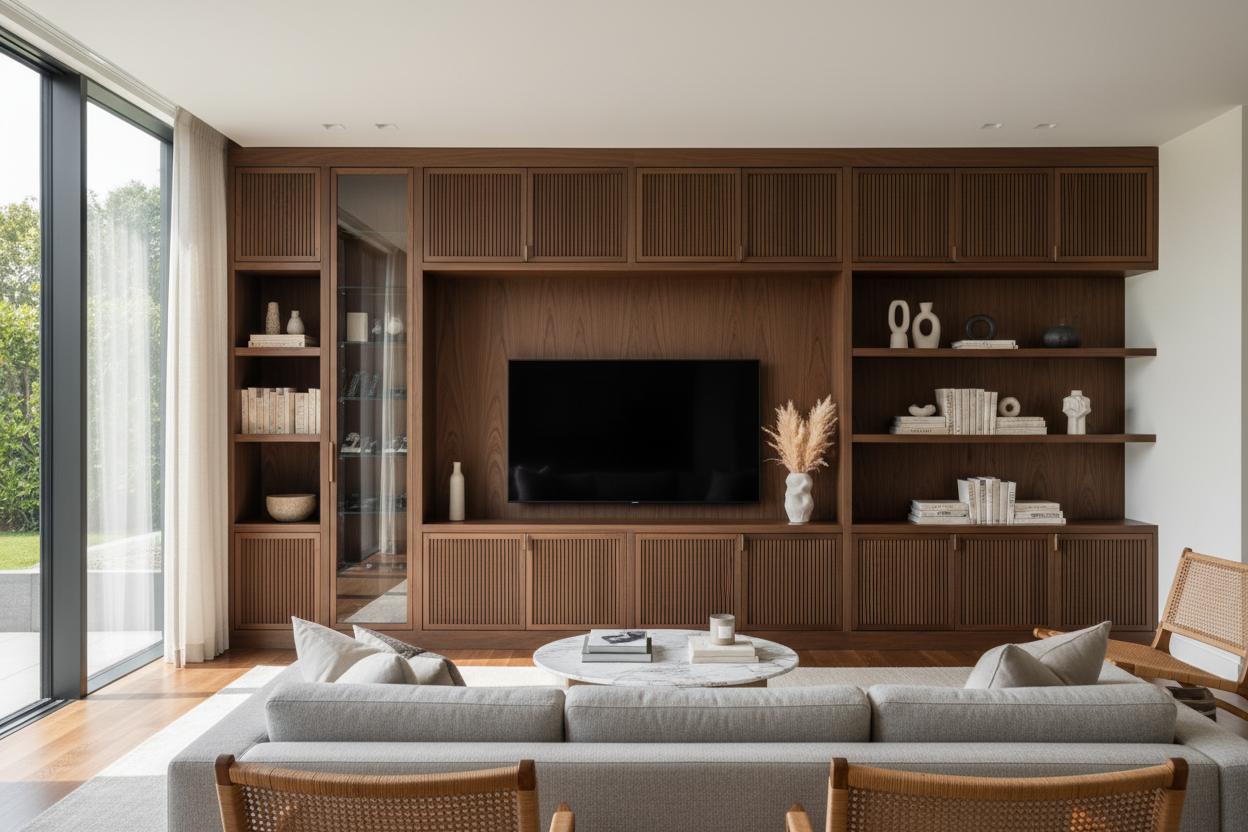
You know that moment when you finally get your new TV mounted, only to stare at the tangle of cables, game consoles, and streaming boxes piled on the floor? I've seen it in over 200 homes. The living room should be for relaxing, not for tripping over tech. That's where the entertainment cabinet comes in. It's not just furniture; it's your command center for calm.
Quick Takeaways
- Measure your wall and TV first. A cabinet should be at least a few inches wider than your TV screen.
- Look for built-in cable management. Grommets and rear channels are non-negotiable.
- Consider ventilation. Leave 2-3 inches of clearance behind electronics to prevent overheating.
- Choose materials for your lifestyle. Solid wood lasts, while laminate is easier on the budget.
Why Your Entertainment Cabinet Should Be Your Living Room's MVP
Think of your entertainment unit as the quarterback of your living room. It holds everything together. I had a client whose living room was a beautiful 14x18 feet, but it felt chaotic because their media gear was scattered across a too-small console. We swapped it for a proper entertainment center with cabinets, and suddenly, the remotes, games, and unsightly power strips vanished. The room breathed. The right piece solves the visual noise we all deal with. If you're starting your search, I recommend you browse our entertainment center collection to see the variety of styles that can anchor a room.
The Anatomy of a Perfect Entertainment Cabinet
A great media center for living room is more than a shelf. Let's break it down. First, cable management: look for units with rear cable ports or a false back panel. This lets you route all wires out of sight in minutes. Second, adjustable shelving. Your Blu-ray player, soundbar, and gaming console are all different heights; adjustable shelves accommodate them all. For materials, I prefer kiln-dried hardwood frames for longevity, though high-quality plywood with a veneer finish is a solid, cost-effective choice. A unit that combines closed storage with open display is ideal. For example, a modern 3-piece entertainment center with overhead cabinets gives you that coveted hidden storage for board games or blankets while keeping decor items visible.
Size Matters: Finding the Right Fit for Your Space
This is where most people go wrong. Grab your tape measure. First, measure the wall width where the cabinet will go. I always leave at least 6 inches of breathing room on each side for balance. For TV proportion, your entertainment cabinet should be wider than your TV—aim for 10-20 inches wider total. Depth is critical too. A standard depth of 16-20 inches accommodates most components, but if you have a large AV receiver, check its specs. In a 12x14 living room, a cabinet around 60-70 inches wide works well without overwhelming the space. Don't forget floor clearance if you have a robot vacuum!
Material and Finish: Beyond Just Looking Good
The material dictates feel and function. Solid wood, like oak or walnut, is durable and develops a beautiful patina, but it's an investment and can be heavy. Engineered wood with a laminate finish is lighter, more affordable, and resists scratches, making it great for homes with kids. Metal frames offer a sleek, industrial look and are incredibly sturdy. Glass shelves add lightness but show dust and fingerprints. For finishes, a satin or matte sheen hides smudges better than high-gloss. Consider your existing furniture: if you have a walnut coffee table, a matching entertainment cabinet for TV creates a cohesive flow.
Designer Tricks for Styling Your Entertainment Cabinet
Now for the fun part. Your entertainment center console shouldn't just store things; it should showcase your style. Start by anchoring the space. Place your largest item, like a soundbar or a series of hardcover books, off-center. Then layer in medium and small objects. I love using a trailing plant, a sculptural object, and a small basket for extra remotes. Keep a 36-inch walkway clear in front for comfortable movement. Lighting is key—a small, plug-in LED strip tucked under a shelf adds warmth and highlights your decor. For more advanced ideas on balancing objects, styling a bookcase and entertainment center offers great visual guides.
Solving Common Entertainment Cabinet Problems
Every piece has its challenges. Overheating is a big one. Never cram electronics into a sealed box. Ensure your unit has a ventilated back or open shelving. I leave a 3-inch gap behind my components. Awkward corners? Consider a corner entertainment unit or a floating shelf system that wraps the angle. Integrating a sound system? Measure your speaker dimensions before you buy. Many media centers have specific cubbies that fit standard soundbars. For small spaces or a minimalist look, a floating TV stand wall mounted media console saves floor space and makes cleaning a breeze.
Your Next Steps to a Better Entertainment Setup
Start by auditing your gear. List every device that needs a home. Then, measure your space—twice. Look for an entertainment cabinet that offers both open and closed storage to balance display and concealment. Remember, it's an investment in your daily peace. For more on how modern units can enhance functionality, check out our thoughts on modern entertainment units that do more.
Frequently Asked Questions
How much should I spend on a good entertainment cabinet?
For a quality piece that will last 5-10 years, budget between $500 and $1500. It depends on materials and size. You can find functional options starting around $300, but check construction details like drawer glides and shelf supports.
Can I put a 75-inch TV on a 70-inch wide cabinet?
Technically yes, but it will look top-heavy and unstable. I recommend a cabinet at least 80 inches wide for a TV that size. The base should feel substantial enough to support the visual weight.
How do I hide cables without cutting into my wall?
Use a cable management kit with adhesive channels. Run the cables along the back of the cabinet legs and down to the outlet. Many entertainment centers have built-in raceways for this exact purpose.
What's the biggest mistake you see people make?
Choosing style over function. A gorgeous, all-glass unit might look stunning in the showroom, but if it has no closed storage, you'll end up with visible clutter. Always prioritize your actual storage needs first.


Dejar un comentario
Este sitio está protegido por hCaptcha y se aplican la Política de privacidad de hCaptcha y los Términos del servicio.