










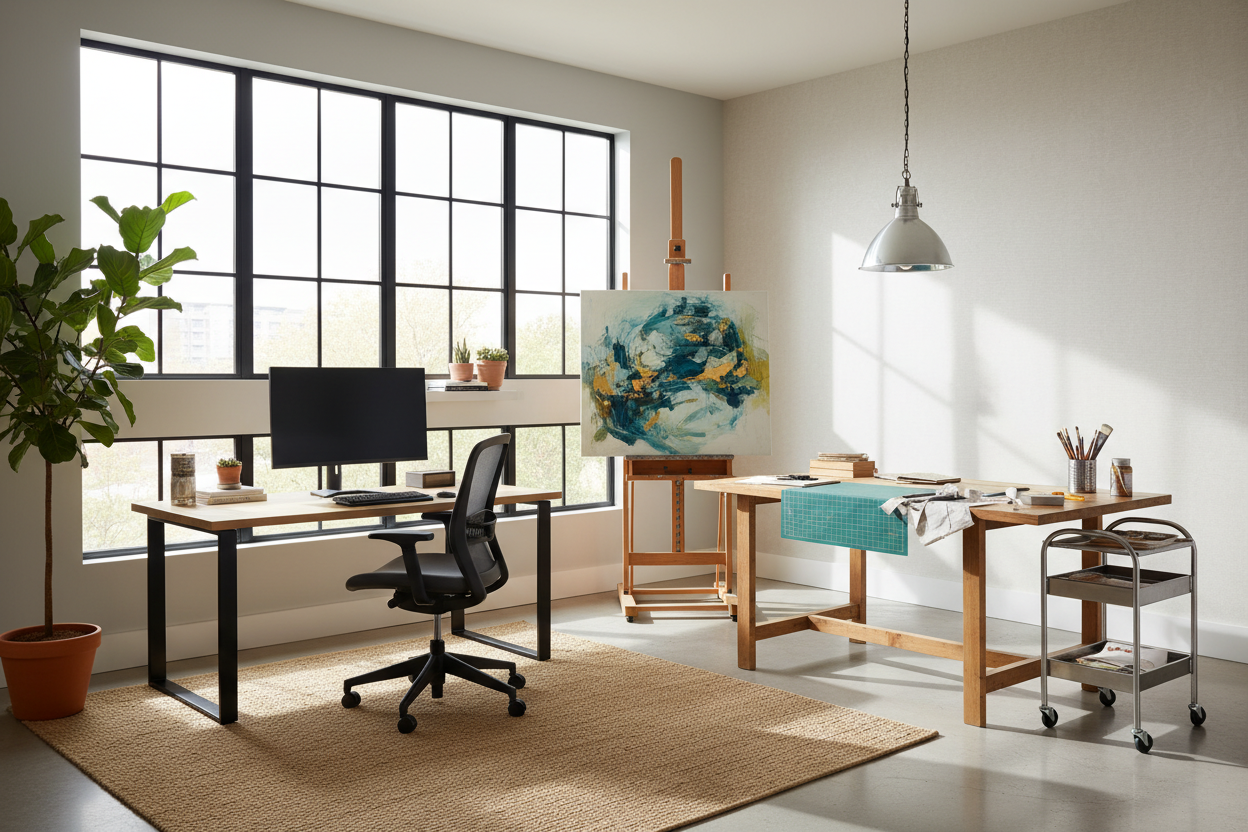
We have all been there—trying to type a spreadsheet while dodging a wet canvas, a tangle of podcasting cables, or a pile of fabric swatches. When your workspace needs to handle both rigid analytical tasks and messy creative projects, a single desk rarely cuts it. Designing a functional home office and studio is one of the most common requests I get from clients who are launching side hustles or permanently shifting to remote work.
Creating a hybrid space is tricky because the needs of a traditional computer setup directly conflict with the needs of a maker space. One requires extreme cord management and ergonomic stillness; the other requires movement, durable surfaces, and access to physical tools. In this guide, we will break down exactly how to plan, furnish, and style an office home studio that handles both sides of your brain without looking like a chaotic storage unit.
Quick Decision Guide
- Establish visual zones: Use area rugs or floating bookcases to physically and psychologically separate the computer desk from the creative workbench.
- Prioritize surface durability: Choose high-pressure laminate or sealed solid wood for the studio side to withstand spills, scratches, and heavy tools.
- Adopt vertical storage: Keep the footprint open by utilizing wall-mounted pegboards or tall, closed cabinetry for supplies.
- Layer your lighting: Rely on ambient overhead fixtures for general work, but install articulated task lamps over specific studio stations.
Space Planning & Layout
Zoning for Two Brains
In a typical North American spare bedroom—usually hovering around 10x12 feet—shoving two desks against the same wall creates a cramped, uninspiring bowling-alley effect. Instead, I prefer an L-shaped layout or a parallel setup. Placing your computer desk on one wall and your studio workbench on the opposite wall allows you to physically turn your back on your day job when it is time to create. This negative space in the center of the room provides crucial breathing room and maneuverability.
Clearance and Flow
Never underestimate the physical footprint of a creative workflow. While a standard home office only needs about 36 inches of push-back clearance for a desk chair, a home office studio requires more dynamic movement. If you are cutting fabric, assembling hardware, or painting, you need at least 42 to 48 inches of clearance around your primary work table. If space is incredibly tight, consider a mobile kitchen island on locking casters as your studio surface—you can pull it into the center of the room when active and push it against the wall when you need to focus on emails.
Material & Build Quality
Work Surfaces That Endure
It is tempting to buy a matching set of inexpensive, paper-veneered desks to keep the room looking cohesive. Do not do this. Veneer will peel the second it meets a damp sponge or a stray craft knife. For the studio side of your room, prioritize materials like butcher block treated with polyurethane, or high-pressure laminate (HPL). HPL is incredibly resilient against moisture and scratches. For the office side, you can opt for softer, more aesthetic materials like matte walnut or tempered glass, provided you use a desk pad.
Style & Coordination
Taming the Visual Clutter
A hybrid room can quickly look visually overwhelming. To prevent your space from feeling like a messy garage, rely on closed storage. Open shelving is beautiful in architectural magazines, but in a real working studio, it just looks like clutter. Use tall wardrobes or credenzas with solid doors to hide your printer, raw materials, and files. Keep the color palette highly constrained—think warm whites, natural oak, and a single accent color. This uniform backdrop allows your creative work to be the focal point rather than competing with loud furniture.
Designer's Honest Take
I learned the hard way that blending these two functions requires strict boundaries. A few years ago, I designed my own dual-purpose room, placing a beautiful, tilt-top drafting table right next to my motorized standing desk. It looked incredibly cohesive and high-end. However, the matte black finish on the standing desk highlighted every single speck of eraser dust and clay from the drafting table.
Worse, the dust made its way into my mechanical keyboard, ruining several switches. The lesson? Aesthetic cohesion is great, but physical separation is mandatory. Now, I always recommend keeping at least three feet of distance between the messy zone and the tech zone, and I strongly advocate for a heavy-duty air purifier in any room where physical materials are being manipulated near expensive electronics.
Frequently Asked Questions
How do I light a home office and studio properly?
You need a mix of ambient and task lighting. Use a central ceiling fixture with daylight bulbs (around 4000K-5000K) for accurate color rendering during studio work. Then, add a dedicated, adjustable task lamp at your computer desk to reduce eye strain during screen time.
What is the best chair for a dual-purpose room?
If you only have space for one chair, invest in a highly adjustable ergonomic drafting stool with a footring. This allows you to sit comfortably at a standard 29-inch computer desk, but also raise the seat to work at a 36-inch counter-height studio table.
How do I hide cables in a room with multiple workstations?
Cable management trays that mount directly to the underside of your desks are essential. For cords running between the office and studio zones, use paintable wall cord concealers or run them under a thick, low-pile area rug to avoid tripping hazards.

Dejar un comentario
Este sitio está protegido por hCaptcha y se aplican la Política de privacidad de hCaptcha y los Términos del servicio.