










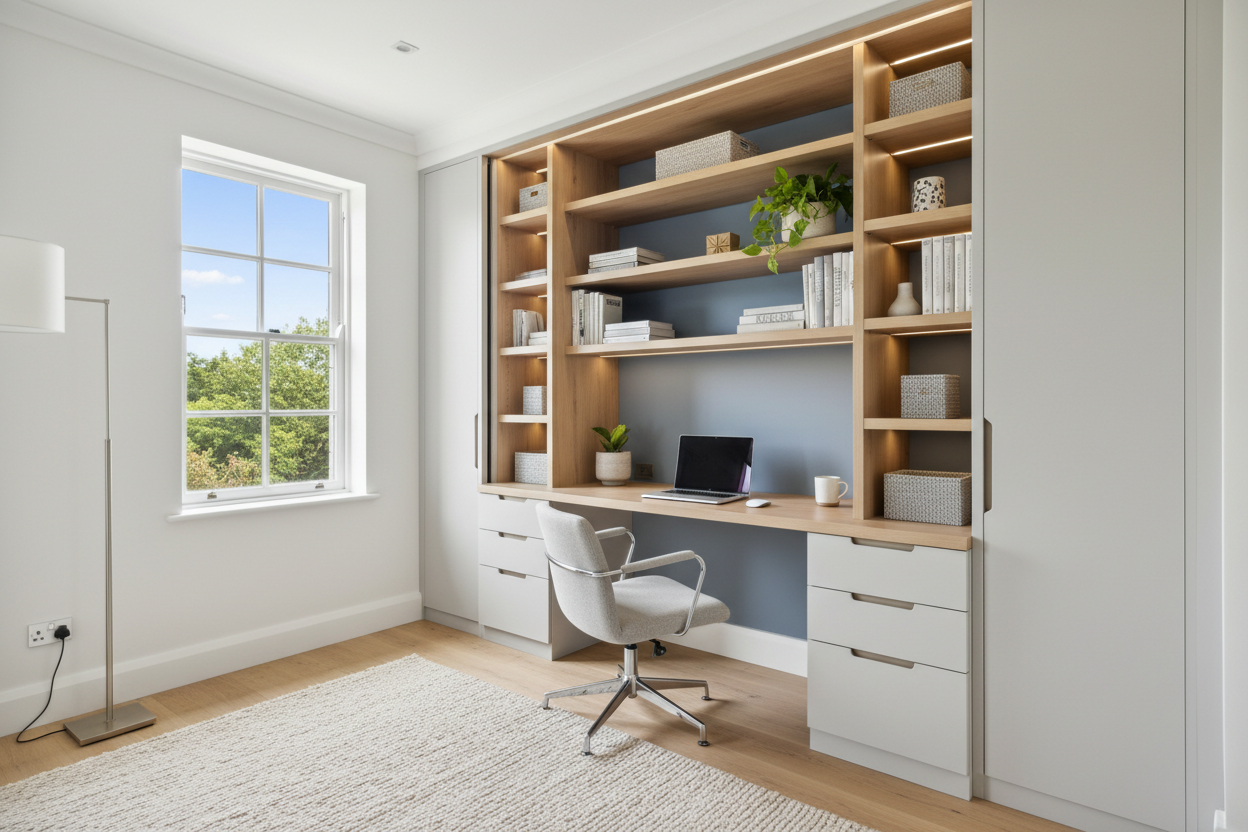
In the world of interior design, the boundaries between rest and productivity have never been more blurred. The challenge isn't just finding a place to work; it is carving out a zone that fosters focus without encroaching on your sanctuary. One of the most sophisticated solutions I frequently propose to clients is the integration of a closet and desk. Whether you are converting a reach-in wardrobe into a dedicated workstation (often dubbed a 'cloffice') or designing a walk-in that serves dual purposes, this layout requires a delicate balance of ergonomics and aesthetics.
Key Features to Look For
- Depth Requirements: Ensure the desk surface is at least 24 inches deep to accommodate monitors without cramping your typing posture.
- Lighting Plan: A closet computer desk requires dedicated hardwired task lighting, as overhead ambient light will likely cast shadows from behind you.
- Vertical Integration: Look for a closet system with desk components that utilize the full height of the wall for shelving to maximize footprint efficiency.
- Power Access: Verify outlet placement before installation; routing cables through solid masonry or finished millwork is a costly retrofit.
Strategic Space Planning
When visualizing desk in a closet ideas, the first step is assessing the architectural constraints. A standard reach-in closet is typically 24 to 27 inches deep. This is the sweet spot for a built-in desk closet, as it sits flush with the existing wall line. However, if you plan to keep the doors, you must account for the clearance of the chair.
The Door Dilemma
For a desk in a small closet, standard swing doors often eat up valuable floor space. I generally recommend removing the header and installing floor-to-ceiling bi-fold doors or pocket doors. This allows the office desk in closet to be completely concealed when not in use, reducing visual noise in the bedroom—a crucial factor for sleep hygiene.
Material Selection and Visual Weight
The difference between a makeshift setup and a luxury custom closet desk lies in the materials. Avoid mixing cheap melamine with high-end hardware. If you are designing a closet with built in desk, aim for continuity.
For a cohesive look, the desktop material should match or complement the shelving above. Solid wood (Walnut or White Oak) adds warmth and durability, effectively grounding the space. If you are integrating a closet organizer with desk from a modular system, ensure the work surface is reinforced. Standard clothing shelves are designed to hold sweaters, not the weight of a leaning human and dual monitors.
Ergonomics in Tight Quarters
Putting a desk in a closet presents unique ergonomic hurdles. Airflow is often restricted, so if you are running a high-performance PC tower, ventilation is non-negotiable. Furthermore, the standing desk in closet trend is gaining traction. If you opt for a sit-stand mechanism, you must calculate the vertical clearance carefully. You don't want your monitor crashing into the upper floating shelves every time you raise the desk.
Managing the Wardrobe Mix
Designing a desk in closet with clothes hanging nearby requires strict zoning. Textiles generate dust, which is the enemy of electronics. I advise clients to keep hanging garments in closed cabinetry or behind glass doors if they share the immediate vicinity with a computer. Open shelving above the closet desk should be reserved for books, decorative objects, or sealed storage bins, rather than loose clothing.
My Personal Take on Closet and Desk Integrations
In my years of designing bespoke joinery, I have learned that the "cloffice" succeeds or fails based on one specific detail: the chair clearance. I once designed a stunning closet built-in desk for a client in a pre-war apartment. We used a rich mahogany finish and antique brass hardware. It looked incredible.
However, I initially underestimated the depth required for the client's preferred ergonomic chair. When the bi-fold doors were closed, everything was fine. But when working, the chair's casters would catch on the rug edge just outside the closet threshold, creating a constant, annoying bump every time they shifted. We had to rethink the flooring transition entirely. Now, I always advise running the flooring seamlessly into the closet without a transition strip if you plan to use a rolling chair. It’s these unpolished, practical nuances that dictate daily comfort.
Conclusion
Merging a closet and desk is more than a space-saving hack; it is a lifestyle design choice that prioritizes efficiency. By selecting the right materials, planning for electrical needs, and respecting ergonomic depths, you can create a workspace that feels like a deliberate architectural feature rather than an afterthought. Elevate your home by making every square inch work for you.
Frequently Asked Questions
What is the minimum width for a functional closet desk?
While you can physically fit a laptop on a 30-inch surface, I recommend a minimum width of 36 to 42 inches for a closet computer desk. This allows space for a mouse, a notepad, and proper elbow room without feeling claustrophobic.
How do I handle lighting for a desk inside a closet?
Relying on the room's ceiling fixture will cause you to work in your own shadow. Install LED strip lighting under the shelf directly above the desk or mount articulating wall sconces on the side walls to provide direct, adjustable task lighting.
Can I install a standing desk in a standard closet?
Yes, but you must measure the "max height" of your monitor when the desk is fully raised. You will likely need to remove the standard closet rod and install shelving much higher up the wall to accommodate the vertical movement of a standing desk in closet setup.

Dejar un comentario
Este sitio está protegido por hCaptcha y se aplican la Política de privacidad de hCaptcha y los Términos del servicio.