










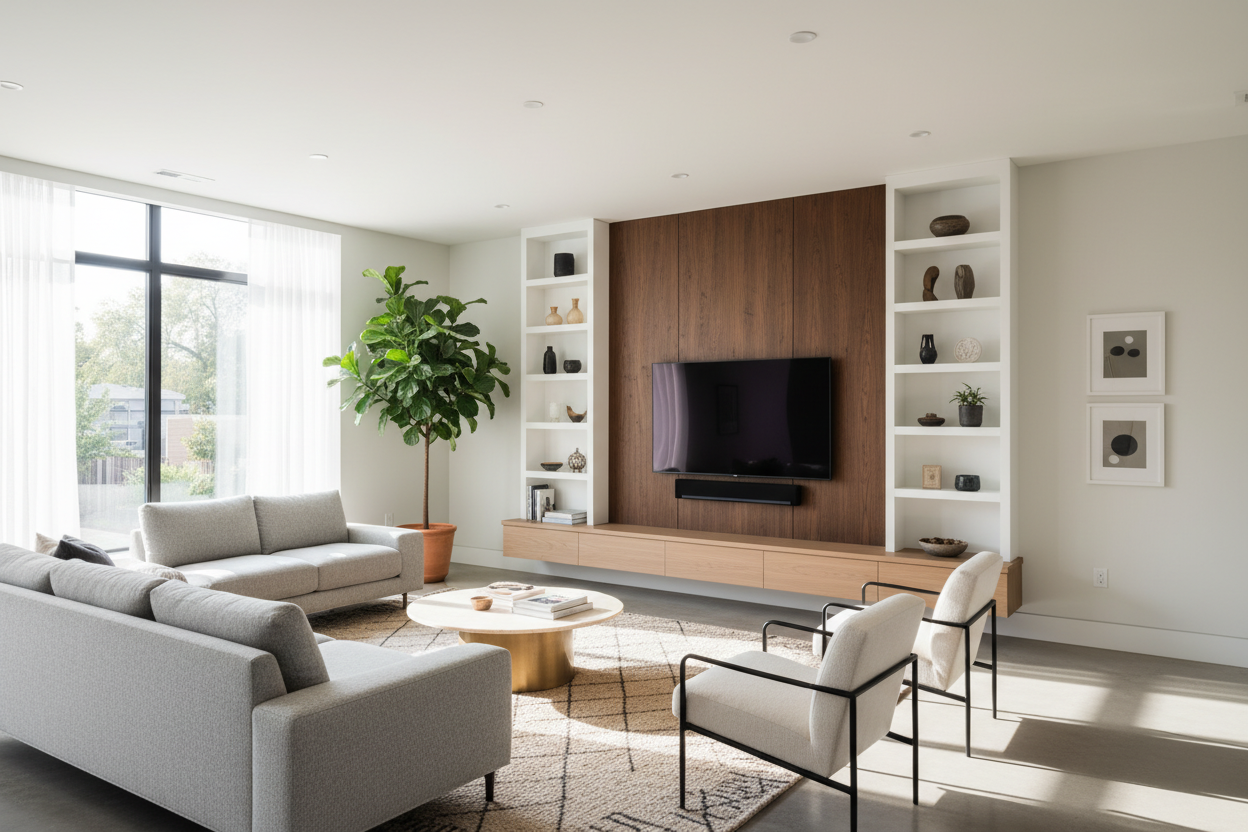
I remember walking into a client's new apartment last year. They'd just moved in, excited to finally have a proper living room after years in a studio. They'd bought a beautiful 84-inch sectional that looked perfect online, but when it arrived, it swallowed the 12x14 space. Their old TV stand looked like a toy next to it, and cables snaked everywhere. That's the moment when a well-designed media wall unit stops being just furniture and becomes the essential solution.
After furnishing over 200 homes, I've seen this scenario countless times. A media wall unit is the command center of your living room. It's where your technology lives, your favorite books and games are stored, and your personal style is displayed. Getting it right means balancing function with form in a way that works for your real life.
Quick Takeaways
- Measure your space first, including wall width, viewing distance, and clearance for walkways (aim for 36 inches).
- Choose materials that match your lifestyle: kiln-dried hardwood frames for longevity, plywood for budget-friendly options.
- Plan for all your tech: not just the TV, but game consoles, soundbars, streaming devices, and their power bricks.
- Your storage needs are probably less than you think—be honest about what you actually use weekly.
- Installation matters: wall-mounted units need proper studs, and cable management should be planned from the start.
What Makes a Media Wall Unit More Than Just Furniture
Remember when a TV stand was just a simple piece of furniture holding a boxy television? Today's living rooms demand so much more. Your media wall unit has evolved into the central hub of your home. It's where you stream movies, play games, display family photos, and store everything from board games to your favorite vinyl collection.
I think of it as the architectural anchor of your living room. When I design a space, the media wall unit sets the tone. A floating, wall-mounted design creates a clean, modern look and saves precious floor space—perfect for smaller rooms. A substantial floor-based unit in a rich walnut finish can ground a large, open-concept area. It's not just about holding your TV; it's about creating a cohesive focal point that organizes your life and reflects your style.
The 3 Essential Functions Every Media Wall Unit Must Master
Let's break down what a great unit actually does. First, it accommodates technology seamlessly. This means built-in cable management channels, proper ventilation for electronics (don't box in that PlayStation), and adjustable shelves to fit different components. I always recommend measuring your largest device and adding 2 inches for airflow.
Second, it provides intelligent storage. This isn't about hiding everything away. It's about accessible, organized storage. Deep shelves for board games, adjustable compartments for media, and perhaps some closed cabinets for the less-attractive necessities. For a truly streamlined look, consider a Floating TV Stand Wall Mounted Media Console. It lifts everything off the floor, creating an airy feel and making cleaning a breeze.
Third, and just as important, it integrates aesthetically. The materials, finish, and proportions need to work with your existing furniture. A unit with a 2.0 lb/ft³ high-resilience foam cushion on a built-in bench seat adds comfort, while the wood grain should complement your coffee table and flooring.
Choosing Your Media Wall Unit: The Designer's Checklist
Before you fall in love with a picture online, let's run through a practical checklist. Start with your room's dimensions. How wide is the wall? A unit should typically occupy between two-thirds and three-quarters of the wall's width for balance. What's your viewing distance? For a 65-inch TV, you'll want about 8-10 feet between the screen and your sofa.
Next, list your non-negotiable tech. Soundbar? Gaming consoles? A turntable? Get their exact dimensions. Storage needs come next—be realistic. How many remotes, books, and decorative items do you need to house? For flexibility with larger TVs or evolving setups, a Wide Adjustable TV Stand can be a smart choice, allowing you to adapt as your needs change.
Finally, consider style compatibility. Is your decor mid-century modern, with clean lines and tapered legs? Or is it more rustic farmhouse? The media unit should feel like a natural member of the furniture family, not a transplant from another showroom.
Measuring Your Space: The Numbers That Matter
Grab a tape measure. First, measure the total width of the wall where the unit will go. Note the location of electrical outlets, light switches, and thermostats—you don't want to cover them. Measure the height from the floor to where you might want the TV's center (eye level when seated is ideal, usually about 42 inches).
Now, measure the room itself. Where is the primary seating? The distance from that spot to the wall is your viewing distance. Don't forget to measure walkways. You need at least 36 inches of clear space for comfortable traffic flow around furniture. I once installed a beautiful unit only to realize it blocked the path to the balcony. We had to shift the entire room layout.
Storage Assessment: What Really Needs to Go In There
Here's a designer secret: most people overestimate their storage needs. Take a weekend and audit your living room. What do you actually use? The weekly board game? The current stack of books? The everyday remotes? The collection of DVDs from 2005 can probably go elsewhere.
I advise clients to categorize: daily essentials (remote, current book), weekly items (game controllers, knitting project), and occasional items (photo albums, special decor). Design your unit's storage around the daily and weekly categories. For everything else, or for those with extensive libraries, look to supplemental solutions like a dedicated Book and Media Storage Collection elsewhere in the room. It keeps the media wall focused and clutter-free.
Style Integration: Making Your Media Wall Unit Work With Your Decor
This is where your unit becomes part of your home's story. Look at the materials in your room. Do you have oak flooring? An oak or warm-toned wood unit will tie in beautifully. Lots of metal accents? Look for units with brushed bronze or matte black metal frames.
Think about finishes. A high-gloss lacquer reflects light and feels modern but shows every fingerprint. A matte or satin finish is more forgiving and feels warmer. Don't forget the hardware. The style of the handles or pulls should echo those in your kitchen or on other furniture for a cohesive feel.
The unit itself is also a platform for display. Style the shelves with intention. Group items in threes, vary heights, and leave some negative space. It's not just a storage box; it's a curated display. For inspiration on balancing objects and art, my post on How to Style Wall Art covers similar principles of creating a cohesive wall display.
Installation and Maintenance: The Practical Realities
Let's talk about getting it into your home and keeping it looking good. If you're choosing a wall-mounted unit, installation is critical. It must be anchored securely into wall studs, not just drywall. Hire a professional if you're unsure—the cost is worth the safety and peace of mind.
Cable management is the magic trick. Use built-in channels, paintable cord covers, or even a simple basket at the back of a unit to gather power strips and excess wire. Plan this during installation, not as an afterthought.
For maintenance, dust regularly with a microfiber cloth. For wood units, use the manufacturer's recommended cleaner. Avoid placing drinks directly on surfaces without coasters. If you're considering the clean look of a mounted unit, my guide on Wall Mounted Entertainment Units Guide dives deeper into the installation benefits and long-term considerations.
Your Next Steps to the Perfect Media Wall Unit
You don't need to solve everything at once. Start with your measurements and your non-negotiable tech list. Browse with those specs in hand. Save images of units that fit both your functional needs and your style vision. If possible, visit a showroom to see the quality of materials in person—the difference between a kiln-dried hardwood frame and particleboard is substantial.
Remember, the best media wall unit for you is the one that disappears into the background of your daily life while beautifully organizing it. It should make movie night easier, hide the clutter, and make you smile when you walk into the room. Take these steps, trust your space's requirements, and you'll find your perfect living room hub.
Frequently Asked Questions
How deep should a media wall unit be?
Typically, 16 to 20 inches deep. This accommodates most AV components while not protruding too far into the room. Always check the depth of your deepest device first.
Can I put a media wall unit on any wall?
Not exactly. Avoid walls with major plumbing or electrical chases you can't move. Also, consider weight. A fully loaded floor unit can be extremely heavy, so ensure your floor can support it, especially on upper levels.
What's the biggest mistake people make?
Choosing based on looks alone and underestimating the size. A unit that's too small for the wall looks insignificant; one that's too wide makes the room feel cramped. Measure, measure, measure.
How do I handle cords with a floating wall unit?
Plan for a power outlet within the unit's footprint or directly behind it. Use an in-wall power kit (check local codes) or a sleek vertical raceway to run cords down to the baseboard neatly.


Dejar un comentario
Este sitio está protegido por hCaptcha y se aplican la Política de privacidad de hCaptcha y los Términos del servicio.