










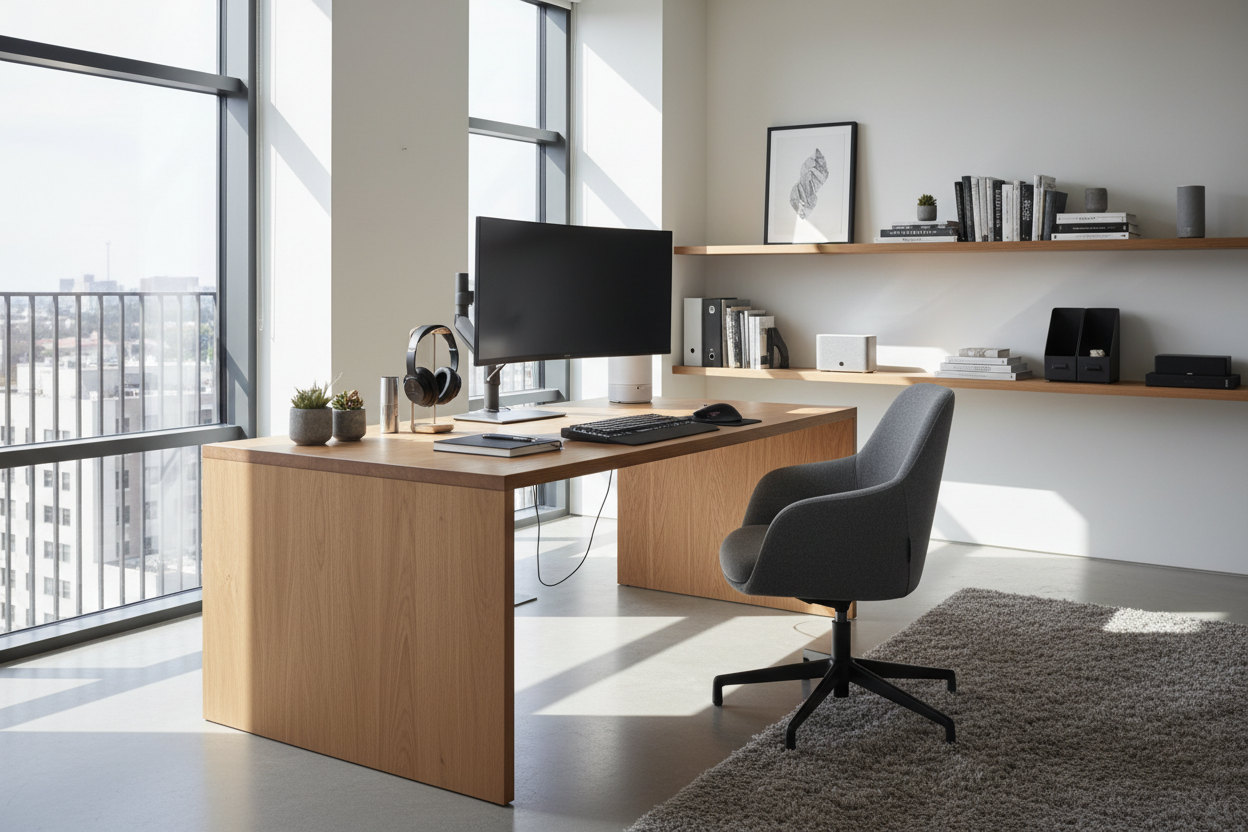
It is easy to mistake a cluttered desk for a productive one. In my years designing high-end workspaces, I frequently encounter clients who believe that acquiring the latest tech will automatically streamline their workflow. However, without a cohesive plan, even high-performance tools become visual noise that distracts rather than assists. A truly functional workspace relies on curation, not consumption. We are looking for the best office gadgets for productivity that respect the visual balance of your room while delivering tangible ergonomic benefits.
Quick Decision Guide: Selecting Desk Tech
Before adding another device to your cart, cross-reference it with this design-first checklist to ensure it adds value rather than clutter:
- Visual Weight: Does the device look bulky? Opt for slim profiles and matte finishes that blend into your desk surface rather than dominating it.
- Cable Ecology: Wireless is preferred. If wired, does the gadget facilitate hidden routing?
- Materiality: Avoid cheap, high-gloss plastics. Look for brushed aluminum, solid wood accents, or textured fabrics that complement your furniture.
- Ergonomics: Does the device promote a neutral posture, or does it force you to hunch?
- Multi-functionality: Choose devices that serve two purposes (e.g., a headphone stand that charges your phone) to save surface area.
The Visual Weight of Technology
When styling a home office, we treat technology as a layer of decor. The most common error is ignoring the "silhouette" of your devices. Home office productivity gadgets should have a deliberate relationship with your desk.
Monitor Arms vs. Stock Stands
The single most impactful change you can make is removing the stock stand from your monitor. A high-quality, articulated monitor arm does not just improve ergonomics by allowing precise eye-level alignment; it reclaims valuable desk real estate. From a design perspective, this introduces "negative space" beneath the screen, making the desk feel larger and airier. Look for arms with internal cable management channels to maintain a clean look.
Input Devices: Tactility and Acoustics
The interaction between user and furniture happens mostly at the keyboard and mouse. Mechanical keyboards are popular, but be wary of the acoustic impact in shared spaces or open-plan homes. I often recommend low-profile mechanical boards with quiet switches (like Brown or Red linear switches). Visually, a keyboard with a heavy aluminum chassis grounds the desktop, preventing the setup from looking temporary or flimsy.
Lighting: The Ambient Factor
Standard overhead lighting is often too harsh for screen work, causing glare and eye strain. The best productivity devices in the lighting category allow for color temperature adjustment.
I recommend a monitor light bar over a traditional desk lamp for small desks. It casts light strictly on your working zone without reflecting off the screen. Ensure the CRI (Color Rendering Index) is above 90; this ensures that the wood grain of your desk and the colors on your documents look accurate, not washed out. If you prefer a traditional lamp for the aesthetic, choose a matte finish to avoid fingerprint smudges and ensure the bulb is shielded from direct eye contact.
Organizing the "Digital Clutter"
Nothing ruins the lines of a beautiful walnut desk faster than a nest of white cables. Docking stations are essential, but they are often ugly. I advise clients to mount these under the desk using brackets or adhesive strips. If the dock must live on the desk, select one with a vertical orientation to minimize its footprint. This approach maintains the architectural integrity of your workspace.
My Personal Take on best office gadgets for productivity
I want to share a specific lesson regarding the popular "Wool Felt Desk Mat." You have likely seen these in every Pinterest minimalist setup. They add incredible texture and warmth to a sterile tech setup, softening the acoustics and preventing keyboard clatter.
However, after using a high-end merino wool mat in my own studio for six months, I noticed a functional flaw that photos don't show: micro-pilling and friction. If you use a mouse extensively for CAD or design work, the friction on a wool mat is significantly higher than a hard pad, which actually slowed down my workflow and fatigued my wrist. Furthermore, if you ever eat lunch at your desk (we all do it), getting crumbs out of felt is a nightmare. I now steer clients toward vegan leather mats. You get the visual framing and surface protection, but with a smooth glide and a wipeable surface. It’s a compromise where function had to override the cozy aesthetic.
Conclusion
Integrating technology into your home office doesn't mean turning your sanctuary into a server room. By selecting gadgets that offer genuine ergonomic support and possess a refined material palette, you create a space that invites focus. Remember, the goal is a workspace that feels as good as it functions.
Frequently Asked Questions
How do I hide cables for gadgets on a glass desk?
Glass desks are unforgiving. The best approach is to route cables down the leg of the desk using clear zip ties or cable sleeves that match the metal finish of the legs. Alternatively, use wireless peripherals exclusively to keep the transparency intact.
Are standing desk converters worth the investment?
If you cannot replace your current desk, a converter is a functional compromise. However, visually, they add significant bulk and height to the desk surface. If you choose one, ensure it has a wood finish that matches your existing desk to minimize the visual disruption.
What is the best color temperature for productivity lighting?
For high-focus tasks, a cool white light between 4000K and 5000K is ideal as it mimics daylight and stimulates alertness. However, in the evening, you should switch to a warmer 2700K to help your mind decompress.


Dejar un comentario
Este sitio está protegido por hCaptcha y se aplican la Política de privacidad de hCaptcha y los Términos del servicio.