










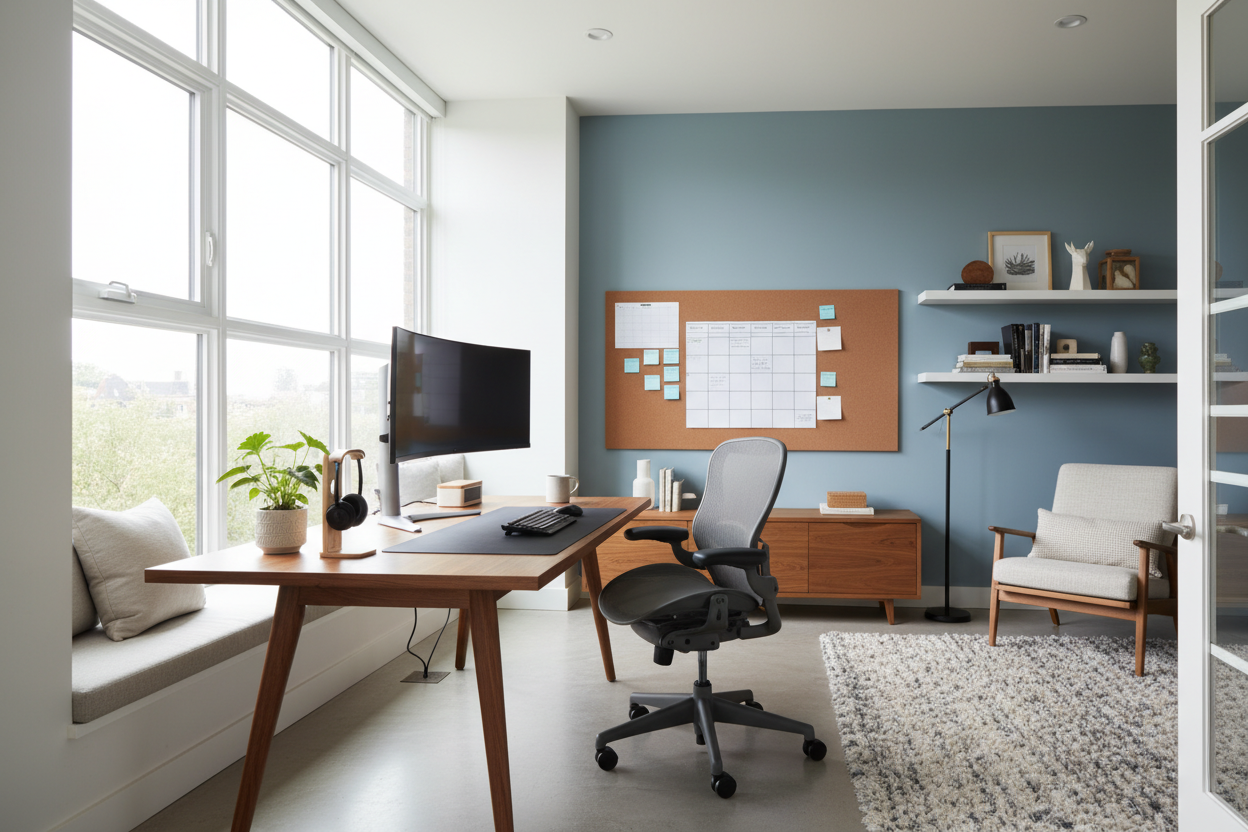
We have all experienced the fatigue of trying to maintain professional focus while perched on a dining chair that offers zero lumbar support. The makeshift setup might suffice for a day, but a permanent workspace requires a deliberate architectural approach. To truly integrate productivity into your residential environment, you must look beyond simple furniture placement and adopt core work from home principles that balance high-performance ergonomics with residential warmth.
Quick Decision Guide: The Essentials
- Ergonomics First: Prioritize chairs with adjustable lumbar support and seat depth over purely sculptural shapes.
- Lighting Layers: Combine ambient overhead lighting with task lighting (3000K-4000K) to reduce eye strain.
- Spatial Zoning: Use area rugs or open shelving to create a psychological boundary between "living" and "working."
- Acoustics: Incorporate soft textiles (drapes, upholstered panels) to dampen echo during conference calls.
- Material Durability: Choose desk surfaces resistant to heat and scratches, such as sealed hardwoods or high-pressure laminates.
Defining the Spatial Layout
The most common error I see in client floor plans is the instinct to push the desk against a wall. While this saves space, it creates a claustrophobic visual field. Whenever possible, position your desk to "float" in the room or face a window (perpendicularly to avoid glare). This command position allows you to see the door, grounding you subconsciously and reducing anxiety.
If square footage is tight, consider a console desk behind a sofa. This utilizes the "dead zone" of a living room while keeping the workspace visually distinct from the relaxation area.
Materiality and Tactile Comfort
Surface Selection
Your desk surface is a high-touch point. While glass desks offer a sleek, modern silhouette, they are cold to the touch and prone to fingerprints. I often steer clients toward solid walnut or white oak. Wood offers a tactile warmth that makes long hours more palatable. If you prefer a lacquer or laminate finish for durability, ensure it has a matte texture to prevent overhead light reflection from blinding you.
Seating Textiles
When selecting a task chair, the abrasion rating matters. Look for fabrics rated over 30,000 double rubs if you plan to sit for 8+ hours a day. Mesh creates breathability, but a high-quality wool blend or semi-aniline leather offers a more sophisticated, executive aesthetic that ages beautifully without peeling.
The Lighting Hierarchy
Lighting is not just about visibility; it is about circadian rhythm. Poor lighting induces lethargy. Your home office requires a mix of ambient light (general illumination) and task lighting. Avoid cool, blue-tinted LEDs (5000K+) as they can feel sterile and hospital-like. Stick to a color temperature between 2700K and 3500K. A high CRI (Color Rendering Index) bulb will also ensure that paint colors and wood tones in your room look rich and accurate, rather than washed out.
My Personal Take on Work From Home Principles
I learned a hard lesson about "aesthetic over function" in my own home office last year. I fell in love with a vintage, unlacquered brass desk lamp. It was sculptural and stunning. However, it had a fixed neck and a metal shade.
After three days of drafting, I realized the metal shade grew incredibly hot—enough to be a hazard if I grazed it—and the inability to angle the beam meant I was constantly shifting my blueprints to dodge shadows. It was a beautiful object, but a terrible tool. I swapped it for a matte black architectural lamp with a fully articulating arm. The lesson? In a workspace, kinetic adjustability beats static beauty every single time. Don't buy lighting you can't direct.
Conclusion
Designing your home office is an investment in your own efficiency and mental well-being. By selecting materials that age gracefully and prioritizing layouts that support human movement, you create a space that invites focus rather than forcing it. Curate your environment intentionally, and your productivity will follow.
Frequently Asked Questions
What is the ideal desk depth for a home office?
For a standard setup with a laptop and monitor, a depth of 24 to 30 inches is ideal. This provides enough distance for your eyes to focus comfortably on the screen while leaving room for a keyboard and notepad.
How do I hide cords in a floating desk layout?
If your desk floats in the center of the room, use a floor outlet if available. If not, run a cord cover along the floor matching your rug or flooring tone, and use magnetic cable management spines that attach to the desk leg to guide wires neatly from the surface to the ground.
Can I use a dining chair as a desk chair?
Generally, no. Dining chairs lack the lumbar support, seat height adjustment, and casters required for long-term work. Using one for full-time work often leads to lower back pain and poor circulation. If you must, add a dedicated lumbar pillow and seat cushion.

Dejar un comentario
Este sitio está protegido por hCaptcha y se aplican la Política de privacidad de hCaptcha y los Términos del servicio.