










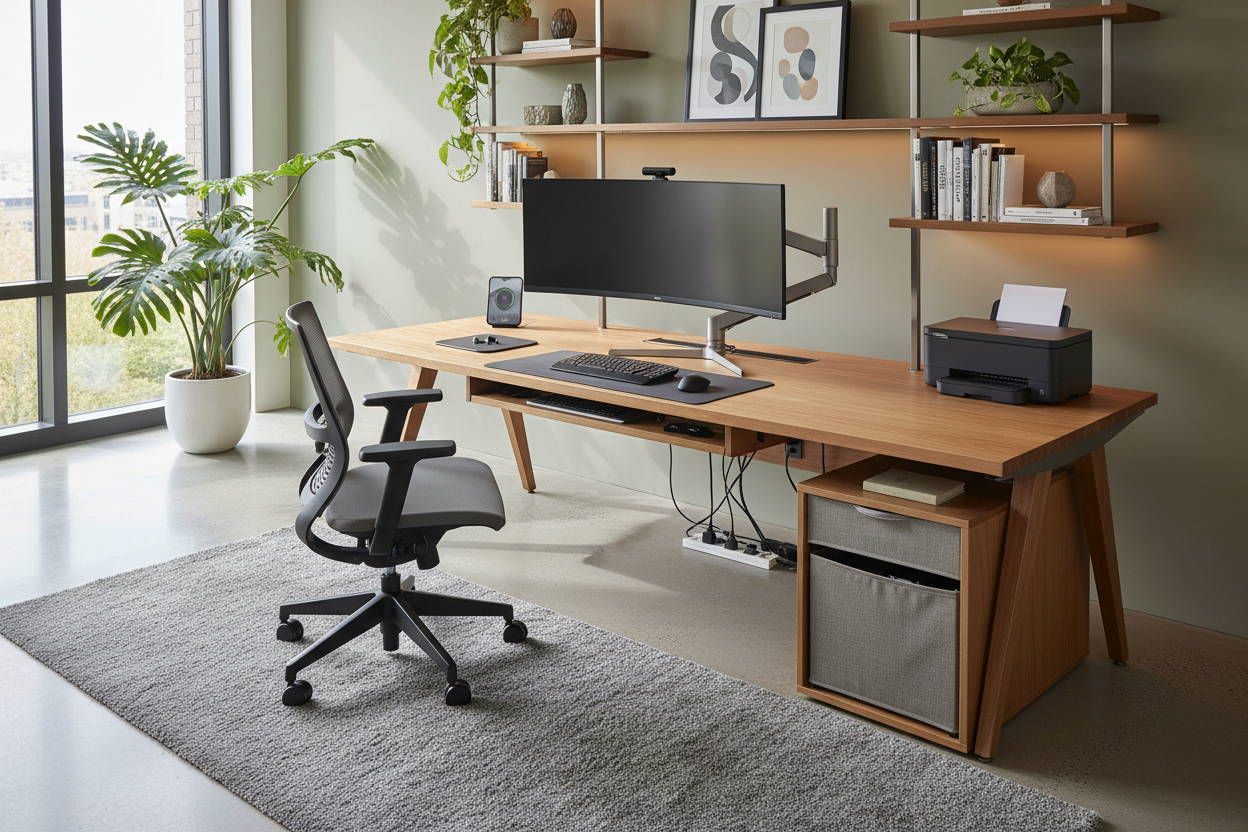
We spend hours selecting the perfect walnut desk and finding an ergonomic chair with just the right silhouette, only to have the visual harmony shattered by a bulky, utilitarian office appliance. Whether it is a massive printer, a tangled shredder, or a tower PC, these necessary evils often feel like intruders in a curated home workspace. As a designer, I see this constantly: a beautiful room compromised by plastic casings and blinking LEDs. The goal isn't to banish technology, but to integrate it so seamlessly that function never compromises form.
Key Features for Aesthetic Integration
Before making a purchase, look beyond the technical specs. To ensure your equipment complements your interior design rather than clashing with it, prioritize these physical attributes:
- Surface Finish: Opt for matte or brushed textures over high-gloss plastics to minimize dust visibility and fingerprints.
- Wireless Capability: Essential for reducing visual clutter caused by cable runs.
- Operational Footprint: Measure the device when trays and drawers are fully extended, not just the closed dimensions.
- Acoustic Profile: Low decibel ratings are crucial for maintaining a calm, focused ambiance.
- Cable Port Accessibility: Rear-facing ports are easier to hide than side-mounted ones.
The Art of Concealment vs. Display
When dealing with office devices, the first decision is binary: do we celebrate it or hide it? High-end monitors with aluminum bezels or sculptural speakers can serve as modern accessories that enhance the desktop. However, purely utilitarian items like shredders or network attached storage (NAS) drives should almost always be concealed.
For items that must remain visible, color coordination is key. If your hardware is silver or white, it tends to feel lighter and less obtrusive against light walls. Conversely, dark computer office equipment can ground a space but requires adequate lighting to prevent it from looking like a black void on your desk.
Materiality and Texture Matching
In luxury interiors, texture is everything. Standard office gear is usually made of injection-molded plastic, which feels cold and cheap next to natural wood or leather. To bridge this gap, look for equipment that mimics the design language of your furniture.
Some manufacturers are now wrapping speakers in acoustic fabric or using wood veneers on peripheral cases. If you cannot find pre-styled equipment, consider the placement context. Placing a plastic printer on a felt desk pad or a leather tray can create a buffer that softens the transition between the synthetic device and your organic furniture surfaces.
Ergonomics and Spatial Flow
Placement is not just about looks; it is about workflow. A common mistake is placing frequently used computer and office equipment out of arm's reach to save space, or conversely, cluttering the primary work zone with occasional-use items.
Create zones based on frequency of use. Your primary monitor and input devices occupy the 'hot zone.' Secondary items like a scanner or reference drive should move to the 'warm zone' (reachable without standing). The 'cold zone'—shelves or cabinets—is where the noisy, bulky printer belongs. This zoning keeps your visual field clear and reduces cognitive load.
My Personal Take on Office Appliance Selection
I learned a hard lesson about office appliance dimensions during a project for a client in a compact city apartment. We designed beautiful custom millwork to hide a multifunction printer. I measured the printer's width, depth, and height perfectly. The cabinet was built, installed, and looked flawless.
However, I hadn't accounted for the top-loading scanner lid. When the client tried to scan a document, the lid hit the underside of the shelf above it, only opening halfway. We had to remove the shelf and reinstall it three inches higher, which threw off the symmetry of the entire unit. Now, I always tell clients: measure your gear in its "active state," not just how it sits in the box. Also, never underestimate the annoyance of a bright blue standby light in a dual-purpose guest room/office; I now keep a roll of "dimming stickers" in my install kit specifically to mute those aggressive LEDs.
Conclusion
Your workspace should inspire creativity, not remind you of a corporate cubicle. By carefully selecting gear with the right finishes and planning your layout to conceal the utilitarian heavy lifters, you can maintain a sophisticated atmosphere. Treat your technology with the same design scrutiny as your furniture, and the result will be a cohesive, productive haven.
Frequently Asked Questions
How do I hide cables from multiple office devices on a glass desk?
Glass desks are unforgiving. The best approach is to run cables down a single desk leg using clear zip ties or a color-matched cable sleeve. Mount a slim power strip to the underside of the desk frame (if opaque) or floor-mount it inside a decorative cable box.
Is it safe to put computer office equipment inside a cabinet?
Only if there is adequate ventilation. CPUs and laser printers generate significant heat. If you place them in a cabinet, ensure the back is open or install a quiet USB-powered exhaust fan to prevent overheating and prolong the life of your equipment.
What is the best color for office appliances in a small room?
In small spaces, white or light grey appliances are superior. They reflect light and blend into white walls, reducing the "visual weight" of the object. heavy black rectangles tend to dominate a small room and make it feel cluttered.

Dejar un comentario
Este sitio está protegido por hCaptcha y se aplican la Política de privacidad de hCaptcha y los Términos del servicio.