










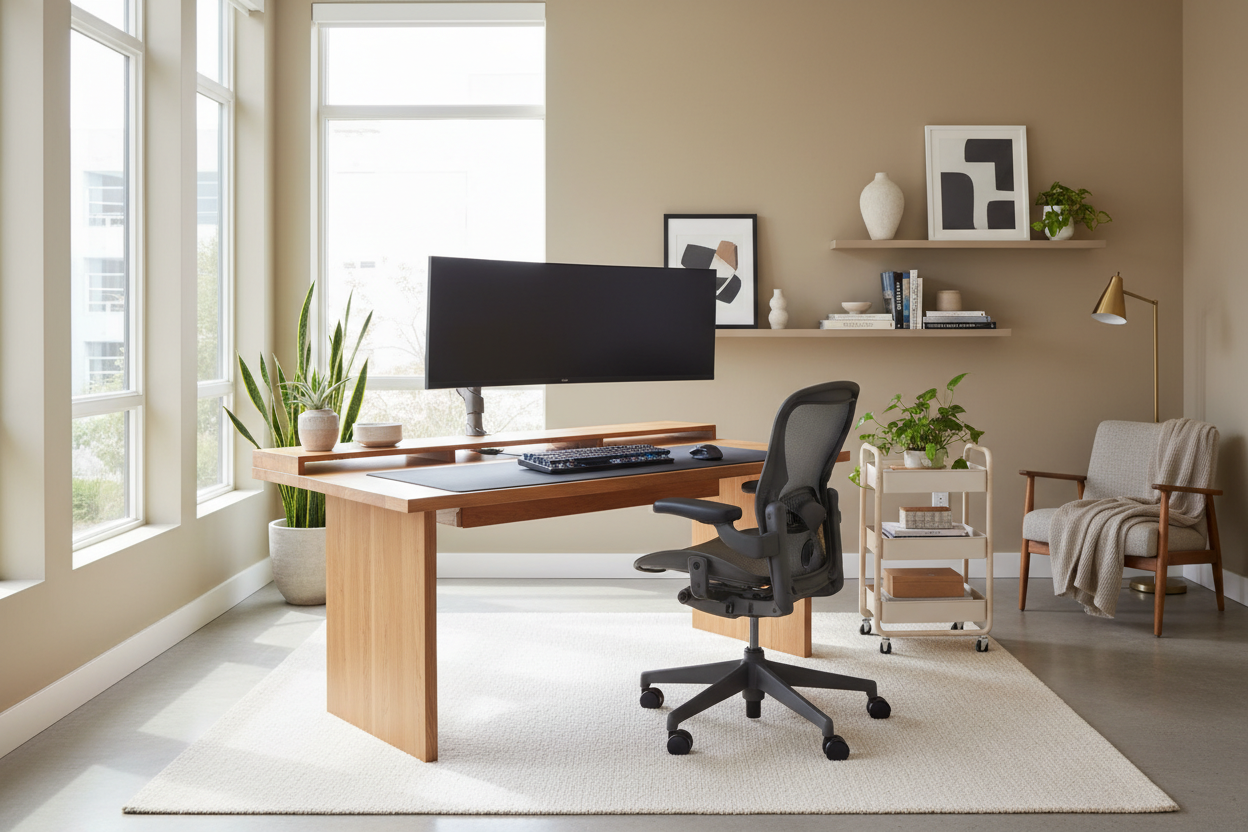
We have all been there: trying to finalize a presentation while balancing a laptop on the kitchen island, fighting the urge to clear away dinner plates. The transition from makeshift surfaces to a dedicated, purpose-built space is not just about productivity; it is about reclaiming your home’s aesthetic integrity. Designing the perfect at home workstation requires a delicate balance between ergonomic function and high-end design principles. It is not merely about fitting a desk into a corner; it is about curating a zone that respects the architectural flow of your room while supporting your professional needs.
Key Features for a Lasting Workspace
- Surface Depth: Ideally 24-30 inches deep to allow proper focal distance from monitors.
- Material Integrity: Solid wood or high-grade veneer for longevity versus hollow-core laminates.
- Wire Management: Integrated grommets or hidden channels to maintain visual silence.
- Ergonomic Clearance: Sufficient knee space (at least 28 inches high) to accommodate adjustable chairs.
Defining the Zone: Placement and Flow
The first mistake I see clients make with a workstation in home settings is treating it as an afterthought. Placing a desk directly against a wall often creates a claustrophobic visual field. Instead, consider the "command position." Float the desk in the room facing the door or a window. This not only improves the visual weight of the space but allows you to benefit from biophilic design elements—natural light and views—which are proven to reduce cortisol levels.
The footprint of a working station for home
Scale is paramount. A heavy, mahogany executive desk will suffocate a 10x10 study, while a spindly mid-century writing desk gets lost in an open-plan loft. Measure your circulation paths; you need at least 36 to 48 inches behind the desk to push your chair back without scuffing the wall or hitting a bookshelf.
Materiality: Texture and Durability
When selecting an at home work station, the tactile experience matters as much as the visual. I often steer clients toward hardwoods like walnut or white oak. These materials develop a patina over time, telling the story of your work. Conversely, tempered glass can look sleek and modern, but be warned: it is cold to the touch and creates acoustic reflections that can make Zoom calls sound tinny.
For a work station at home that sees heavy daily use, avoid high-gloss lacquers. While stunning in a showroom, they are magnets for micro-scratches and fingerprints. A satin or matte oil finish is far more forgiving and easier to spot-repair.
Ergonomics Meets Aesthetics
The chair is the anchor of your setup. The design challenge here is finding a piece that offers lumbar support without looking like it belongs in a corporate cubicle. Look for chairs with a "synchro-tilt" mechanism hidden within a tailored silhouette—perhaps upholstered in cognac leather or a performance velvet. The goal is to maintain the residential vibe of the room while ensuring your spine is aligned.
My Personal Take on at home workstation
Let me share a lesson I learned the hard way on a project in Tribeca. We designed a stunning, custom floating desk for a client. It was sleek, minimal, and featured a trendy "knife-edge" profile (where the edge tapers to a sharp point). It looked incredible in photos.
However, two weeks later, the client called me. They wanted to install a dual monitor arm. Because of that beautiful knife-edge taper, the clamp of the monitor arm couldn't grip the desk securely—it kept slipping off the beveled angle. We had to retrofit a clumsy block of wood underneath just to get the clamp to hold, which completely ruined the floating aesthetic I had fought for. Now, I always ask clients about their tech hardware before we choose the edge profile. If you plan on clamping anything to your desk, stick to a squared-off edge or ensure there is a deep enough flat lip underneath.
Conclusion
Curating your workspace is an investment in your daily well-being. By prioritizing scale, authentic materials, and thoughtful placement, you elevate your daily grind into a ritual of focus and style. Don't settle for temporary solutions; build a space that commands respect.
Frequently Asked Questions
What is the ideal depth for a computer workstation?
For a laptop only, 20 inches is sufficient. However, if you use an external monitor, aim for 24 to 30 inches of depth. This ensures the screen is an arm's length away, preventing eye strain.
How do I light a home workstation without glare?
Avoid placing a light source directly behind you (creating shadows) or directly behind the screen (causing contrast strain). Use layered lighting: ambient overhead light combined with an articulated task lamp positioned to the side of your dominant hand.
Can I fit a workstation in a bedroom without ruining the vibe?
Yes, but visual separation is key. Use a rug to define the "office" zone, or choose a secretary desk that can be closed up to hide the clutter when the workday ends, restoring the bedroom's serenity.


Dejar un comentario
Este sitio está protegido por hCaptcha y se aplican la Política de privacidad de hCaptcha y los Términos del servicio.