










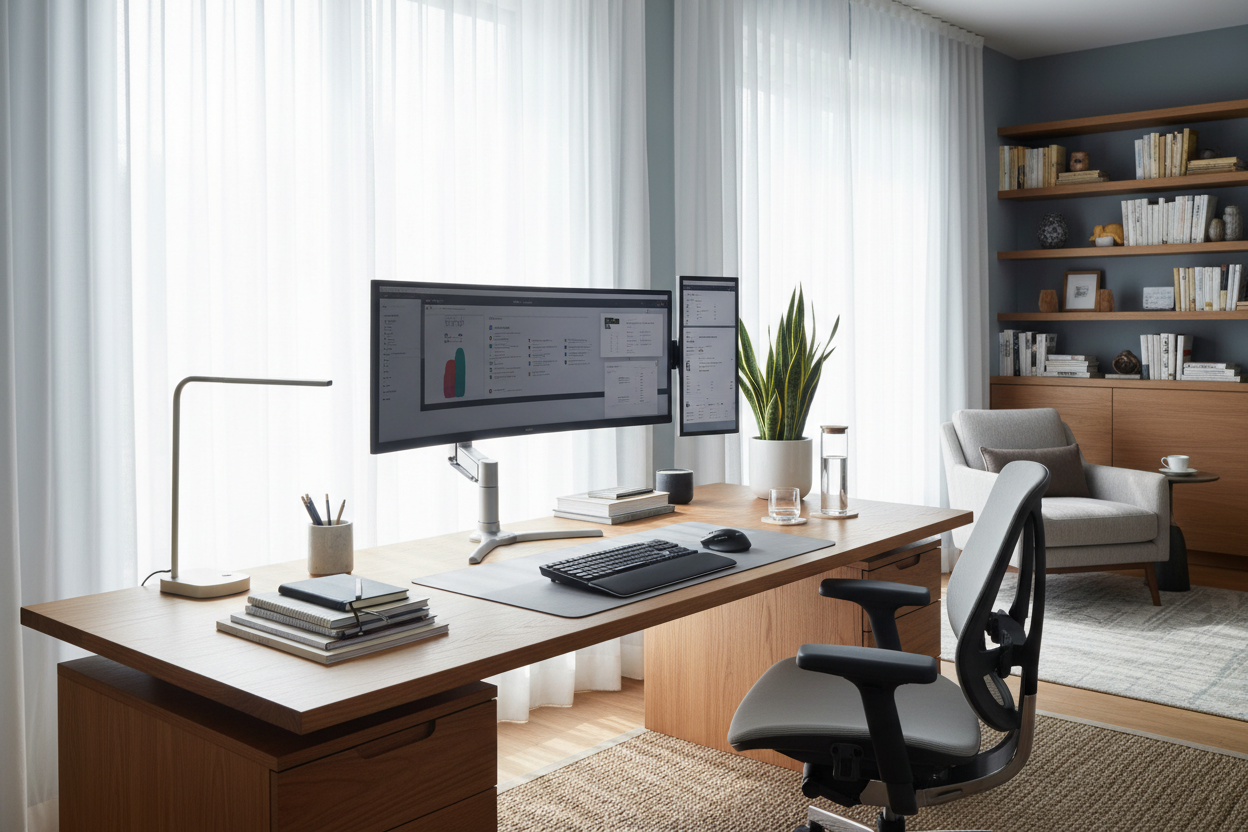
We have all experienced that specific kind of mental fatigue that sets in the moment you sit down to work. Often, we blame it on a lack of coffee or a poor night's sleep, but as an interior designer, I look at the environment first. If your workspace fights against your natural workflow, your output suffers. Achieving peak desk productivity is rarely about buying the most expensive gadget; it is about curating a space where function meets psychological comfort.
Key Features to Look For
- Surface Depth: A minimum depth of 30 inches is crucial to maintain a healthy viewing distance from monitors without cramping your keyboard space.
- Material Tactility: Natural materials like solid wood or high-grade matte veneers reduce glare and provide a grounding, tactile experience compared to cold glass or plastic.
- Structural Rigidity: For standing desks, look for a crossbar or heavy-duty columns to prevent the 'typing wobble' that ruins concentration.
- Cable Management Integration: Built-in grommets or hidden trays are essential for maintaining the visual calm required for deep work.
Mastering the Productive Room Setup
The placement of your furniture dictates the energy of the room. One of the most common mistakes I see in a home office is the 'cubicle mentality'—shoving the desk directly against a blank wall. While this saves space, it creates a claustrophobic visual field.
For the best office desk layout, I always advocate for the 'command position.' This means positioning your desk so you have a view of the door, but are not directly in line with it. If space permits, floating the desk in the center of the room anchors the space and creates a sense of authority. If you must face a wall, soften the view with a mood board or open shelving to create depth, transforming a sterile corner into an efficient desk layout.
Choosing the Right Productivity Table
When selecting the best desk for productivity, consider the silhouette and visual weight. A heavy, dark mahogany desk might feel authoritative, but in a small room, it can feel oppressive. Conversely, a minimalist Parsons desk offers clean lines that promote clear thinking.
Material Matters
The surface you touch for eight hours a day matters. I often steer clients toward matte finishes for a productivity workstation. High-gloss finishes look stunning in a catalog, but in practice, they reflect overhead lighting and cause significant eye strain over time. Walnut or oak veneers offer warmth and hide fingerprints, keeping the desk setup for productivity looking pristine with minimal maintenance.
Ergonomics and Visual Balance
A good desk setup is an ecosystem. The relationship between your chair height, desk surface, and monitor position is non-negotiable. Your elbows should rest at a 90-degree angle, and the top of your screen should be at eye level. This isn't just about back health; physical discomfort is a massive distraction.
Beyond ergonomics, we must address visual noise. To achieve an amazing desk setup, adhere to the rule of three for decor. A task lamp, a plant for biophilic connection, and one personal artifact are enough. Anything more becomes clutter; anything less feels sterile. This balance is the secret to a productive desk layout.
My Personal Take on Desk Productivity
I learned a hard lesson about aesthetics versus function during a project for a tech executive in Seattle. We selected a stunning, custom-made reclaimed wood desk with a live edge. It was visually breathtaking—a true statement piece.
However, two weeks later, the client called me in frustration. The beautiful, uneven texture of the wood grain, while gorgeous to look at, made writing on paper impossible without a blotter, and the irregular edge meant his ergonomic clamp-on monitor arm wouldn't sit flush. It kept slipping sideways every time he adjusted the screen. I had to retrofit a glass top to smooth it out, which killed the matte look we wanted. Now, I always check the underside of a desk for a flat clamping surface and ensure the top is smooth enough for practical use before recommending it as the best productivity setup.
Conclusion
Curating the best workspace setup is an investment in your own potential. By prioritizing flow, selecting the right materials, and eliminating visual friction, you create a vessel for your best work. Don't just fill a room with furniture; design a system that works as hard as you do.
Frequently Asked Questions
What is the ideal size for a productivity desk?
For a standard setup with a laptop and one monitor, a width of 48-60 inches is ideal. However, for a productivity table housing dual monitors and paper storage, aim for at least 72 inches in width to avoid a cramped feeling.
How do I set up my office desk for better lighting?
Avoid placing your desk where a window is directly behind you (creating glare on the screen) or directly in front of you (creating contrast eye strain). Perpendicular placement to a window is the best desk layout for natural light control.
Is a standing desk actually better for productivity?
Yes, but with a caveat. The ability to shift posture keeps energy levels high, making it a work desk layout essential. However, ensure you invest in a fatigue mat; without one, leg discomfort will ruin any productivity gains.

Dejar un comentario
Este sitio está protegido por hCaptcha y se aplican la Política de privacidad de hCaptcha y los Términos del servicio.