










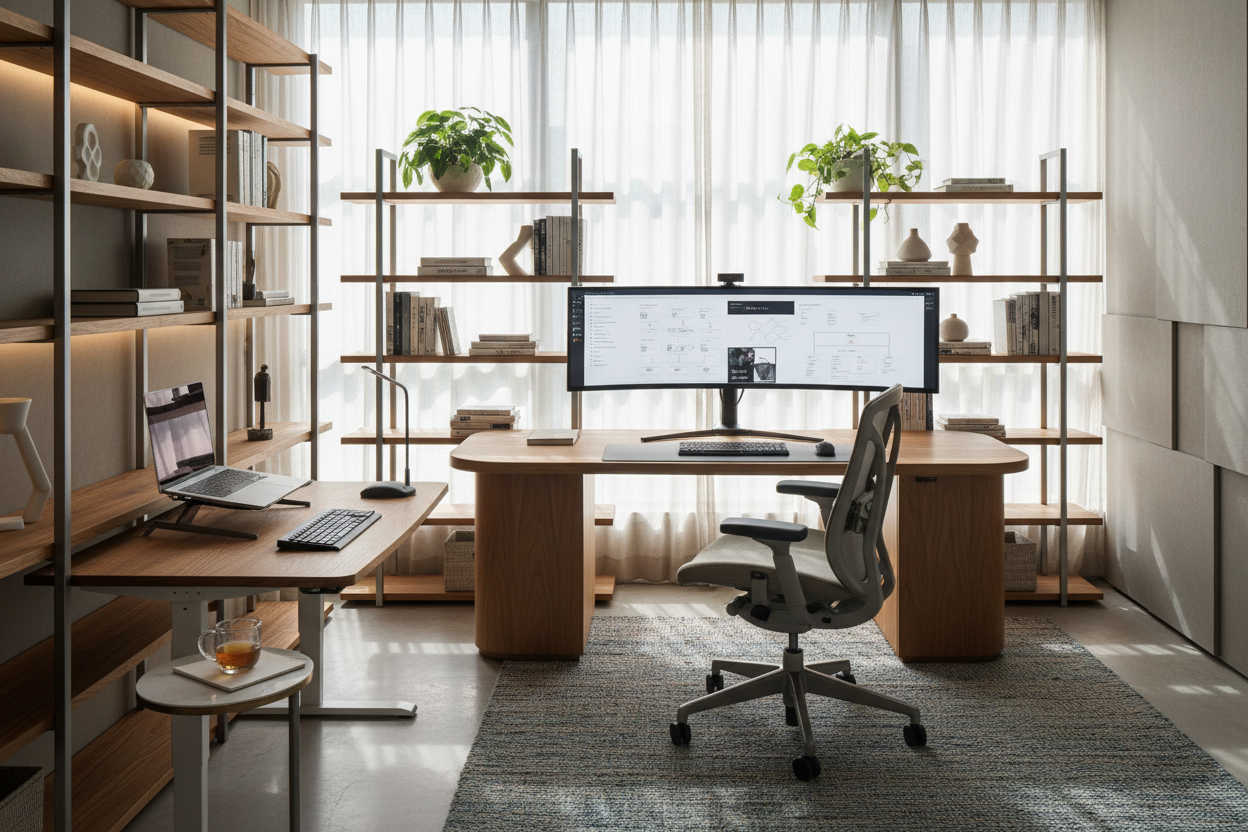
We have all experienced the fatigue that comes from working in a space that fights against us. You might have the latest technology, but if your lighting casts shadows on your notes or your chair forces a slouch, your productivity creates a slow leak of energy. As a designer, I tell my clients that the best office set up is rarely about buying the most expensive gear; it is about the intelligent orchestration of ergonomics, material quality, and spatial flow.
Key Elements of a High-Performance Workspace
Before we dive into the aesthetics, here are the non-negotiable pillars of a functional design. Prioritize these factors to ensure your space serves your workflow:
- Ergonomic Fidelity: Your chair and desk height must allow for a 90-degree elbow angle to prevent repetitive strain.
- Lighting Layering: Combine ambient overhead light with task lighting to reduce eye strain and screen glare.
- Material Durability: Choose surfaces (like solid wood or high-pressure laminate) that resist heat from electronics and friction from daily use.
- Visual Quiet: A layout that positions 'visual noise' (clutter, cables) out of your direct line of sight.
- Acoustic Control: Incorporating soft textures (rugs, curtains) to dampen echo for clearer calls.
Space Planning and Layout
The foundation of a professional office setup lies in the floor plan. A common error is pushing the desk directly against a wall, facing a blank surface. This 'time-out' position kills creativity. Instead, aim for the 'command position'—facing the door but not directly in line with it. If space allows, floating the desk in the center of the room anchors the space and creates a sense of authority.
For a smaller footprint, consider the traffic flow. You need at least 36 to 48 inches of clearance behind your chair to move freely without scuffing the wall or feeling boxed in. This clearance is vital for a nice office setup that feels breathable rather than claustrophobic.
Choosing the Right Materials: Wood vs. Synthetics
When selecting the anchor piece—your desk—the material dictates both the longevity and the tactile experience. Solid hardwoods like Walnut or White Oak offer warmth and can be refinished over time, making them a wise investment for a permanent home office. However, they require humidity control to prevent warping.
For a more rigorous office computer setup, high-pressure laminate (HPL) or Fenix surfaces offer superior resistance to scratches and the heat generated by laptops and monitors. Avoid cheap thermal-fused melamine (TFM) found in budget furniture; the edges tend to peel within a year of heavy use, ruining the aesthetic.
Integrating Technology Without the Clutter
Nothing ruins a sophisticated design faster than a nest of cables. The best computer office setup treats technology as an integrated element, not an afterthought. Look for desks with integrated wire management channels or grommets. If you are retrofitting a vintage table, use magnetic cable spines that run down the desk leg to conceal cords.
Monitor Placement and Visual Balance
Your screen is the focal point, but it shouldn't dominate the room. Mounting monitors on articulating arms not only clears desk real estate but also allows you to push the technology back when you need analog space for sketching or reviewing documents. This flexibility is the hallmark of the office set up designed for multi-disciplinary work.
Lighting: The Invisible Design Element
Ideally, position your desk perpendicular to a window. This provides natural light without the harsh contrast of backlighting or the glare of direct sunlight hitting your screen. Supplement this with a desk lamp that has a high Color Rendering Index (CRI). A high CRI reveals the true colors of your environment, which is subtle but reduces subconscious mental fatigue over a long day.
My Personal Take on the Best Office Set Up
I learned a hard lesson about surface finishes in my own home office last year. I fell in love with a matte black, soft-touch laminate desk for its sleek, modern look. It looked incredible in the showroom and in photos. However, living with it was a different story.
Within two weeks, I realized that 'soft-touch' matte finishes are absolute magnets for skin oils. Every time I rested my palms on the desk to type, it left shiny, greasy patches that were nearly impossible to wipe away without a specialized cleaner. It drove me crazy. I eventually had to use a large leather desk pad just to cover the high-traffic area. If you are designing your computer office setup, I highly recommend choosing a textured wood grain or a lighter color if you want to avoid wiping your desk down three times a day. It’s a small detail, but it affects how clean the room feels.
Conclusion
Creating the best office set up is a balancing act between the technical requirements of your work and the human need for comfort and beauty. By investing in the right layout, durable materials, and proper lighting, you elevate your work from a daily chore to a professional practice. Take the time to measure, plan, and select pieces that will age gracefully with your career.
Frequently Asked Questions
How deep should a desk be for a proper computer office setup?
For a standard setup with a monitor, aim for a depth of at least 30 inches (76 cm). This allows you to place the monitor at arm's length, which is the optimal distance for reducing eye strain. Shallower desks (24 inches) often force you to sit too close to the screen.
What is the best way to make a small office look bigger?
Use a desk with 'open' legs (like a metal frame or spindle legs) rather than a solid block or cabinet base. Being able to see the floor continuously underneath the furniture tricks the eye into perceiving more square footage. Additionally, wall-mounted shelving draws the eye upward, utilizing vertical space.
Is a standing desk necessary for a professional office setup?
While not mandatory, a sit-stand desk is highly recommended for long-term health. If the industrial look of a standing desk clashes with your decor, look for models that conceal the lifting columns within wood-clad legs, or simply use a high-quality ergonomic drafting stool to vary your posture.

Leave a comment
This site is protected by hCaptcha and the hCaptcha Privacy Policy and Terms of Service apply.