










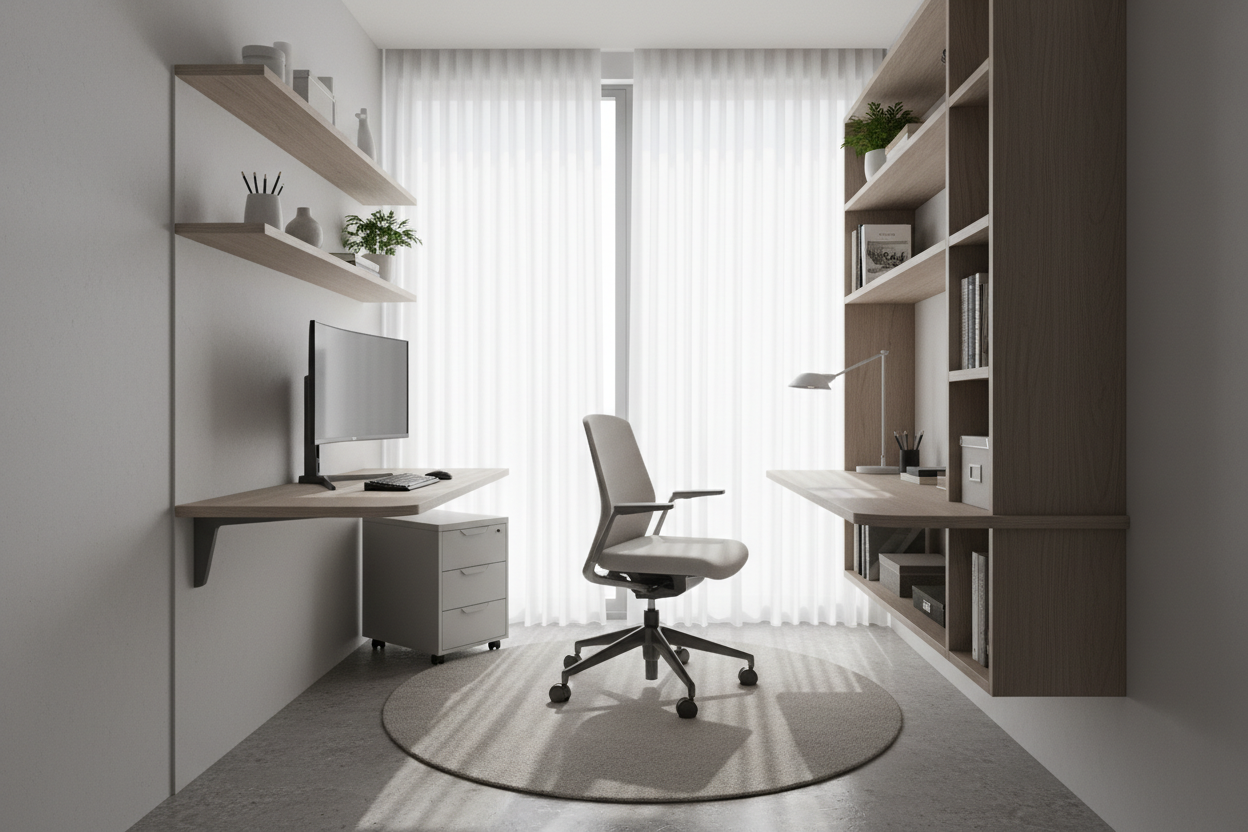
Living in a compact urban apartment or a cozy bungalow often forces a compromise between professional functionality and residential comfort. The challenge isn't just squeezing a desk into a corner; it is about curating a zone that respects the architectural integrity of your room while fostering deep work. A constrained footprint shouldn't dictate your productivity. By prioritizing vertical storage, controlling visual weight, and selecting materials that age gracefully, you can achieve the best work from home setup small space scenarios demand.
Quick Decision Guide: Essentials for Compact Offices
- Visual Weight: Opt for acrylic (ghost) chairs or open-leg metal desks to keep the room feeling expansive.
- Verticality: Utilize floor-to-ceiling shelving units to minimize the floor footprint while maximizing storage.
- Material Durability: Choose high-pressure laminates or sealed hardwoods that withstand daily friction in tight quarters.
- Lighting Temperature: Select 4000K (cool white) task lighting to maintain focus without washing out your home's warmer ambient light.
- Scale: Ensure furniture proportions match the room; oversized executive chairs will dominate and suffocate a small wfh office space.
Mastering Spatial Economy and Zoning
In interior design, we often talk about "zoning"—the art of creating distinct areas within an open plan. When dealing with a small wfh set up, physical dividers are often too bulky. Instead, rely on rugs and lighting to define the boundary.
The Floating Desk Solution
Floor space is premium real estate. A cantilevered or floating desk anchored to wall studs eliminates legs, creating an illusion of more space. This is critical for a wfh setup for small spaces because seeing the floor extend to the wall tricks the eye into perceiving the room as larger. However, ensure the mounting hardware is rated for at least 100 lbs to support monitors and the inevitable weight of your leaning elbows.
Furniture Selection: Silhouette and Materiality
The silhouette of your furniture dictates the flow of the room. Boxy, solid-wood desks with drawers on both sides (pedestal desks) are often too heavy for these applications.
Selecting the Chair
Ergonomics must never be sacrificed for aesthetics, but in a work from home room setup, the chair is the largest visual disruptor. Look for mid-back task chairs with a slim profile. Mesh backs are excellent not just for breathability, but because they allow light to pass through, maintaining that crucial visual openness. If the office is in a living room, consider a chair upholstered in performance velvet or boucle to bridge the gap between office utility and residential warmth.
Material Integrity
When selecting work from home solutions for small spaces, consider the finish. Veneers are cost-effective but can chip easily in tight spaces where chair arms might bump the desk edge. Solid wood or high-grade plywood with an exposed edge offers better longevity and can be refinished if scratched. A matte finish is preferable to high-gloss, as it hides fingerprints and reduces glare from nearby windows.
Lighting and Vertical Integration
A common error is relying solely on overhead ceiling cans. This creates shadows on your workspace. For a compact setup, wall-mounted sconces with swing arms serve as excellent task lights without taking up desk surface area. Furthermore, utilize the wall space above your monitor. Floating shelves installed at varying heights can house peripherals and decor, drawing the eye upward and making the ceiling feel higher.
My Personal Take on best work from home setup small space
In my years designing for city lofts, I've learned that the "best" setup is often the one that disappears when you're off the clock. I recently designed a "cloffice" (closet-office) for a client in a 500-square-foot studio. We used a solid oak slab cut to fit an alcove perfectly.
The lesson I learned the hard way? Monitor arm clearance. We mounted a shallow desk flush against the wall, only to realize the client's heavy-duty monitor arm required four inches of clearance behind the desk to articulate properly. We had to pull the heavy oak slab off the wall and install spacers. Now, I always recommend checking the "elbow" depth of any articulating arm before committing to a desk depth. Additionally, in small spaces, cable management isn't just neatness; it's sanity. Seeing a rat's nest of wires in a small room makes the entire space feel chaotic. I now insist on routing channels along the underside of the desk leg or wall for every single project.
Conclusion
Designing a functional workspace in a limited area requires a shift in perspective. It is not about shrinking a corporate office to fit your home; it is about integrating productivity into your living environment seamlessly. By focusing on scale, light, and vertical utility, you can create a workspace that invites focus without overwhelming your home.
Frequently Asked Questions
What is the minimum depth for a functional small desk?
For a laptop-only setup, 18 inches is sufficient. However, if you use an external monitor, aim for a minimum depth of 24 inches to maintain proper focal distance and prevent eye strain.
How do I hide cables in a desk with open legs?
Use adhesive cable clips along the back of the desk legs to route wires down to the floor. Alternatively, a neoprene cable sleeve can bundle cords together into one visual line, which looks much cleaner than individual hanging wires.
Can I use a dining chair for my WFH setup?
For short bursts, yes. However, dining chairs lack the lumbar support and adjustability required for an 8-hour workday. If space is tight, look for "crossover" chairs that have ergonomic internal structures but residential upholstery.

Leave a comment
This site is protected by hCaptcha and the hCaptcha Privacy Policy and Terms of Service apply.