










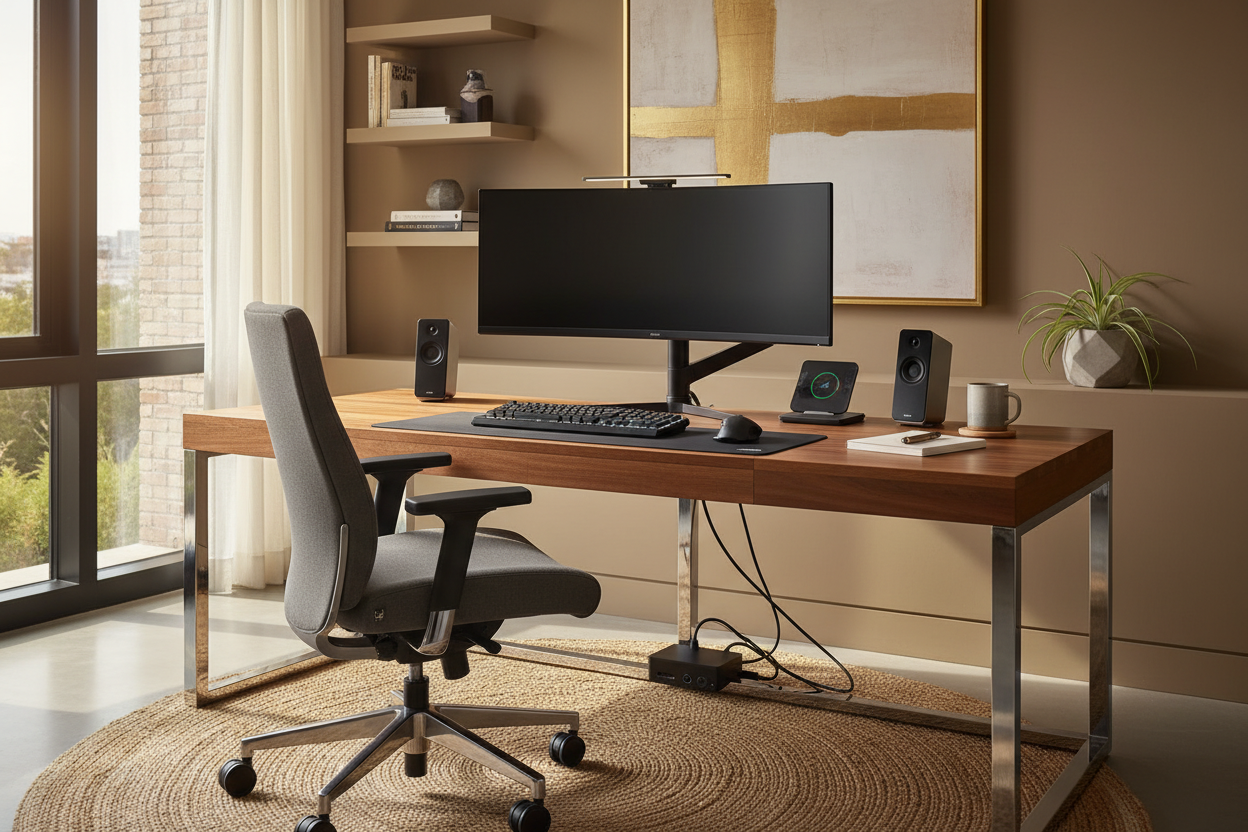
We have all faced the same visual dilemma: you spend months curating a serene, cohesive home office with rich walnut textures and soft textiles, only to have the aesthetic ruined by a tangle of black wires and aggressive plastic peripherals. As a designer, I believe your workspace should inspire creativity, not remind you of a server room. Finding the right gadgets for work from home is no longer just about processing power or battery life; it is about finding technology that respects your interior architecture while enhancing your workflow.
Key Features to Look For
Before purchasing new equipment, consider how these elements impact both functionality and your room's visual flow:
- Visual Footprint: Opt for devices with slim profiles or mounting capabilities to maintain negative space on your desk.
- Materiality: Look for tech featuring brushed aluminum, fabric mesh, or matte finishes rather than high-gloss plastics that attract fingerprints.
- Cable Management Potential: Prioritize wireless devices or gadgets with built-in routing channels to reduce visual clutter.
- Ambient Integration: Select technology that offers adjustable lighting temperatures (warm vs. cool) to match your room’s existing lighting scheme.
Harmonizing Tech with Interior Design
When selecting the best wfh tech, treat every piece of hardware as you would a decor object. The silhouette matters. A curved monitor, for instance, offers a softer line than a rigid, sharp-edged display, mimicking the organic curves often found in mid-century modern furniture.
For those working in shared living spaces, the best remote work accessories are the ones that disappear when not in use. Look for laptop stands that fold flat into a drawer or wireless charging pads that double as valet trays. The goal is to create a space that feels like a home first and an office second.
The Ergonomic Aesthetic
Many homeowners assume that ergonomic furniture must look clinical. This is a misconception. The best work from home technology today blends orthopedic support with high-end design.
Monitor Arms and Spatial Planning
One of the must have gadgets for working from home is a high-quality monitor arm. By lifting your screen off the desktop, you not only align your spine but also reveal the surface material of your desk. Seeing more of the wood grain or stone surface creates a sense of openness and luxury that a bulky plastic monitor stand obscures.
Keyboard and Input Devices
When choosing input devices, tactile feedback is key, but so is the finish. Mechanical keyboards are popular, but ensure the colorway complements your palette. A stark white keyboard on a dark mahogany desk can create a jarring focal point. Opt for slate greys or muted tones that anchor the space.
Lighting: The Invisible texture
Lighting is arguably the most critical aspect of interior design, yet it is often overlooked in tech setups. The cool gadgets for work from home are those that control luminosity. A monitor light bar is essential; it illuminates your workspace without creating glare on the screen or casting harsh shadows that disrupt the room's ambiance.
Furthermore, smart lighting strips should be used with restraint. Avoid the "gamer" aesthetic of flashing RGB colors. Instead, use bias lighting behind your monitor set to a warm 2700K-3000K temperature to reduce eye strain and create a cozy, library-like atmosphere.
Audio and Acoustic Control
Sound quality is invisible, but the devices that produce it are not. The technology for work from home regarding audio has shifted towards fabric-wrapped speakers and microphones that resemble sculptural art. If you are in a minimal space, consider noise-canceling headphones with a dedicated stand. Leaving headphones sprawled on a desk creates instant visual chaos.
My Personal Take on Gadgets for Work from Home
I learned a hard lesson about materiality during a recent renovation of my own study. I purchased a highly-rated, glossy black docking station that was touted as one of the work from home must-have gadgets. While it functioned perfectly, I hated it within a week.
Why? Because of the dust and micro-scratches. In a room with ample natural light, that glossy finish highlighted every speck of dust and every fingerprint, making the desk look perpetually dirty regardless of how often I cleaned it. It clashed with the matte, natural oil finish of my oak desk. I eventually swapped it for a dock with a textured, anodized aluminum shell. It diffused the light rather than reflecting it, and the difference in the room's "polished" feel was immediate. It’s a small detail, but in design, the nuance is everything.
Conclusion
Curating your workspace is an exercise in balance. The work from home devices you choose should serve your career without dominating your home’s character. By focusing on materials, cable management, and streamlined silhouettes, you can build an office that is as beautiful as it is functional.
Frequently Asked Questions
How do I hide cables for a clean look?
Use cable sleeves that match your wall or desk leg color. For a truly seamless look, mount a cable management tray under the desk surface to hold power bricks, ensuring only one single cord runs to the wall outlet.
Is a curved monitor worth the investment for design work?
Yes, specifically for immersion and reducing eye strain. From a design perspective, the curve can also soften the harsh angular lines of a rectangular desk, adding a modern, fluid element to the room.
What is the best lighting temperature for a home office?
Aim for 3500K to 4000K for task lighting (focus work), as it mimics natural daylight. However, for ambient background lighting, stick to warmer tones (2700K) to maintain a residential, comfortable feel.


Leave a comment
This site is protected by hCaptcha and the hCaptcha Privacy Policy and Terms of Service apply.