










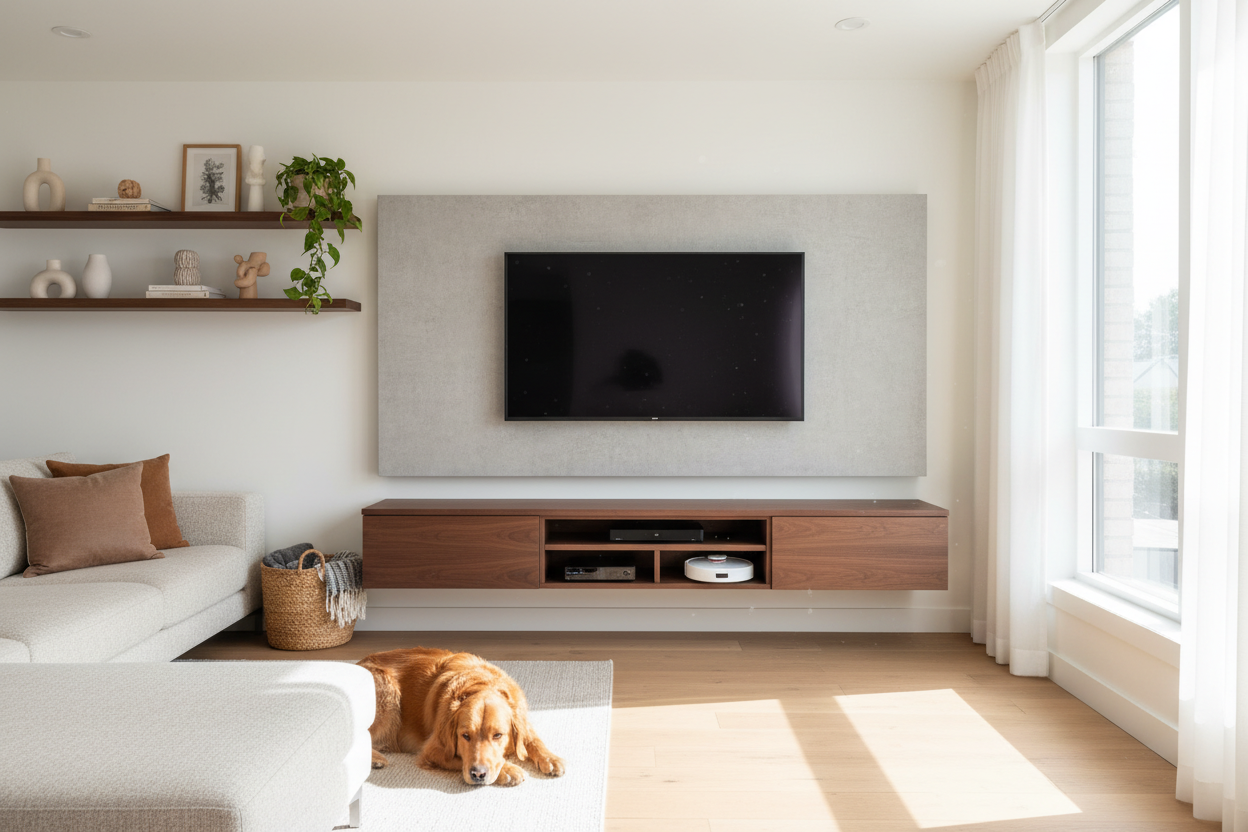
I spent twenty minutes yesterday watching my robot vacuum, 'Sir Sucks-a-Lot,' try to navigate the three-inch clearance under my old media unit. It wasn't pretty. He got wedged between a chunky wooden leg and a spaghetti-tangle of HDMI cables, eventually giving up with a pathetic beep of despair. My living room looked fine from the sofa, but underneath? It was a graveyard of pet hair and forgotten AA batteries.
That was the breaking point. I realized that if I wanted a clean house without a daily rescue mission, I had to stop buying furniture with legs. I needed a wall mounted tv console to clear the floor once and for all. Moving the media setup off the ground didn't just save my vacuum—it actually made my cramped apartment feel like a deliberate design choice rather than a cluttered storage unit.
- Eliminates the 'dust bunny zone' where vacuums can't reach.
- Hides messy cable bundles within the unit itself.
- Creates visual floor space, making small rooms feel significantly larger.
- Requires mounting into studs—drywall anchors alone won't cut it for heavy tech.
The Dark, Dusty Underbelly of Traditional Floor Stands
Standard media furniture is usually designed with zero regard for how humans actually clean. Most standard floor-bound TV stands sit just high enough to let dust in, but too low for a mop or a vacuum to get out. Over six months, that gap becomes a compressed layer of pet dander and debris that you only discover when you eventually move the furniture and realize you've been living in a biohazard zone.
Beyond the dust, there’s the cord chaos. When you have a mounted tv with console setup on the floor, those black power strips and thick cables just sit there, attracting hair like a magnet. It’s an eyesore that no amount of 'cable management' boxes can truly fix because the furniture itself is blocking your path to a clean floor. I was tired of moving a 60-pound cabinet just to reach a stray cat toy.
Enter the Wall Mounted Solution (And Exit the Cord Chaos)
The switch to a mounted tv console changed the entire physics of my living room. By installing a wall mounted media console entertainment center, I effectively deleted the floor-level obstacles. Now, the robot vacuum glides underneath without a single 'stuck' notification hitting my phone. It’s the ultimate lazy-person’s cleaning hack.
What surprised me most about the media cabinet wall mount was the cord management. These units usually have pre-drilled ports that allow you to run wires directly through the back and into the wall (if you're fancy) or just keep them tucked neatly inside the cabinet. No more dangling wires for the cat to chew on or for the vacuum to choke on. It’s a closed system that looks incredibly sharp.
The Installation Anxiety: Will It Actually Hold My Heavy Tech?
I’ll be honest: I was terrified this thing would rip out of the wall and crush my PlayStation. If you’re hanging a hanging tv console, you cannot wing it. You need a stud finder, a level, and a bit of patience. I’ve seen people try to use heavy-duty drywall toggles, but for a hanging media cabinet that holds a receiver, a console, and maybe a soundbar, you absolutely must hit at least two studs.
Most quality units are rated for 50 to 75 pounds, which is plenty for modern electronics. My setup has been up for a year now, and it hasn't budged a millimeter. The trick is to check your wall type first. If you have metal studs or plaster and lath, you might need specific hardware, but for standard 16-inch on-center wooden studs, it’s a thirty-minute job that provides permanent peace of mind.
The Unexpected Aesthetic Payoff
I originally did this for the vacuum, but the visual change was the real win. A wall hung tv stand creates a 'floating' effect that draws the eye upward. Because you can see the floor extending all the way to the baseboard, the room feels three feet wider than it actually is. It’s a trick interior designers use constantly, and it works even better in person than in photos.
I eventually replaced my clunky console with a TV cabinet on every wall where I have tech. The result is a home that feels intentional and airy. No more heavy, dark furniture anchoring the room down. It’s just clean lines, clear floors, and a robot vacuum that finally gets to finish its job without me having to stage a rescue operation every afternoon.
How high should I mount my console?
Aim for the 'eye-level' rule. Your TV should be at eye level when you're seated, so the console usually sits about 10 to 12 inches below the bottom of the TV screen. Usually, this means the bottom of the console is 12-18 inches off the floor.
Can a wall mounted console hold a heavy AV receiver?
Yes, provided it's bolted into wooden studs. Most receivers weigh 20-30 pounds. If your console is rated for 60 pounds and secured to the structure of the house, it’s not going anywhere. Avoid cheap MDF units if you have heavy vintage gear; look for solid wood or high-grade plywood.
How do I hide the wires between the TV and the console?
The cleanest way is an in-wall cable routing kit (about $20). If you're renting and can't cut holes, use a paintable cable raceway. It sticks to the wall and disappears once you hit it with a coat of your wall color.


Leave a comment
This site is protected by hCaptcha and the hCaptcha Privacy Policy and Terms of Service apply.