










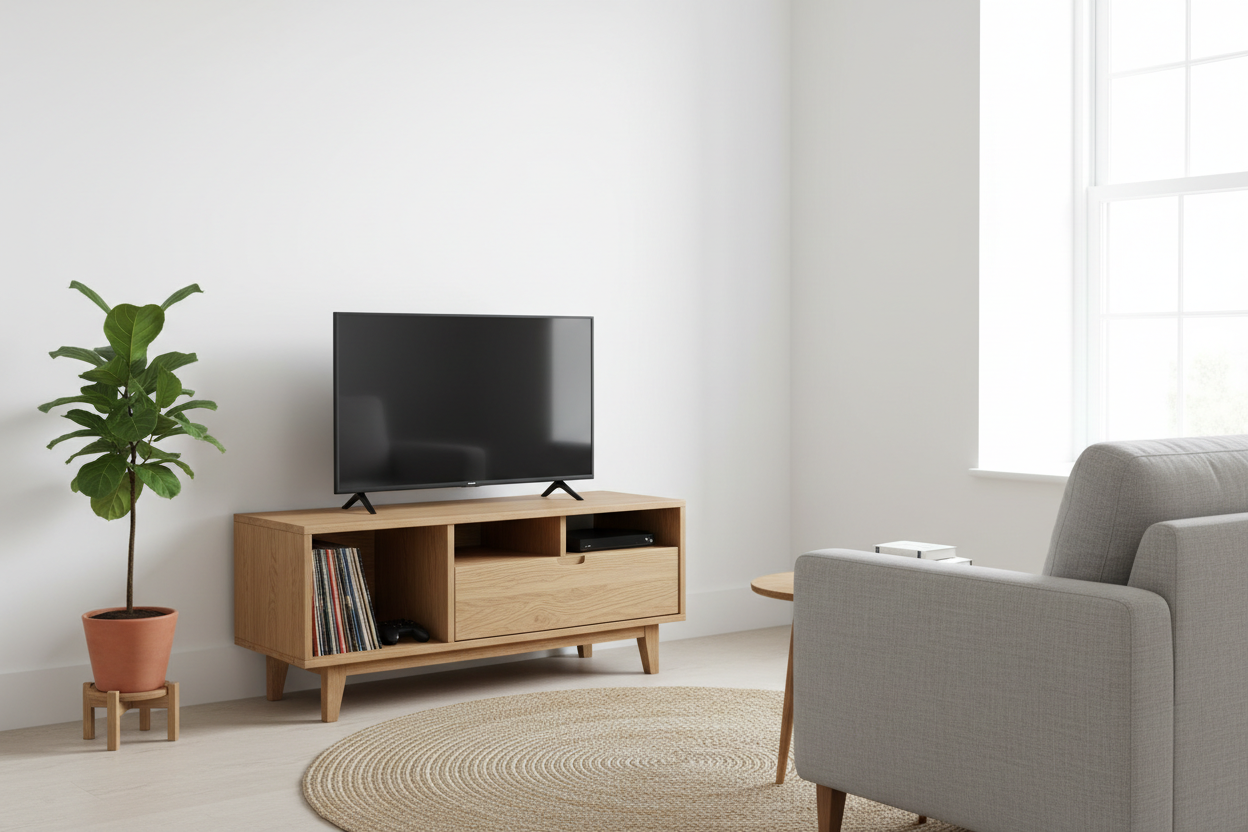
Living in a cozy apartment or trying to furnish a modest den often feels like a game of Tetris. You have the television, the gaming console, the router, and perhaps a turntable, but you lack the sprawling wall space to house them all. This is where the right furniture makes all the difference. A small wood media cabinet serves as the anchor of a room, providing warmth and texture while hiding the chaotic tangle of wires that usually accompanies entertainment setups. Unlike open metal racks or glass stands, wood offers a visual weight that grounds the space without dominating it.
Choosing the right piece involves more than just measuring the width of your TV. It requires a balance of airflow, storage depth, and aesthetic cohesion. Whether you are hunting for a mid-century modern vibe or a rustic farmhouse look, the goal is to maximize functionality in a minimal footprint.
My Battle with Bulky Furniture
I learned the value of proper scaling the hard way. In my first studio apartment, I inherited a massive, heavy oak entertainment center. It was a beautiful piece of furniture, but it was completely wrong for the room. It projected almost two feet from the wall, choking the walkway to the kitchen and making the entire living area feel claustrophobic. I spent months bumping my shin against the corner of that unit before I finally swapped it out for a compact media cabinet with sliding doors.
The change was immediate. Suddenly, the room could breathe. The new unit was shallow enough to sit unobtrusively against the wall but sturdy enough to hold my TV and record player. That experience taught me that in small spaces, inches matter. A cabinet that is just three inches shallower can completely transform the flow of traffic in a room.
Defining "Small" in Media Furniture
When shopping, definitions vary, but generally, a media cabinet is considered small if it falls between 30 and 50 inches in width. Height is equally important. Lower profiles, usually around 20 to 24 inches high, tend to make ceilings look higher—a crucial visual trick for cramped rooms. However, if you need to keep equipment away from toddlers or pets, a taller, narrower cabinet might be the safer bet.
For those dealing with truly tight corners, such as a nook between a fireplace and a wall, you might need a very small media cabinet. These units often resemble nightstands or audio towers rather than traditional credenzas. They are perfect for housing a router and a streaming box, assuming your TV is mounted on the wall above. The key here is verticality; using internal shelves to stack components upward rather than spreading them out horizontally.
Why Wood Remains the Best Material Choice
Glass and metal stands had their moment in the early 2000s, but wood remains the superior choice for compact spaces for several reasons. First, it hides dust and fingerprints far better than glass. Second, and perhaps more importantly, wood offers acoustic benefits. It absorbs sound rather than reflecting it, which helps dampen the echo in smaller, uncarpeted rooms.
Solid Wood vs. Veneer
You do not always need to splurge on solid walnut or oak. High-quality veneers over MDF (Medium Density Fiberboard) are often more stable than solid wood, which can warp with humidity changes. Veneer allows you to get the look of exotic grains like teak or rosewood at a fraction of the price and weight. However, ensure the veneer is thick enough to withstand scratches. If you plan to place heavy amps or receivers on the shelves, check the weight rating. Solid wood legs are usually a must for structural integrity, even if the body is engineered wood.
The Modern Aesthetic: Clean Lines and Legs
Style dictates how much visual space a piece consumes. A blocky cabinet that sits flush on the floor can look heavy and immovable. In contrast, a small modern media cabinet raised on tapered legs creates a sense of airiness. Being able to see the floor underneath the furniture tricks the eye into thinking the room is larger than it is.
Mid-century modern designs excel in this category. They typically feature clean lines, minimal hardware, and warm wood tones that blend with various color palettes. Look for features like tambour doors (slatted doors that roll back) or sliding panels. These are brilliant for tight spots because you don't need extra clearance to swing a door open. You can access your devices without blocking the walkway.
Functionality Checklist: Ventilation and Cables
A pretty face isn't enough if your PlayStation overheats inside it. Electronics generate heat, and packing them into a small wooden box can be a recipe for disaster if airflow is ignored. Inspect the back panel of any potential purchase. It should have generous cutouts not just for cords, but for air circulation. If you fall in love with a vintage piece, be prepared to use a hole saw to create ventilation ports in the back.
Cable management is the second hurdle. In a small room, a rat's nest of wires is immediately visible. A dedicated compact media cabinet should have internal channels or velcro ties to keep power cords disciplined. If the unit has legs, consider how you will hide the cables running from the cabinet to the wall outlet. Taping them to the back of a leg is a simple, effective trick.
Styling Your Compact Console
Once you have the cabinet in place, resist the urge to clutter the top. Since the surface area is limited, less is more. If your TV is on a stand, you might only have room for one or two decorative items. A small plant adds life, while a stack of two or three coffee table books can add height variation.
If you have mounted the TV on the wall, the top of the cabinet becomes a prime display area. However, keep the decor low-profile so it doesn't obscure the bottom of the screen. A soundbar is often the most practical use of this space, improving your audio experience without requiring a separate subwoofer on the floor.
Making the Final Decision
Selecting furniture for limited square footage requires patience. Measure your largest electronic component—usually an A/V receiver or a gaming console—and ensure the internal depth of the cabinet can accommodate it, including the plugs sticking out of the back. Many buyers forget the plug depth and end up with doors that won't close.
Whether you opt for a sleek, wall-mounted floating unit or a freestanding small wood media cabinet with vintage charm, the goal is harmony. The right piece will hide the technology you need while highlighting the style you love, turning a cramped corner into a curated entertainment zone.
Frequently Asked Questions
How much space should I leave between the TV and the media cabinet?
If your TV is wall-mounted, aim for a gap of about 4 to 8 inches between the bottom of the TV and the top of the cabinet. This connects the two visually without making them look crowded. If the TV sits on the cabinet, ensure the stand leaves at least 2 inches of surface space on either side for stability.
Can I use a nightstand or sideboard as a very small media cabinet?
Yes, repurposing other furniture is a great space-saving hack. However, you must modify the back panel to allow for cord pass-throughs and airflow. Without these modifications, your electronics may overheat, and remote control signals might be blocked if the doors are solid wood.
How do I stop my electronics from overheating in a small cabinet?
Ensure there is open space behind the components and that the back panel has ventilation holes. If the cabinet runs hot, you can install a small, USB-powered cabinet fan to exhaust warm air. Avoid stacking hot devices like receivers and consoles directly on top of one another.

Leave a comment
This site is protected by hCaptcha and the hCaptcha Privacy Policy and Terms of Service apply.