










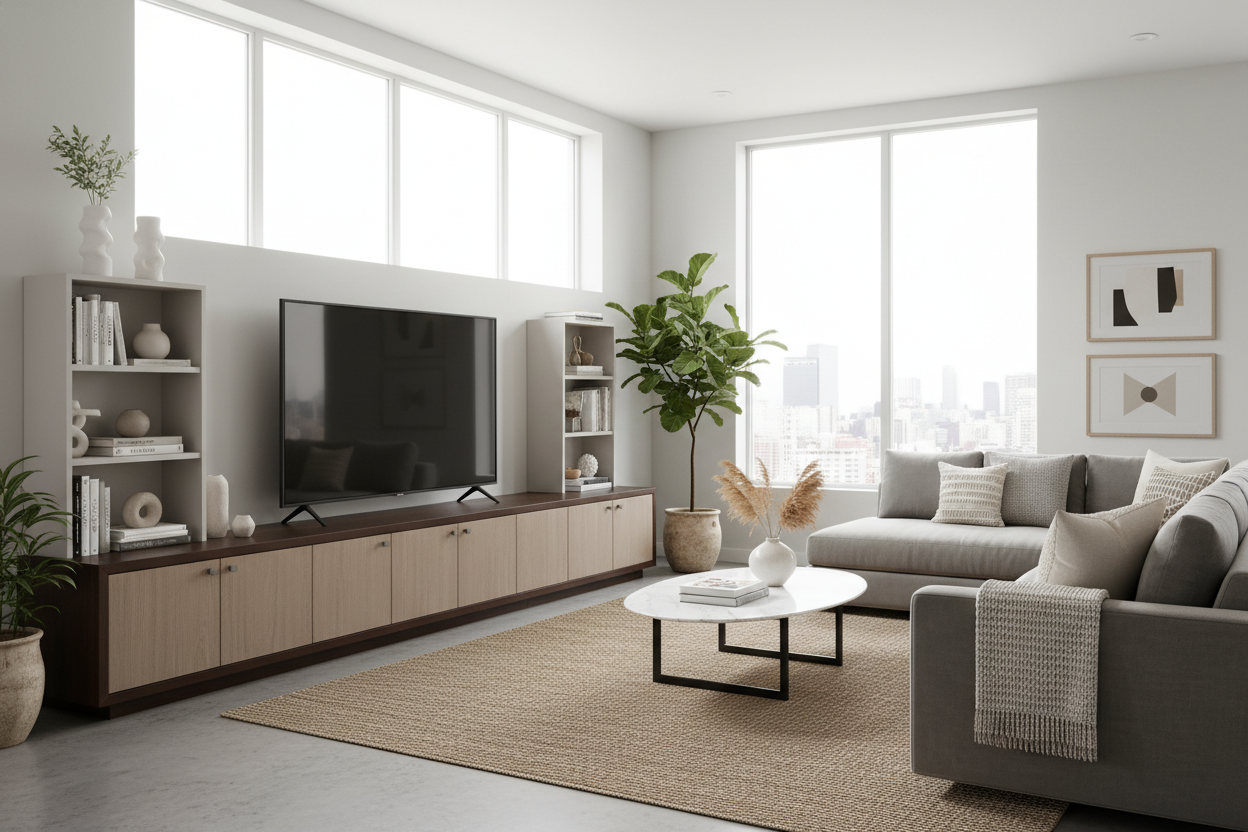
I remember the day my 75-inch OLED arrived. I had spent three weeks obsessing over refresh rates and black levels, but I hadn't spent a single second thinking about the 60-inch media console currently sitting in my living room. When the delivery guys finally set that massive screen down, the vibe immediately shifted from 'home cinema' to 'local sports bar.' It looked ridiculous.
The screen literally hung off the edges of the wood by several inches on each side. It felt precarious, cheap, and visually exhausting. That was the moment I realized that hunting for large tv stands isn't just about finding a surface that won't collapse under the weight; it's about architectural balance. If your furniture is smaller than your tech, your room will always feel like it's losing a fight. I've personally assembled enough flat-pack units to know that if you don't respect the scale of the screen, no amount of cable management or 'styling' will save the room.
- The stand should always be at least 6 inches wider than the TV's actual horizontal width.
- Visual weight is as important as the physical weight limit—don't let your screen look top-heavy.
- Closed storage is mandatory to hide the inevitable cable nightmare that comes with big setups.
- Low-profile benches help keep the screen at eye level while adding the necessary width to the room.
The Day I Realized My Living Room Looked Like a Sports Bar
There is a specific kind of regret that hits when you realize your expensive new tech has ruined your decor. My 75-inch screen was roughly 65 inches wide. Placing it on a 60-inch console meant I had two and a half inches of expensive glass dangling in the air on either side. It looked like a bodybuilder who skipped every single leg day for a decade. The proportions were so skewed that the TV felt like it was threatening to tip over if someone sneezed too hard.
The problem wasn't just the overhang; it was the lack of intention. In a sports bar, you want the screen to be the only thing that exists. In a home, you need the furniture to anchor the electronics. Without that anchor, the TV looks like a temporary guest rather than a part of the room. I spent the first night watching a movie, but I couldn't focus on the plot—I was too busy staring at the awkward gap where the wood ended and the screen kept going. It felt like my living room had been swallowed by a giant black rectangle.
The 'Overhang' Problem Explained
Most people buy furniture based on the weight limit listed on the box. They see a stand rated for 150 lbs and assume it's fine for their 80 lb screen. But physical safety is the bare minimum requirement. The real issue is the awkward geometry of buying TV stands for large TVs. When the screen is wider than the base, it creates a visual tension that makes the whole room feel smaller and more cluttered. It’s a design mistake that even the most expensive screen can't overcome.
I’ve tested dozens of setups, and the math never lies. A 65-inch TV is about 57 inches wide. An 85-inch screen is nearly 74 inches wide. If you’re looking for the best tv stands for large tvs, you have to ignore the diagonal screen measurement and look at the actual horizontal footprint. You want your furniture to be the 'frame' for the screen, not just a pedestal. When the stand is wider, the screen feels 'nested' and secure. When it's narrower, the screen feels like it's looming over you aggressively.
Why 'Just Barely Fitting' Isn't Good Enough
Interior design usually follows a sense of proportion. If your TV 'just barely' fits on the stand, it looks like a mistake. I spent a frantic weekend scrolling through retailers, wondering does a TV cabinet large enough for modern screens even exist that doesn't look like a massive black coffin. Most standard units stop at 60 or 70 inches, which is fine for the TVs of 2015, but it's woefully inadequate for the 85-inch behemoths we're buying today.
You need at least 3 to 4 inches of furniture extending past both sides of the screen. This extra space allows you to place a small plant, a soundbar, or even just a bit of empty space to let the eye rest. Without that breathing room, the screen feels like it's vibrating with intensity. It’s the difference between a curated living space and a dorm room setup where the tech was the only priority. I’ve found that 80 to 94 inches is the 'sweet spot' for most modern living rooms with large screens.
My Hunt for the Best Large TV Stands
When I finally got serious about my search, I had a strict checklist. It had to be at least 80 inches wide, it needed to be made of something sturdier than 12mm particle board, and it had to have serious cable management. Big TVs come with big power bricks, soundbar cables, and gaming consoles. If you can see the wires, the whole 'sleek' look is dead. I've seen too many 'best large tv stands' lists that ignore the fact that we actually have to plug things in.
I eventually settled on a large TV cabinet with spacious storage that clocked in at 94 inches. It felt huge in the box, but once it was against the wall, it was a revelation. The closed doors hid my PS5 and my messy collection of 4K Blu-rays, and the sheer width of the unit made the 75-inch TV finally look like it belonged. I opted for a unit with a kiln-dried hardwood frame and soft-close hinges, because if you're putting a $2,000 TV on it, the furniture shouldn't feel like it's made of cardboard.
How Sizing Up Actually Made My Room Feel Bigger
It sounds wrong, but putting a massive piece of furniture in a medium-sized room actually made the space feel larger. A long, low large entertainment center creates a strong horizontal line that draws the eye across the room. It stretches the perception of the wall, whereas a small, cramped stand makes the corners of the room feel like they're closing in. It’s about scale—large screens require large foundations.
If you've upgraded your screen recently, please do yourself a favor and measure the width. Don't let your screen hang out in the air. Browse through some properly scaled TV stands and give your tech the foundation it deserves. Your living room—and your visual anxiety—will thank you. Once you see the difference a properly sized console makes, you'll never go back to the 'overhang' life again.
How much wider should my TV stand be than my TV?
At a minimum, aim for 3 to 5 inches of clearance on each side. If your TV is 65 inches wide, your stand should be at least 71 to 75 inches long. This prevents that top-heavy look and provides a much-needed visual anchor for the room.
Can I use a dresser as a TV stand for a large screen?
You can, but check the height. Most dressers are 30-36 inches tall. Once you add a 75-inch screen, the top of the TV will be near the ceiling. For the best viewing experience, the center of the screen should be at eye level when you're sitting down, which usually means a stand height of 18-24 inches.
What material is best for heavy, large TVs?
Avoid thin particle board or 'honeycomb' fills. Look for solid wood, high-grade plywood, or metal frames. A large TV plus a soundbar and gaming consoles can easily exceed 100 lbs, and cheap materials will sag in the middle over time, creating a permanent dip in your furniture.



Leave a comment
This site is protected by hCaptcha and the hCaptcha Privacy Policy and Terms of Service apply.