










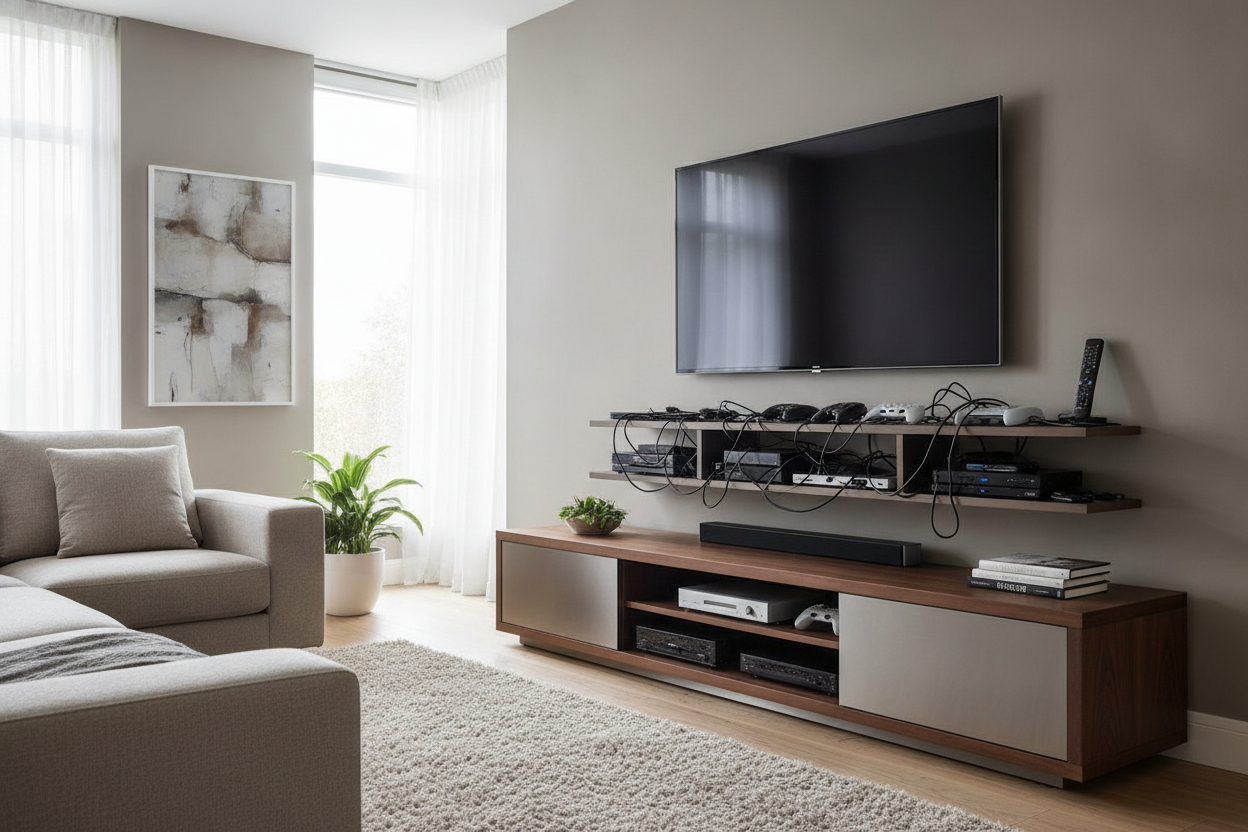
I remember staring at my living room wall three years ago, convinced I was a design genius. I had just installed a sleek, walnut-finished floating shelf under my 65-inch TV. It looked like a minimalist museum—for about twenty minutes. Then I started plugging things in. Within an hour, my wall looked like a server room had exploded, with black cables dangling like vines against my white paint. I realized very quickly that unless you are prepared to cut into your studs and run wiring behind the drywall, the floating aesthetic is a lie.
- Floating shelves offer zero cable management for real-world tech.
- A grounded unit provides a necessary visual anchor for large screens.
- Closed storage is the only way to hide ugly routers and gaming controllers.
- Heavy-duty builds prevent the 'sag' that happens with cheap particle board.
The Minimalist Mirage (Why I Tried to Ditch the Console)
I spent an entire Saturday afternoon patching drywall holes from my old cabinet, thinking I was finally 'evolving' my space. I wanted that airy, Pinterest-ready look where the TV just hovers. But the reality of modern living involves a lot of plastic boxes. My PS5 didn't fit on the shelf, the Apple TV box looked like a stray coaster, and the power strip sat on the floor like a giant mechanical centipede.
The regret was immediate. I didn't just lose storage; I lost the ability to hide the 'guts' of my entertainment system. I spent the next week shopping for dedicated tv stands because my clean look was actually a cluttered nightmare. I needed something with weight, something with a back panel, and something that didn't require me to be a licensed electrician to hide a simple HDMI cord.
The Cord Chaos Reality Check
Modern tech is incredibly needy. Between the soundbar, the mesh router, and the gaming consoles, you are looking at a minimum of six to eight cables. A media tv stand isn't just a piece of furniture; it is a piece of infrastructure. If you buy a cheap unit, you usually get one tiny circular cutout in the back that barely fits a three-prong plug.
When you upgrade to a proper multimedia tv stand, you are looking for functionality. You want ventilated back panels so your electronics don't overheat and enough depth—at least 16 to 18 inches—so your cables don't get crushed against the wall. I learned the hard way that a shallow console means your expensive 4K cables are constantly bent at 90-degree angles, which is a great way to ensure they fail right in the middle of a movie.
3 Things a Grounded Cabinet Actually Fixes
First, it solves the 'drifting TV' problem. A large screen mounted on a bare wall looks like it’s trying to escape. A solid floor unit grounds the room and gives your eyes a place to rest. It balances the visual weight of that giant black rectangle above it. Second, it hides the heavy power bricks. Those massive 19.5V adapters for your laptop or console don't fit behind a floating shelf, but they disappear inside a cabinet.
Third, it provides a 'junk drawer' for the living room. I eventually settled on a spacious four drawer media console and it changed everything. Suddenly, my coffee table wasn't covered in half-broken chargers, spare batteries, and three different remotes. Everything has a home, and that home is behind a solid piece of kiln-dried wood, not sitting out in the open collecting dust.
Finding a Heavy-Duty Unit That Doesn't Look Like a 90s Block
The fear with grounded furniture is that it will look like a massive, clunky oak block from your parents' 1994 basement. But modern design has figured this out. You want to look for pieces that use materials to create 'visual lightness.' For example, choosing a media console with glass doors allows you to see the depth of the unit without seeing the mess. Fluted or reeded glass is even better—it lets remote signals through but blurs the silhouette of your router.
Pro tip: always go wider than you think. A TV that is wider than its stand looks top-heavy and cheap. Styling a wide media console is much easier because it gives you room to place a lamp or a vase on either side of the screen, which helps the TV blend into the room rather than dominating it. Look for long, low-profile silhouettes rather than tall, chunky ones.
Decorating the Top So It Feels Like Home Again
Once you have a surface that isn't struggling to hold up your electronics, you can actually have some fun. I like to treat the top of my console like a mantel. I put a stack of oversized design books on one end and a small, dimmable lamp on the other for soft 'movie night' lighting. It’s all about avoiding the typical showroom look by mixing in things that aren't tech-related.
Add a small tray for your daily remotes so they don't migrate into the couch cushions. Maybe a small ceramic bowl for your keys if the stand is near the entry. By adding these personal touches, the TV becomes just one part of the decor rather than the entire personality of the room. It turns a 'media center' back into a living room.
How deep should my TV stand be?
Aim for at least 16 inches. Most modern receivers and gaming consoles need 14 inches of depth just to sit flat, and you need that extra 2 inches for the cables to plug into the back without being crushed.
Does my remote work through wooden doors?
Usually, no. If you want to keep your devices behind closed doors, look for a unit with 'IR-friendly' glass or slatted wood (louvers) that allow the signal to pass through. Otherwise, you'll be standing up to change the volume like it's 1975.
Should the stand be wider than the TV?
Yes, absolutely. Ideally, you want at least 3 to 6 inches of clearance on both sides of the TV. If the TV overhangs the edges of the stand, it looks unstable and visually 'off.'

Dejar un comentario
Este sitio está protegido por hCaptcha y se aplican la Política de privacidad de hCaptcha y los Términos del servicio.