










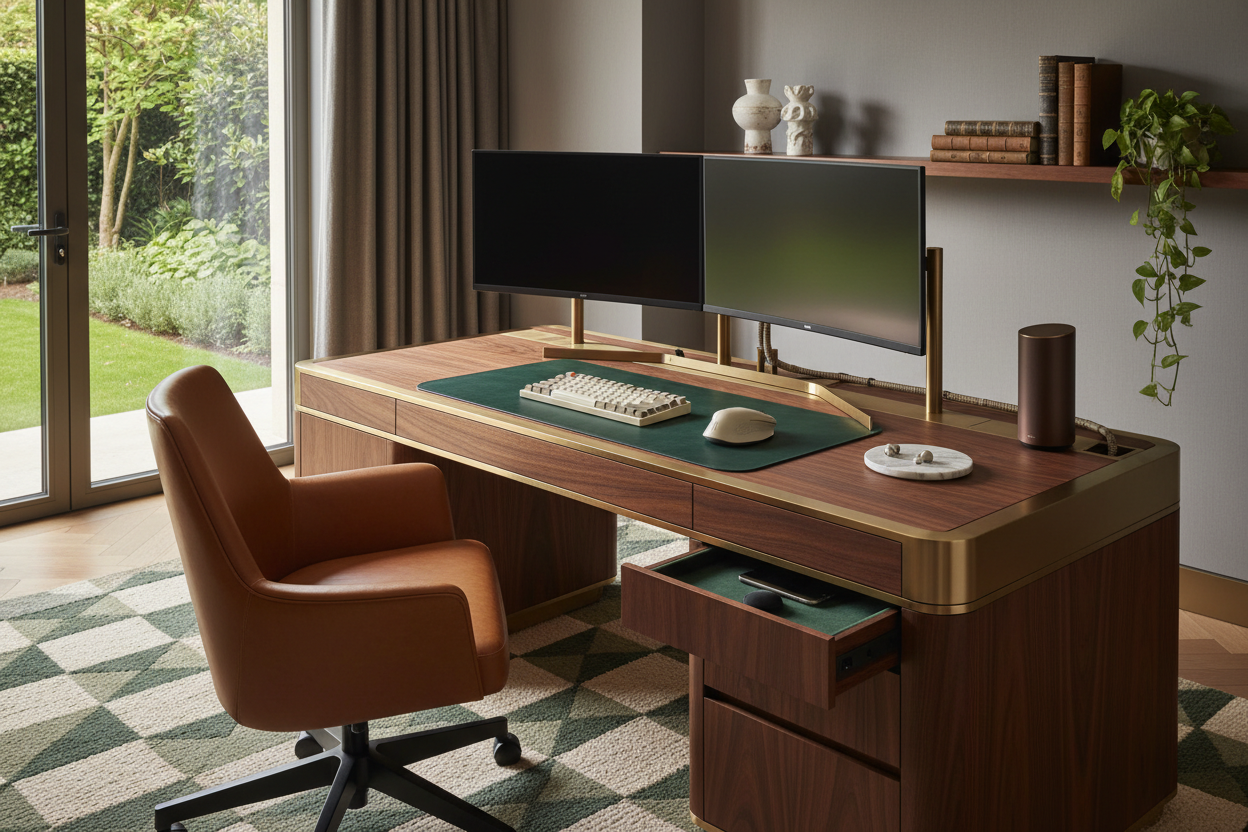
We have all encountered the same visual friction: you invest in a beautiful, hand-oiled walnut desk and a statement chair, only to have the aesthetic ruined by a chaotic nest of cables and cold, black plastic monitors. As an interior designer, the most frequent request I receive isn't about choosing a color palette—it's about integrating a high-performance technology set up without turning a sanctuary into a server room. The goal is to stop treating your tech as an afterthought and start treating it as a key element of your interior architecture.
Key Features to Look For
- Cable Management Capacity: Does the furniture possess integrated channels or hidden compartments to route a complex tech setup?
- Material Warmth: Counteract cold screens with natural textures like solid oak, wool felt, or full-grain leather.
- Ergonomic Integrity: The setup must align the monitor with your eye line without requiring industrial-looking risers.
- Ambient Lighting Integration: Look for bias lighting capabilities to reduce contrast glare and soften the technical visual.
Anchoring the Space: Materiality and Acoustics
When curating a refined technical set up, the surface material is paramount. A common error is selecting glass or high-gloss finishes for a heavy tech zone. While they look sleek in a catalog, they are fingerprint magnets and amplify the acoustic reflection of typing and clicking.
I always advise clients to lean toward matte, solid woods or high-quality linoleum surfaces. These materials absorb sound and ground the visual weight of multiple monitors. Furthermore, introducing a large, felt desk mat isn't just an aesthetic choice; it acts as a necessary acoustic damper and provides a tactile boundary for your keyboard and mouse.
Lighting: The Invisible Design Element
Your tech set up is only as good as the lighting that surrounds it. Overhead recessed lighting is often the enemy here, creating harsh shadows and screen glare. To achieve a studio-quality look that feels residential, layer your lighting.
Bias Lighting
Place LED strips behind your monitors. This reduces eye strain by equalizing the brightness between the screen and the wall, but from a design perspective, it creates a floating silhouette that adds depth to the room.
Task Lighting
Select a desk lamp with an adjustable arm but a domestic shade—think brass or matte ceramic rather than utilitarian plastic. This bridges the gap between office function and living room comfort.
The Art of Concealment
A truly sophisticated setup tech strategy involves invisibility. The "black box" of the computer tower or the tangle of power bricks should never be the focal point. If you are using a standing desk, invest in a 'vertebrae' cable spine that moves with the desk. For stationary setups, I often specify custom joinery with ventilated cabinets. This allows the hardware to breathe while remaining completely hidden, maintaining the clean lines of the room.
My Personal Take on technology set up
I learned a hard lesson about three years ago while redesigning my own home studio. I bought a stunning, vintage mid-century modern desk, convinced it would be the centerpiece of my workflow. I spent days perfecting the cable routing.
However, within a week, I realized a fatal flaw: the desk depth. It was only 24 inches deep. Once I placed my 32-inch monitor on it, the screen was practically touching my nose. I had focused so much on the visual style that I ignored the ergonomics of the focal depth. I ended up having to pull the desk six inches off the wall and mount the monitor on a wall arm just to reclaim my desk space. It looked intentional in the end, but it was a panic fix. Now, I never specify a desk under 30 inches deep for a serious workstation.
Conclusion
Designing a space that accommodates modern hardware doesn't mean sacrificing style. By focusing on natural materials, proper scale, and aggressive cable management, your workspace can feel less like a cubicle and more like a curated library. It is about making the technology serve the design, not the other way around.
Frequently Asked Questions
How do I hide cables in a glass desk setup?
Glass desks are unforgiving. Your best bet is to route cables down the metal legs using zip-ties that match the leg color, or use a floor-mounted cable box to house the surge protector, keeping only a single cord visible.
What is the ideal desk depth for a dual-monitor setup?
To maintain proper visual ergonomics and desk utility, aim for a depth of at least 30 inches (approx. 76cm). This allows room for the monitor stands, a keyboard, and negative space for writing or sketching.
Does solid wood interfere with wireless charging tech?
Thick solid wood can block signals if you are trying to install an under-desk charger. However, many modern wood desks now come with routed-out undersides that thin the wood enough to allow Qi charging to pass through to the surface.

Dejar un comentario
Este sitio está protegido por hCaptcha y se aplican la Política de privacidad de hCaptcha y los Términos del servicio.