










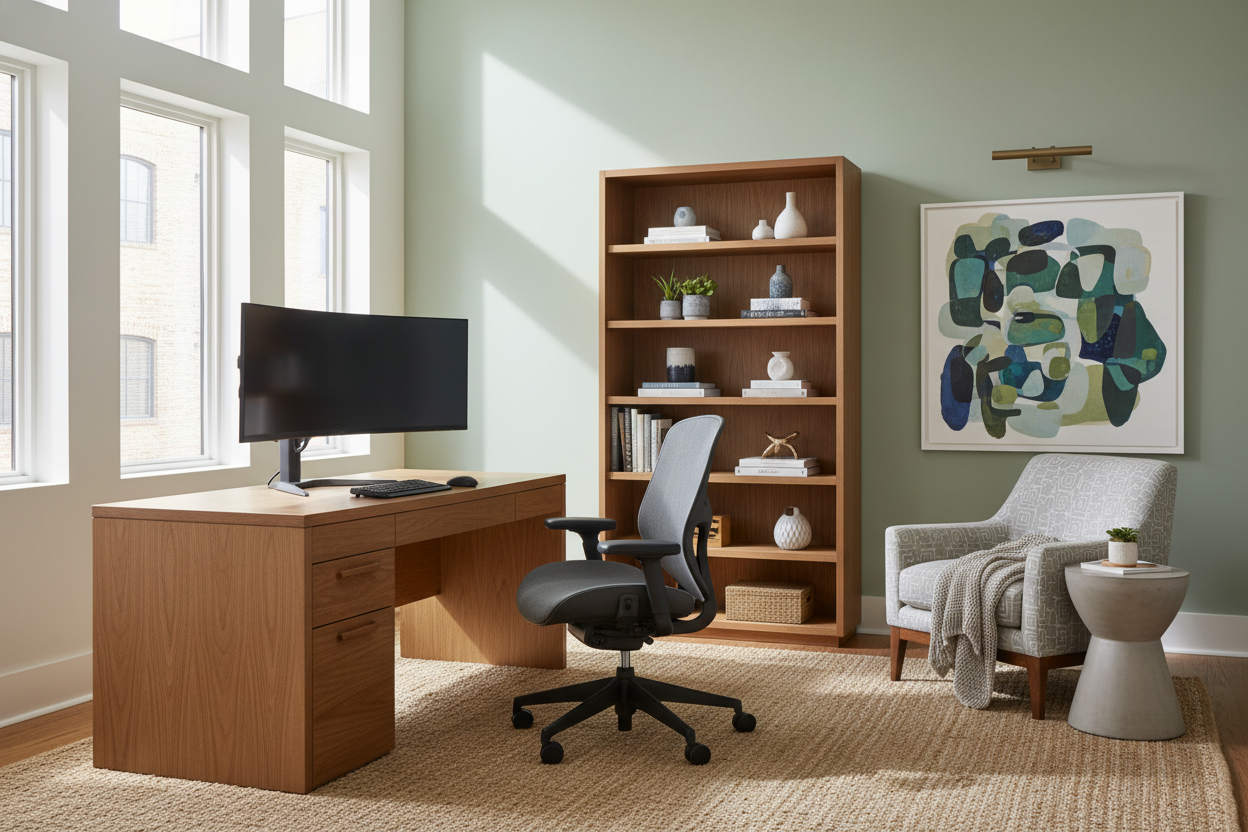
We have all moved past the phase of working from the kitchen island or balancing a laptop on a stack of books. As we settle into a permanent hybrid reality, the makeshift approach no longer suffices. A curated, intentional work-from-home setup is not merely about aesthetics; it is about creating a symbiotic relationship between your physical health and your professional output. As a designer, I see too many homeowners prioritize style over substance, only to find their beautiful workspace unusable after two hours. Let’s bridge the gap between high-end interior design and ergonomic necessity.
Quick Decision Guide: The Essentials
Before we dive into the nuances of texture and layout, here is a checklist of non-negotiables for a functional wfh station. This summary will help you prioritize your budget effectively.
- Ergonomics First: Your chair must offer adjustable lumbar support and seat depth; aesthetics come second to spinal alignment.
- Desk Depth: Aim for a surface depth of at least 24-30 inches to maintain proper focal distance from monitors.
- Lighting Layers: Combine ambient overhead lighting with task lighting (desk lamps) to reduce eye strain.
- Material Durability: Choose high-pressure laminate or sealed solid wood over cheap veneers that chip easily.
- Cable Management: Integrated grommets or under-desk trays are essential to reduce visual noise.
Zoning and Spatial Planning
The foundation of any professional home office setup lies in where you place your furniture. In design, we often talk about the "command position." Ideally, your working station setup should face the door but not be directly in line with it. This reduces subconscious anxiety and allows you to greet anyone entering the space.
For those navigating small spaces, the layout becomes a game of inches. If you are integrating a wfh office setup into a living room or bedroom, use rugs to visually zone the area. A high-pile rug under the desk creates a tactile boundary that signals to your brain: "this is where work happens." Avoid placing your screen directly opposite a window to prevent glare, which is a common oversight in many work from home set ups.
Selecting the Right Desk: Material and Scale
When curating the ultimate work from home setup, the desk is your anchor. I often advise clients to look beyond standard office supply catalogs. A dining table can serve as an expansive desk, provided the height aligns with your seating.
Solid Wood vs. Engineered Surfaces
For a wfh set up that ages gracefully, solid wood (walnut or oak) offers warmth and can be refinished if scratched. However, if your working at home set up involves heavy writing or equipment that might drag, a high-quality engineered surface or Fenix laminate offers superior scratch resistance and a matte finish that doesn't reflect monitor light.
The Chair: The Silhouette of Comfort
The chair is where the vast majority of your budget should go. In a work from home office set up, the chair is the engine. Avoid the "dining chair trap." While a velvet bucket chair looks chic, it lacks the kinetic support required for an eight-hour day.
Look for a chair with a breathable mesh back or high-grade leather that adapts to your body temperature. The silhouette should complement the room—a low-profile mid-century design works well for a wfh office in a shared space, whereas a high-back executive chair suits a dedicated room. Remember, the best work from home set ups prioritize the user's lumbar curve over the latest trend.
Tech Integration and Visual Harmony
Nothing ruins a sophisticated interior faster than a tangle of black wires. A truly professional home office setup manages technology seamlessly. This is how to set up work from home equipment without sacrificing style:
- Monitor Arms: Elevating screens on arms clears desk space and maintains a clean sightline. This is crucial for a home office tech setup that feels airy rather than cluttered.
- The Laptop Dock: For a streamlined work from home laptop setup, use a vertical dock. It allows you to tuck the laptop away and use external peripherals, mimicking a desktop experience.
- Hidden Peripherals: Mount hard drives and power strips to the underside of the desk. A clean work from home computer setup reduces cognitive load.
My Personal Take on Work-From-Home Setups
I learned a hard lesson early in my career regarding desk depth. I once designed a custom home work setup for a client using a stunning, vintage console table they loved. It was beautiful—rich mahogany, brass inlays—but it was only 18 inches deep.
Two weeks later, the client called me. They were suffering from headaches. The issue? The monitor was too close to their face. We had to retrofit the space with a keyboard tray (which ruined the aesthetic) just to push the user back. Since then, I never specify a desk under 24 inches deep for a permanent work from home workstation. It’s a detail you don't notice in a showroom, but you definitely feel at 2:00 PM on a Tuesday. Furthermore, I always insist on matte finishes now; glossy lacquer looks incredible in photos but becomes a nightmare of fingerprints and glare in a practical at home work setup.
Conclusion
Creating the best computer set up for home office use isn't just about buying expensive gear; it's about curating a space that respects your workflow and your home's aesthetic. By focusing on ergonomic silhouettes, durable materials, and clever cable management, you can build a wfh set that inspires productivity rather than fatigue. Treat your office furniture with the same discernment you would a living room sofa, and the investment will pay dividends in your daily comfort.
Frequently Asked Questions
How do I improve lighting in my wfh station?
Layer your lighting. Start with general overhead light, but rely heavily on task lighting. A desk lamp with an adjustable arm and variable color temperature (2700K-4000K) allows you to shift from warm ambient light to cool focus light as needed.
What is the best desk height for a working setup?
The standard desk height is 29-30 inches, but this is often too high for typing ergonomics. Ideally, use an adjustable sit-stand desk or install a keyboard tray so your elbows remain at a 90-degree angle while typing.
Is a dual monitor setup worth it for a home office?
For most professionals, yes. A dual monitor work from home setups significantly increases productivity by reducing window switching. If you dislike the look of two screens, consider a single ultra-wide curved monitor for a sleeker profile.


Dejar un comentario
Este sitio está protegido por hCaptcha y se aplican la Política de privacidad de hCaptcha y los Términos del servicio.