











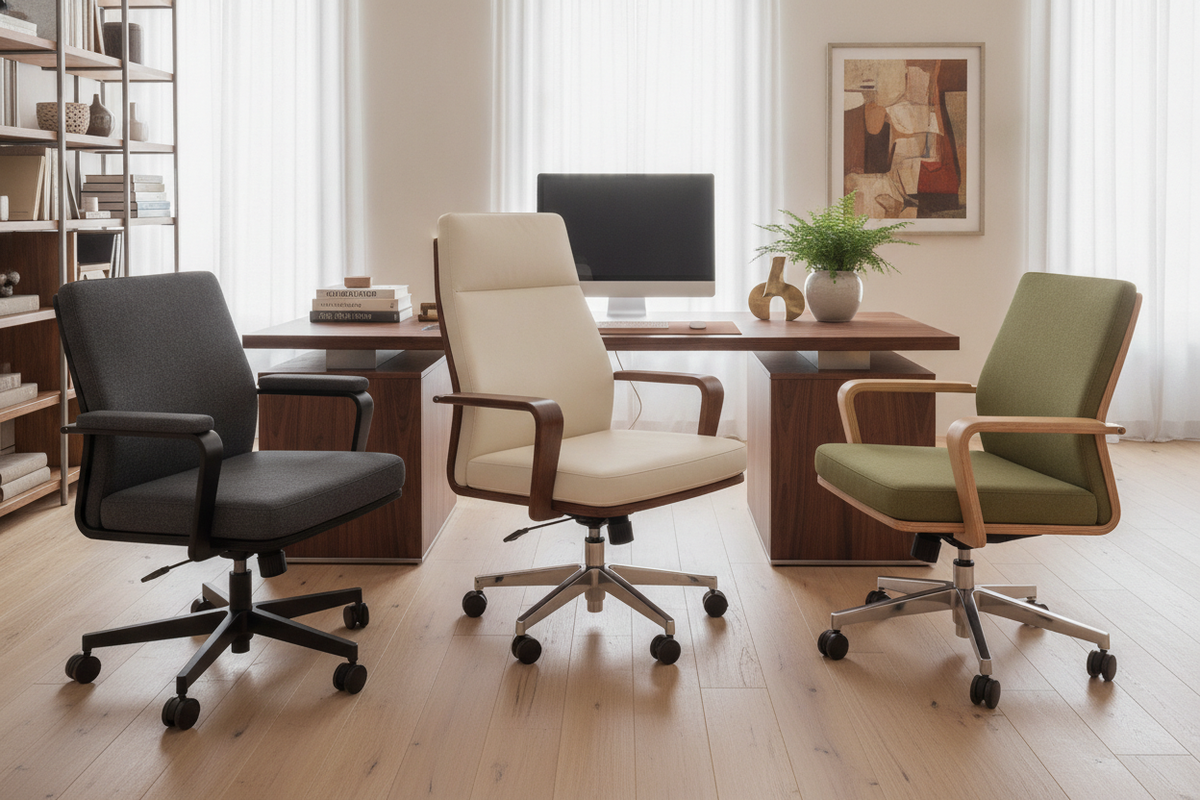
Finding the right balance between long-term posture support, room aesthetic, and budget often leads shoppers to search for desk chairs nearby. While ordering furniture online offers broad catalogs, evaluating seating in a local showroom provides immediate tactile feedback that digital product listings cannot replicate. Experiencing seat pan firmness, backrest contouring, and mechanical adjustments in person eliminates the guesswork of ergonomic comfort.
However, heading to a store without preparation can result in purchasing a chair that clashes with your home office dimensions or fails to tuck cleanly under your work surface. Establishing a structured evaluation plan helps you assess retail floor models, verify physical clearances against your current workstation, and inspect core construction details before loading a chair into your vehicle.
The Local Sourcing Strategy: Navigating Desk Chairs Nearby vs. Online Delivery
Searching for seating locally introduces distinct advantages over waiting for parcel freight. The primary benefit is real-time evaluation: you can test whether the curve of a lumbar pad aligns with your spine and confirm whether the seat upholstery feels comfortable under continuous pressure. Visiting local outlets also allows you to inspect floor stock availability, helping you avoid shipping delays when setting up an urgent remote workspace.
Before browsing local showrooms, define your primary ergonomic priorities and aesthetic requirements. Consider whether your workspace requires a lightweight task chair for occasional study or a fully adjustable ergonomic model designed for full workdays. Sourcing seating often coincides with updating your foundational workspace layout, making it helpful to review a dedicated computer desk collection to determine how your desk surface and seating profile will coordinate within the room.
The Showroom Sit-Test Framework: Evaluating Comfort and Ergonomic Profiles in Person
When assessing a desk chair in store, avoid sitting for just a few seconds and moving on. A structured sit-test protocol requires spending several minutes in standard working postures to reveal how the chair responds to shifting body weight.
- Lumbar Contour and Backrest Support: Sit upright and lean back naturally. Check whether the lumbar support nestles firmly into the small of your lower back without forcing your spine into an exaggerated arch.
- Seat Pan Depth and Edge Profile: Ensure there is comfortable clearance between the front edge of the seat cushion and the back of your knees. A waterfall seat edge helps prevent localized pressure beneath the thighs.
- Armrest Adjustability: Test the vertical height and horizontal angle of the armrests. Your shoulders should remain relaxed with your forearms resting parallel to the floor rather than hunched upward.
- Pneumatic Cylinder and Tilt Mechanisms: Engage the height lever and tilt-lock functions. The gas lift should operate smoothly without sudden drops, and the recline tension should offer steady resistance rather than tipping backward abruptly.
Testing multiple computer chairs nearby across different showroom sections allows you to compare mechanical smoothness and cushioning density across various price tiers.
Dimensional Fit and Under-Desk Clearance: Pre-Trip Workstation Planning
One common pitfall when purchasing retail seating is bringing home a chair that cannot tuck beneath the desk frame. Before visiting local stores, measure your current desk footprint carefully, focusing on knee-well width, underside apron height, and surrounding clearance zones.
If you work at an L-shaped layout or a dedicated office computer desk product featuring integrated side shelving, take note of the internal swivel radius. High-profile caster bases or wide fixed armrests can bump against modesty panels, drawer pedestals, or open cubbies. Recording the exact height from your floor to the underside of the desktop ensures you select a chair whose armrests glide smoothly beneath the worktop when docked at the end of the day.
Vetting Budget Options: Inspecting Build Quality in Entry-Level Office Chairs
Shoppers searching for a cheap office chair nearby often encounter entry-level models on sale or promotional floor displays. While budget seating provides an accessible entry point, examining physical construction details helps ensure reasonable durability over daily use.
- Cushion Foam Density: Press firmly into the center of the seat cushion. High-resilience molded foam resists bottoming out against the baseboard, whereas low-density foam compresses completely and loses its shape quickly.
- Base and Caster Construction: Inspect the five-star base. Solid nylon molding or reinforced metal bases provide structural stability, while smoothly rotating caster stems prevent wobbling during movement.
- Upholstery Durability: If evaluating mesh backrests, press against the weave to confirm firm elastic tension that bounces back immediately. For fabric or synthetic leather, examine seam stitching along high-stress contact points.
- Structural Fasteners: Check the connection points between the backrest bracket, armrests, and seat pan. Sturdy steel mounting plates reduce wobble compared to plastic structural joints.
Pairing value-focused seating with an organized, cost-effective workstation setup is simple when following an office computer desk guide that balances affordability with functional room styling.
Logistics and Transport: Moving Assembled vs. Flat-Packed Showroom Models
Securing a chair from a local store requires planning your vehicle transport. Retailers typically offer two options: taking home a flat-packed, boxed unit or purchasing an assembled floor display model.
Flat-packed boxes fit easily into standard vehicle trunks or back seats and include factory-packed hardware kits and assembly guides. Conversely, purchasing an assembled floor display saves home assembly time but demands sufficient vehicle cargo height and depth. If transporting an assembled chair in a standard car, check whether the backrest or gas cylinder can be quickly separated from the seat mechanism using standard hex keys.
Once home, inspect the supplied casters against your flooring material. Hard nylon wheels work best on low-pile carpets or protective floor mats, while soft-tread or polyurethane casters help prevent scuffs on delicate hardwood and laminate surfaces.
Integrating Seating with Compact Workstations and Enclosed Storage
In multi-functional living areas, guest rooms, or tight home offices, seating must integrate seamlessly with surrounding cabinetry and enclosed storage furniture. Choosing oversized executive chairs in tight floor plans can obstruct cabinet doors, block walkway paths, and overwhelm the room layout.
For space-conscious arrangements, such as those detailed in a computer desk office guide, consider compact task seating equipped with flip-up armrests or a mid-back silhouette. Flip-up arms enable the entire chair to slide flush inside an armoire or narrow desk opening, allowing doors to close fully when the workday ends. Matching chair hardware, caster accents, and neutral upholstery to nearby storage cabinets creates a cohesive, clutter-free home office environment.

Dejar un comentario
Este sitio está protegido por hCaptcha y se aplican la Política de privacidad de hCaptcha y los Términos del servicio.