










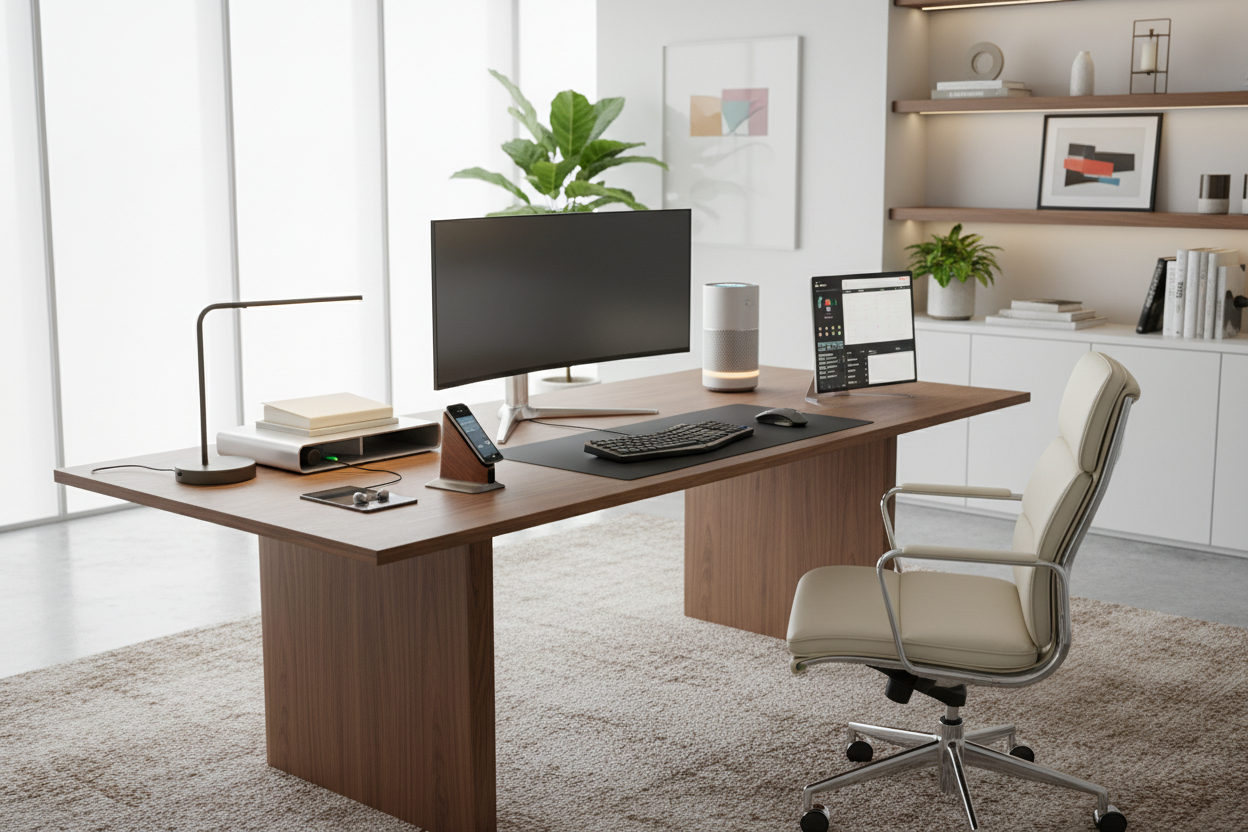
We often treat technology as an afterthought in interior design—something plugged in long after the desk is positioned and the rug is laid. However, in a modern home office, the seamless integration of technology is the difference between a cluttered room and a sanctuary of focus. As a designer, I see clients struggle to balance high-performance needs with visual serenity. The goal is not just to acquire the latest gadgets for productivity, but to curate tools that enhance your workflow while respecting the aesthetic integrity of your space.
Key Features to Look For
- Visual Footprint: Opt for devices with slim profiles and minimal branding to reduce visual noise.
- Materiality: Look for matte finishes, brushed aluminum, or wood accents that complement your furniture rather than clashing with it.
- Cable Management Potential: The best productivity gadgets offer wireless capabilities or discreet port placement.
- Ergonomic Versatility: Ensure the device adjusts to your body mechanics without dominating the room's silhouette.
- Ambient Integration: Tech for productivity should blend into the environment, offering adjustable lighting or silent operation.
Harmonizing Tech with Interior Architecture
When selecting a productivity device, consider the "visual weight" it adds to your desk. A bulky printer or a monitor with a thick, glossy bezel can disrupt the clean lines of a mid-century modern writing desk. I always advise clients to treat their electronics like sculpture. Look for monitors with edgeless displays and matte backings. If your desk floats in the center of the room, the back of your equipment is just as important as the front. A well-designed monitor arm not only clears desk real estate but also adds a touch of industrial elegance to the setup.
The Tactile Experience: Materials Matter
In the world of high-end design, texture is paramount. Unfortunately, most productivity tech is encased in cold, black plastic. To elevate the space, seek out peripherals that introduce warmth. Mechanical keyboards with customized keycaps in muted earth tones or a mouse featuring a soft-touch, ergonomic coating can bridge the gap between utility and luxury.
Lighting as a Productivity Tool
Lighting is often categorized under decor, but smart lighting is arguably one of the best gadgets for productivity available. We aren't talking about harsh overhead fluorescents. Consider a screen bar light that sits atop your monitor; it illuminates your workspace without creating screen glare, reducing eye strain while maintaining a moody, sophisticated ambiance in the rest of the room. This targeted illumination creates a focal point, signaling to your brain that it is time to work.
Space Planning for the Modern Workflow
Even the best productivity gadgets will fail you if the layout hinders flow. When placing larger tech items, adhere to the rule of negative space. Do not crowd your primary work surface. If you utilize a tablet for sketching or a stream deck for shortcuts, position them on a secondary tier or a side credenza. This separation of tasks—typing here, referencing there—creates a physical rhythm that aids mental clarity.
My Personal Take on Gadgets for Productivity
I learned a hard lesson about "spec-sheet buying" versus "design-led buying" during a project for a tech entrepreneur last year. We bought a top-rated ergonomic chair solely based on its lumbar support reviews. When it arrived, it was a massive, neon-accented monstrosity that looked like the cockpit of a race car. It completely destroyed the Zen, Japandi aesthetic we had built.
I had to swap it for a high-end mesh chair with a graphite frame. It offered the same support but disappeared into the room visually. The lesson? A productivity gadget is only effective if you actually enjoy being in the room with it. If a device is an eyesore, you will subconsciously avoid your workspace. I now prioritize the finish and silhouette of tech just as highly as its processor speed. For example, I use a wireless charging tray made of leather rather than plastic; it charges my phone just as fast, but it feels like a piece of decor when I touch it.
Conclusion
Integrating tech for productivity doesn't mean turning your home into a server room. By selecting devices that prioritize form alongside function, you create a workspace that invites creativity rather than inducing stress. Invest in pieces that feel good to touch and look beautiful when turned off.
Frequently Asked Questions
How do I hide cables from multiple productivity devices?
Invest in a cable management spine that attaches to the back of your desk leg, or use a desk pad made of felt or leather that can conceal wires running underneath. Wireless peripherals are the ultimate solution for reducing clutter.
Are standing desk converters considered good design?
Functionally, yes. Aesthetically, they can be bulky. If you need a standing option, I recommend a full standing desk with hidden motors rather than a converter that sits on top of an existing table, as this maintains a cleaner silhouette.
What is the best way to clean high-end tech finishes?
Avoid harsh household cleaners which can strip anti-glare coatings on screens or degrade soft-touch rubber. Use a microfiber cloth slightly dampened with distilled water for screens, and a soft brush for removing dust from keyboard crevices.


Dejar un comentario
Este sitio está protegido por hCaptcha y se aplican la Política de privacidad de hCaptcha y los Términos del servicio.