










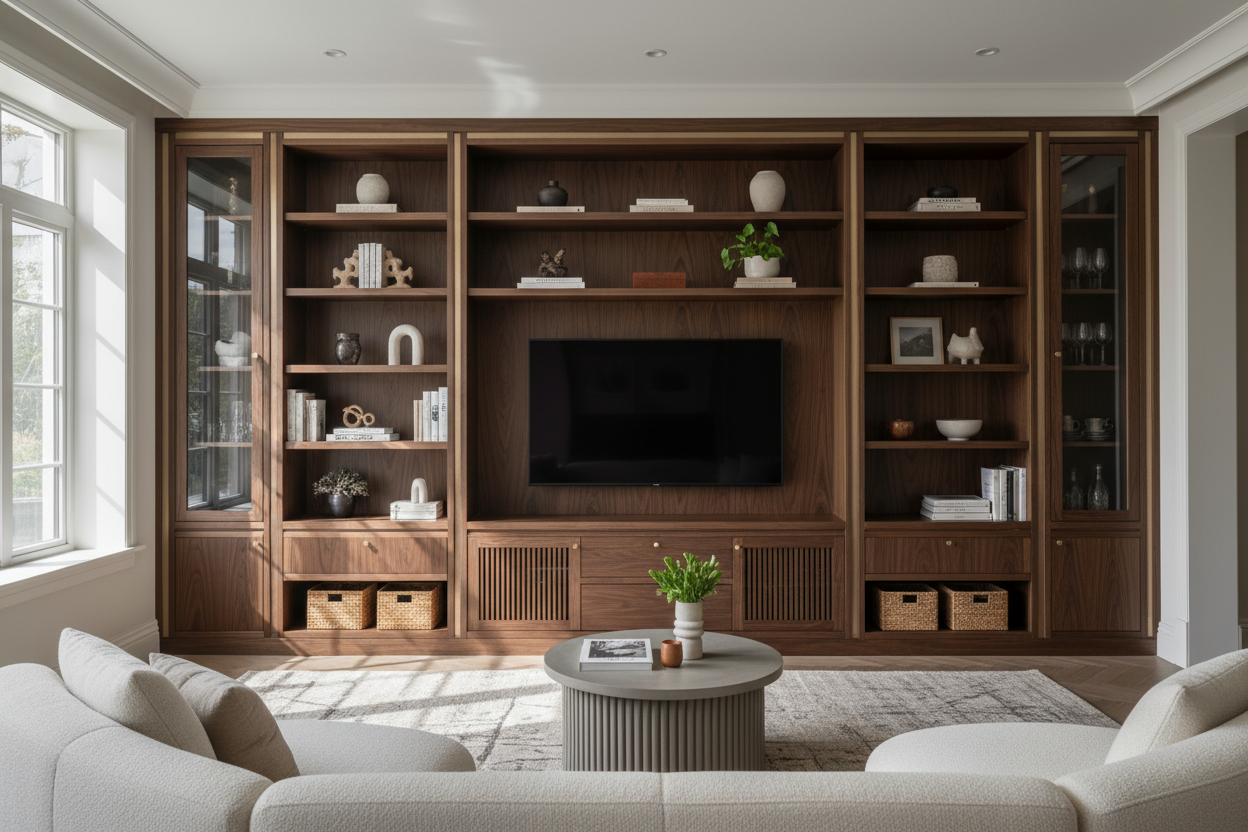
I remember walking into a client's living room last year. The TV was perched on a flimsy stand, cables snaked across the floor like black vines, and gaming consoles, remotes, and DVDs were piled on the floor. The room had great bones, but it felt chaotic. The solution wasn't a bigger rug or new paint—it was the right entertainment storage unit. After furnishing over 200 homes, I've learned this piece is the unsung hero that either makes or breaks your living room's function and flow.
Quick Takeaways
- Your entertainment unit must manage cables and hide devices, not just hold a TV.
- Look for adjustable shelves, durable materials like solid wood or high-quality engineered wood, and integrated cable ports.
- Measure your space carefully: leave 30-36 inches for main walkways and consider a low-profile unit (under 24 inches tall) to make rooms feel larger.
- For families, prioritize rounded edges, wipeable finishes, and accessible, lockable storage for media.
- Style is key—balance tech with decor like books and plants to integrate the unit into your room's aesthetic.
Why Your Entertainment Storage Unit Needs to Do More Than Just Hold a TV
Gone are the days when a TV stand was just a slab of wood. Today's living room is a command center. You've got a smart TV, a streaming device, a soundbar, maybe a gaming console or two, and all their accompanying cables and remotes. A basic stand leaves this tech clutter exposed, turning your relaxing space into a reminder of chores. A true entertainment storage unit solves this. It's designed to contain the chaos. I look for units that offer dedicated compartments with ventilation for electronics, spaces to route cables internally, and doors or drawers to tuck away less-used items. This isn't just about storage; it's about creating visual calm. As I've discussed in articles on what designers actually think about TV entertainment storage, the best units act as a foundational piece that supports your lifestyle, not just your television.
Key Design Elements Every Smart Entertainment Unit Should Have
Let's get specific. When I'm selecting a unit for a client, I run through a mental checklist. First, cable management: built-in cord channels, rear cut-outs, and a dedicated cavity for a power strip are non-negotiable. Second, flexibility. Adjustable shelves are a lifesaver. That soundbar you have today might be replaced by a taller component next year. Third, material durability. In a high-use area, you need something that can withstand the occasional bump or spill. Finally, it has to look good. The unit should complement your style, whether that's a sleek, handle-less design for a modern space or something with shaker details for a more traditional feel. A great example is a stylish black TV stand with ample storage—it offers clean lines, multiple compartments, and that practical black finish that hides dust and fingerprints.
The Cable Management Challenge: How to Hide the Mess
This is the number one complaint I hear. You buy a beautiful unit, plug everything in, and a nest of cables hangs out the back. Here's my fix: start with a unit that has a solid back panel with strategic punch-outs. Feed all cables through one central hole. Inside, use velcro straps or flexible conduit to bundle them together. Mount your power strip to the inside back or bottom of the unit with adhesive strips, so it's not sliding around. For devices that sit on shelves, leave a little slack in the cable, then use adhesive-backed clips to route the wire neatly along the back edge before it disappears into the main channel. The goal is zero visible wires from the front or sides.
Material Matters: What Holds Up Best in Real Homes
Let's talk materials honestly. Solid wood (like oak or walnut) is top-tier for durability and can be refinished, but it's heavy and pricey. High-quality engineered wood (MDF or plywood with a thick veneer) is a fantastic, stable, and more affordable choice for most families—just ensure it's at least ¾-inch thick. Avoid particleboard for the main frame; it sags under weight. Metal frames offer an industrial look and are incredibly sturdy, often paired with wood or glass shelves. Tempered glass shelves are great for a light, airy feel and are easy to clean, but they show dust and fingerprints constantly. My rule: choose based on your household. For busy families, a durable engineered wood or metal frame with a laminate finish you can wipe clean is often the smartest investment.
Choosing the Right TV and Media Storage Unit for Your Space
Size is everything. First, measure your wall. The unit should be at least a few inches wider than your TV for a balanced look. For a 65-inch TV, aim for a unit around 70 inches wide. Depth is crucial for storage—look for at least 16-20 inches to accommodate deep components like AV receivers. Don't forget room flow. Leave 30-36 inches of clear walkway in front of the unit. Height affects perception. A lower unit (around 18-22 inches tall) can make your ceiling feel higher, a trick I've detailed in posts about low TV stand storage secrets. For the TV itself, the center of the screen should be at seated eye level, roughly 42 inches from the floor.
Small Space Solutions: When Every Inch Counts
In an apartment or small living room, your entertainment unit needs to be a multitasker. Go vertical. Look for tall, narrow media cabinets that offer storage without eating up precious floor space. A unit with closed cabinets up top for hiding items and open shelves below for display can break up the visual weight. Consider depth carefully—a unit that's only 12-14 inches deep can hold a soundbar and game console while saving crucial inches in a narrow room. Wall-mounted units or floating shelves with integrated cable management can also free up floor space, making the room feel instantly larger.
Family-Friendly Features That Actually Work
If you have kids or pets, your priorities shift. Safety first: look for units with rounded or softened corners. Durability is next—a scratch-resistant laminate or a sturdy painted finish is easier to maintain than a high-gloss veneer. Storage should be accessible but secure. Drawers with soft-close mechanisms prevent slammed fingers, and having a mix of open shelves for daily items (like the current board game) and doors with child locks for media or delicate electronics is ideal. Avoid glass doors in high-traffic zones. The goal is a piece that looks good but can handle real life.
Beyond the TV: Integrating Your Media Storage Unit with Your Decor
Your entertainment unit shouldn't scream "tech." It should feel like part of your living room. Style the top and shelves intentionally. On the top, flank the TV with a pair of substantial table lamps (for ambient lighting) or a curated stack of large-format books. On shelves, use the rule of thirds. Fill one-third with necessary tech (the cable box, a speaker), one-third with books (check out our book and media storage collections for inspiration), and one-third with decorative objects like a vase, a small plant, or a sculptural piece. Use baskets or decorative boxes in cabinets to corral smaller items like remotes and charging cables. This layering turns a functional piece into a focal point.
The Minimalist Approach: When Less Storage Actually Does More
For clients craving a clean, serene space, I often recommend a minimalist entertainment unit. The philosophy is about hiding clutter, not eliminating function. These units feature clean lines, often in warm wood tones or matte finishes, with clever hidden storage. Doors glide smoothly to reveal deep compartments for everything. The key is that every item has a designated, out-of-sight home. A perfect case study is the modern minimalist TV stand with hidden storage. Its sleek, handle-less design and soft-close hinges offer a premium feel, while its spacious interior manages to hold a surprising amount. It proves that by reducing visual noise, the unit itself becomes a quiet, stylish anchor.
Your Next Steps: Finding the Perfect Entertainment Storage Unit
Ready to choose? Here's your action plan. 1. Measure your wall, your TV, and the room's walkways. 2. Audit your tech: list every device, game console, and media item that needs a home. 3. Define your non-negotiables: is it cable management, child safety, or a specific material? 4. Set a realistic budget, remembering this is a long-term investment piece. 5. Finally, look at the unit in context. Will it fit through your door? Does the color work with your flooring? Taking these steps will lead you to a piece that works hard and looks great for years.
Personal Experience: The Unit That Taught Me a Lesson
Early in my career, I specified a beautiful, open-shelf media unit for a family with young twins. It looked stunning in the showroom. Within a month, my client sent a photo: every shelf was a jumble of toys, DVDs, and tangled cables. It was a functional disaster. The unit offered no way to hide the daily clutter of family life. I learned that aesthetics must be paired with practical, enclosed storage for real-world living. Now, I always ask, "What needs to be seen, and what needs to disappear?" That lesson has guided every recommendation since.
FAQ
How deep should an entertainment unit be?
Aim for at least 16 inches, but 18-20 inches is ideal to accommodate most AV components, game consoles, and media boxes without them hanging over the edge.
Can I put a 75-inch TV on a 70-inch wide unit?
Technically yes, but it will look top-heavy and precarious. For the best proportions, your unit should be 4-10 inches wider than your TV. For a 75-inch TV, look for a unit around 80 inches wide.
What's the best finish for hiding dust and fingerprints?
Matte or satin finishes in medium to dark tones (like charcoal, walnut, or navy) are champions at concealing everyday dust and smudges. Avoid high-gloss black or white if you dislike constant cleaning.
Is it okay to use an entertainment unit as a room divider?
Absolutely, if you choose the right one. Look for a unit that is finished on all sides (often called a "console" style) rather than one with an unfinished back. This allows it to function beautifully from multiple angles in an open-concept space.

Dejar un comentario
Este sitio está protegido por hCaptcha y se aplican la Política de privacidad de hCaptcha y los Términos del servicio.