










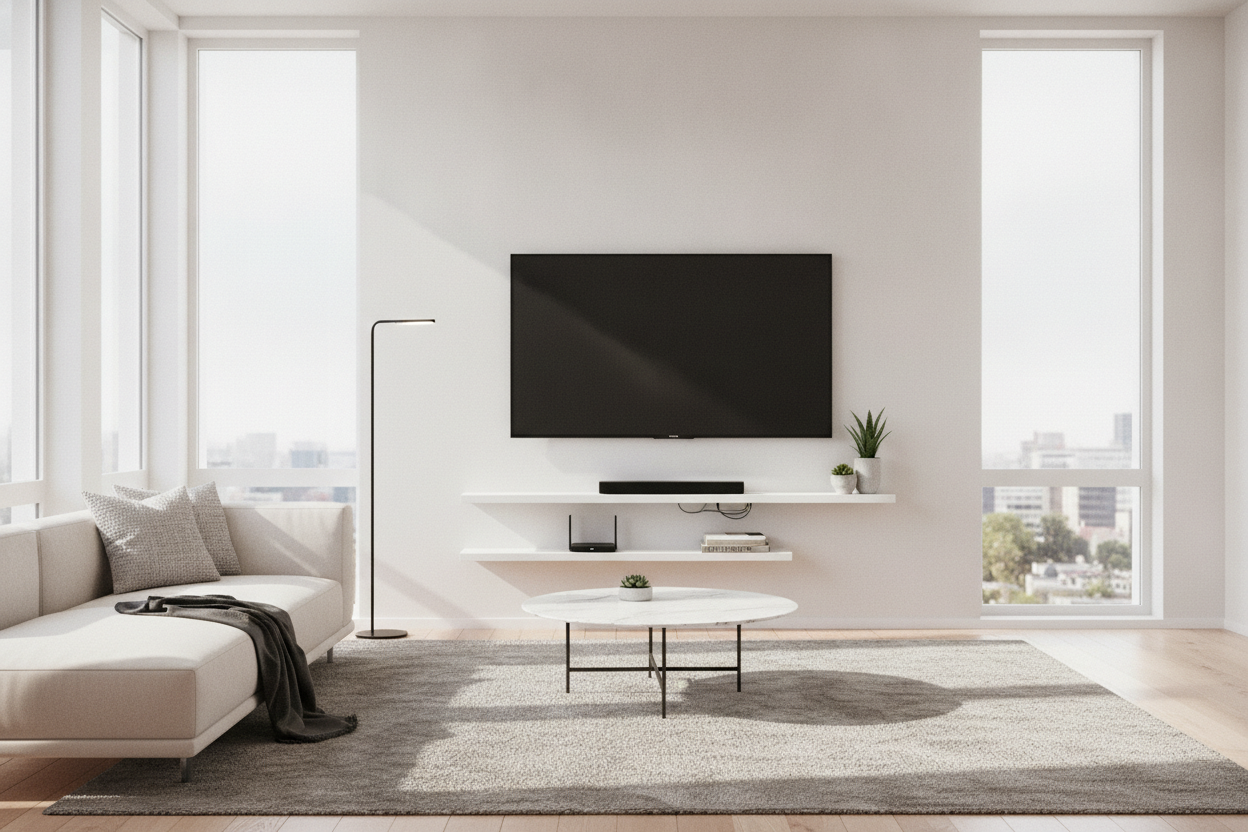
I spent three hours perfectly centering my 65-inch OLED only to realize I had created a visual nightmare. My cable box was dangling by a single HDMI cord like a tech-based hostage situation. I thought the wall mount would solve my clutter issues, but it actually just put my cable management sins on a pedestal. I needed a dedicated floating shelf for tv box storage, and I needed it to not look like a piece of scrap wood I found behind a hardware store.
- Depth is King: Measure your deepest device (usually the cable box or receiver) and add two inches for cable clearance.
- Ventilation Matters: Electronics die in stagnant air; avoid glass-topped shelves if your box runs hot.
- Weight Ratings: Drywall anchors are fine for an Apple TV, but you need a stud for a heavy DVR.
- Cable Routing: If the shelf doesn't have a pre-drilled notch, you'll be drilling one yourself.
The Wall-Mount Aftermath (Where Does the Tech Go?)
The dream of the floating TV is often ruined by the reality of the peripheral. You successfully hung the screen to save floor space, but now the cable box, the router, and the streaming hub are awkwardly perched on a chair or, worse, hanging by their own wires. It is a messy aftermath that kills the minimalist vibe immediately.
I’ve found that a simple floating shelf for TV setups can actually replace a massive, floor-hogging media console. The trick is scale. You aren't trying to recreate a 72-inch sideboard on your wall; you're just creating a landing pad for the essentials. If you do it right, the tech looks intentional rather than like an afterthought.
Stop Buying Picture Ledges for Your Electronics
The biggest mistake I see people make—and I’ve made it too—is buying a standard picture ledge. Most picture ledges are four inches deep. Your average cable box is at least seven or eight inches deep once you factor in the rigid HDMI cable sticking out the back. If you buy the wrong floating shelves for tv box use, your expensive gear will literally hang off the edge.
You need a shelf with a depth of at least 10 inches. This allows for the 'cable bend radius'—the space a cable needs to curve without snapping the internal wires. Also, consider the heat. Cheap MDF shelves can warp if a high-powered receiver is sitting on them 24/7. Look for solid wood or ventilated metal if you're running high-performance gear.
How I Hid the Wires (Without Calling an Electrician)
Hiding wires is the difference between a professional-looking tv box floating shelf and a DIY disaster. If you own your home, go ahead and fish those wires through the drywall using a brush plate kit. It’s a 20-minute job that makes the shelf look like it’s powered by magic. If you're renting, don't touch the drill yet.
I’m a huge fan of D-line cable raceways. I buy the ones you can paint, and I match them to the exact shade of my wall. Run the raceway straight down from the center of the shelf to the baseboard. It’s a clean, vertical line that the eye eventually ignores. For the power strip, I mount it to the underside of the shelf using heavy-duty Command strips. Out of sight, out of mind.
Styling the Ledge So It Doesn't Look Like a Server Room
Black plastic boxes are inherently ugly. To fix this, you have to soften the edges of your floating tv box shelves. I always place a small, trailing plant like a Pothos on one end. The vines naturally drape over the side and can even hide the ports where the wires plug in. It’s a classic designer trick that works every time.
Stack a couple of coffee table books next to the cable box to match its height. This makes the tech look like part of a curated collection rather than a piece of utility equipment. Just make sure you aren't covering the top vents of your devices. If the box can't breathe, it will throttle your internet speed or just shut down entirely during the best part of the movie.
When a Tiny Ledge Actually Isn't Enough
Let's be real: if you have a PS5, an Xbox, a Sonos Amp, and a legacy DVR, a single 12-inch ledge is going to look ridiculous. It will be a cluttered mountain of plastic. In these cases, you need to look into adjustable shelf storage that can handle different heights and heavier loads.
If your gear list is truly massive, skip the small shelves and go for a floating high gloss tv stand. These wider units give you the same floor-clearing benefits but offer enough internal volume to hide the power bricks and messy bundles of excess cord. I tried to force a 'one shelf fits all' solution for my gaming setup once, and I ended up with a shelf that sagged so badly my controller rolled off the front.
FAQ
Can I mount a floating shelf for a TV box on drywall?
Yes, but use toggle bolts, not the cheap plastic anchors that come in the box. A cable box isn't heavy, but the constant plugging and unplugging of cables puts stress on the mount that can pull standard anchors right out of the wall.
Will my remote still work if the box is on a high shelf?
Most modern remotes use Bluetooth or RF, so they don't need a line of sight. If you have an older infrared (IR) box, just make sure the front 'eye' of the device isn't blocked by a plant or a book.
How far below the TV should the shelf be?
I aim for 4 to 6 inches. Any closer and it looks cramped; any further and the connecting wires become a primary focal point that's harder to hide.


Dejar un comentario
Este sitio está protegido por hCaptcha y se aplican la Política de privacidad de hCaptcha y los Términos del servicio.