










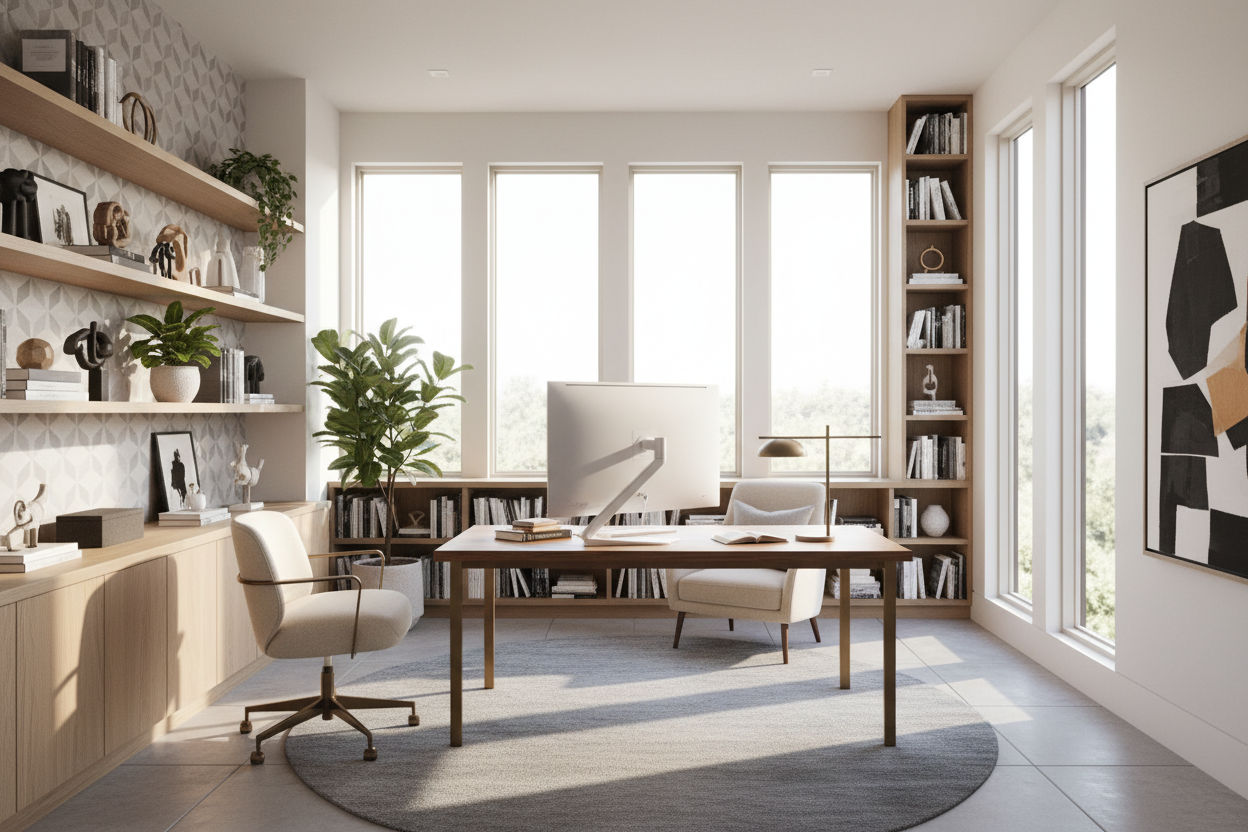
We have all been there: trying to draft an important email while staring at a pile of laundry in the guest room, or suffering through lower back pain from sitting in a rigid dining chair. A dedicated workspace is no longer just a luxury; it is a daily necessity for most North American professionals. But getting home study designs right is much harder than simply buying a desk and plugging in a lamp. You need a space that fosters deep focus without feeling like a sterile corporate cubicle.
By the end of this guide, you will know exactly how to plan a functional layout, choose materials that hold up to daily wear, and avoid the expensive aesthetic mistakes that ruin a room's usability.
Quick Decision Guide for Your Study
- Place your desk perpendicular to the window to reduce monitor glare while keeping the mental benefits of natural light.
- Prioritize a high-density foam or ergonomic mesh chair over heavily upholstered, aesthetic-only accent chairs.
- Maintain at least 36 inches of clearance behind your desk to allow for easy chair movement and traffic flow.
- Mix closed storage for messy cables and paperwork with open shelving for curated decor to balance the room's visual weight.
Space Planning: Getting the Layout Right
When browsing home study designs ideas online, it is easy to get swept up in massive executive desks and wall-to-wall library shelves. But in typical suburban homes or city apartments, scale and placement dictate how comfortable the room actually feels.
The Command Position
Never push your desk flat against a blank wall if you can avoid it. It creates a claustrophobic feeling and limits your field of vision, which can cause subtle mental fatigue. Instead, try the 'command position'—floating the desk in the room facing the door, or placing it perpendicular to a window. This anchors the room, gives you a psychological sense of control over the space, and creates a much better background for video calls.
Fusing Style with Functionality
A modern home study should feel like a natural extension of your house. If your home leans transitional or mid-century, carrying those warm wood tones and brushed metal finishes into the study creates a cohesive flow.
Managing Visual Weight
If your room is under 120 square feet, avoid heavy, solid-wood pedestal desks that drop all the way to the floor. They consume all the visual space and make the room feel cramped. Opt for a writing desk with slim metal or tapered wood legs. You can always add a rolling file cabinet underneath for storage without permanently weighing down the room's aesthetic.
The Ergonomic Reality Check
You can design the most beautiful room in the neighborhood, but if the furniture hurts your back, you will inevitably end up working from the living room sofa.
Desk Height and Seating
The standard desk height in North America is 29 to 30 inches. Surprisingly, this is actually too high for many people unless they use an adjustable chair and a footrest. When pairing a chair, ensure your feet rest flat on the floor and your arms form a relaxed 90-degree angle at the keyboard. Do not compromise on a supportive, adjustable chair just because a velvet dining chair looks better on camera.
Lessons from My Own Projects
A few years ago, I designed what I thought was the ultimate study for a client in Toronto. We installed a stunning, custom matte walnut built-in desk right under a massive south-facing window. It photographed beautifully for my portfolio. But within a month, the client called me frustrated.
The afternoon sun was blinding, the glare on the monitor was unbearable, and the matte walnut finish showed every single fingerprint and coffee cup ring. I learned the hard way that you must account for the sun's trajectory when placing a desk, and that high-touch work surfaces need a durable, satin-finish polyurethane. We ended up having to install motorized blackout shades and a custom glass top to salvage the setup. Always prioritize the daily reality of a space over a static photo.
Frequently Asked Questions
What is the minimum size for a functional home study?
You can create a highly functional workspace in an area as small as 6 by 6 feet. The key in tight spaces is utilizing vertical wall space for shelving and choosing a desk with a slim, open-leg profile to keep the floor visible.
How do I hide computer cables?
Cable management is critical for a clean, intentional look. Use a desk with a built-in grommet hole, attach a wire management tray to the underside of the desk, and route cords down the back of a desk leg using zip ties or velcro straps.
Are built-in desks worth the investment?
Built-ins maximize every inch of a room and add significant resale value to a home, making them great for permanent residences. However, they lock you into a specific layout. If you like to rearrange your furniture frequently or plan to move soon, stick to high-quality freestanding pieces.

Dejar un comentario
Este sitio está protegido por hCaptcha y se aplican la Política de privacidad de hCaptcha y los Términos del servicio.