










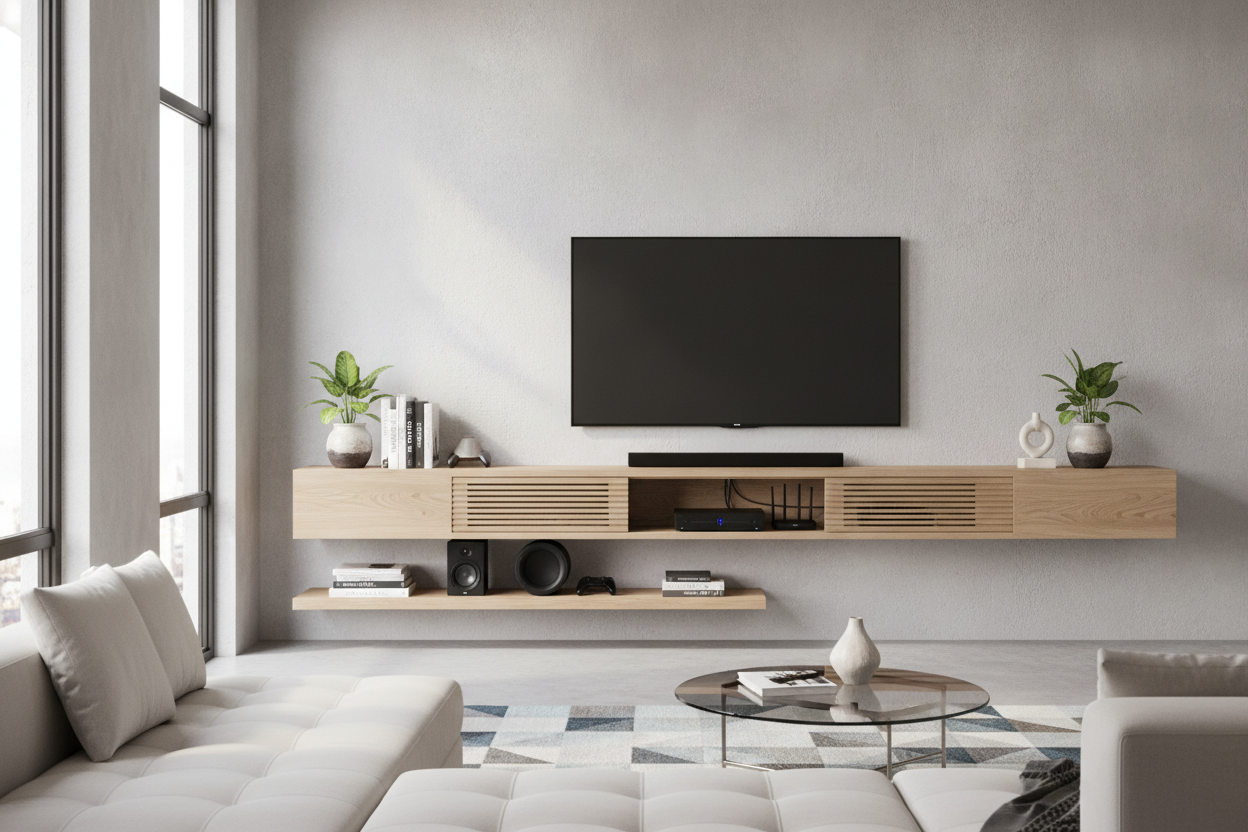
I spent three months staring at a tangle of black cables that looked like a nest of angry snakes. My partner, a dedicated gamer with a deep emotional attachment to a 2015-era AV receiver, insisted we needed the hardware out in the open for 'airflow.' I just wanted to see my floor again. The compromise that saved our living room (and my sanity) was finding a floating shelf for tv components that didn't look like a cheap dorm room accessory.
- Check the depth: Most shelves are 8 or 10 inches deep, but a PS5 or a standard receiver needs at least 14 inches to sit safely.
- Studs are non-negotiable: Do not trust drywall anchors with a $500 console; find the wood.
- Airflow is king: Open-front shelves prevent your gear from sounding like a jet engine taking off.
- Cable management: If the shelf doesn't have a pre-drilled hole, you'll be doing a DIY hack job later.
The Great Living Room Tech Standoff
It’s the classic interior design struggle. You want a space that looks like a curated gallery, and your partner wants a command center. In our house, the 'tech pile' consisted of a massive black box of a receiver, three different gaming consoles, and a router with four antennas that looked like it was trying to contact Mars. It sat on the floor, collecting dust bunnies and making the whole room feel cluttered.
I tried to hide it behind a decorative basket. That lasted two hours before the PlayStation overheated and shut down mid-game. I realized that if I wanted the clutter gone, I had to stop fighting the tech and start housing it properly. We needed a dedicated spot for floating shelves for tv components that could handle the weight without sagging like an old mattress.
Why Traditional Media Consoles Failed Us
Before going the floating route, we looked at traditional TV stands. The problem is that most of them are bulky. In a smaller living room, a floor-based unit eats up precious square footage and makes the wall feel crowded. Plus, the back panels on those cabinets are often just flimsy cardboard with one tiny hole for twenty different wires.
We also found that closed cabinets are a death sentence for modern electronics. Even with the doors open, the heat buildup was real. By switching to a floating setup, we got the gear off the floor, which instantly made the room feel five feet wider. It also made vacuuming significantly easier—no more shimmying a Dyson around a heavy wooden base. We realized we could effectively replace your media console with something much lighter and more intentional.
What to Look For in a Floating Shelf for TV Components
Shopping for these isn't like buying a shelf for your succulent collection. You have to be a bit of a nerd about the specs. First, let’s talk about depth. I can’t tell you how many 'media shelves' I saw online that were only 10 inches deep. Most AV receivers are 12 to 15 inches deep once you factor in the plugs sticking out the back. If you buy a shallow shelf, your expensive gear will literally be hanging off the edge.
Next is weight capacity. A high-end receiver can weigh 25 to 30 pounds on its own. Add a console and a heavy-duty power strip, and you’re pushing 40 pounds. You need a shelf with a heavy-duty steel bracket. If the product description doesn't explicitly state the weight limit, move on. I personally look for solid wood or high-density MDF; avoid the hollow honeycomb stuff you find at big-box Swedish retailers if you’re planning on loading it up.
Finally, look at the cord routing. A good shelf for floating shelves for tv equipment should have a notch or a hole at the back. This allows the cables to drop down behind the shelf rather than spilling over the front. I made the mistake of buying a 'solid' shelf once and had to use a 2-inch hole saw bit to fix it. It was messy, and I almost split the wood. Buy one that is already designed for tech.
Styling Floating Shelves for TV Equipment
Once the shelf is up, the goal is to make it look like a design choice, not a Best Buy clearance rack. I call this 'tech-camo.' I started by placing the largest, ugliest component (the receiver) on the bottom tier. Then, I balanced the look by stacking two oversized coffee table books next to the Xbox. It breaks up the plastic-and-metal texture with something organic.
Plants are your best friend here. A trailing Pothos or Heartleaf Philodendron works wonders. Place it on the end of the shelf and let the vines hang down. It naturally draws the eye away from the blinking LED lights and the black boxes. If you have white walls, try to find a shelf that matches the wall color to make the whole unit 'disappear,' or go for a warm oak to add some much-needed texture to a tech-heavy corner.
The Final Verdict: Harmony Restored
After a year with this setup, I’m never going back to a floor unit. The room feels airy, the electronics stay cool, and my partner is happy because his gear is easily accessible. If you want something even more polished, a high gloss floating TV stand is a great alternative that offers a bit of hidden storage while keeping that hovering, minimalist look.
The biggest win? No more wire-nest. By using a few Velcro ties and a plastic cord raceway painted the same color as our wall, the cables are virtually invisible. It’s the ultimate design compromise that actually feels like an upgrade for both of us.
FAQ
Will my TV components overheat on a floating shelf?
Generally, no. Because floating shelves are open on the sides and front, they offer much better airflow than a traditional closed cabinet. Just make sure you don't stack components directly on top of each other; give them an inch of breathing room.
How do I hide the wires hanging down from the shelf?
The cleanest way is an in-wall cable management kit. If you’re renting, use a paintable cable raceway. It’s a plastic strip that sticks to the wall and hides the cords; once you paint it to match your wall, it disappears.
Can I install a floating media shelf on metal studs?
It’s possible, but you’ll need specific toggle bolts designed for metal. Standard wood screws won't hold. If you have metal studs, I’d recommend keeping the weight light or consulting a pro to ensure it doesn't rip out of the wall.

Dejar un comentario
Este sitio está protegido por hCaptcha y se aplican la Política de privacidad de hCaptcha y los Términos del servicio.