










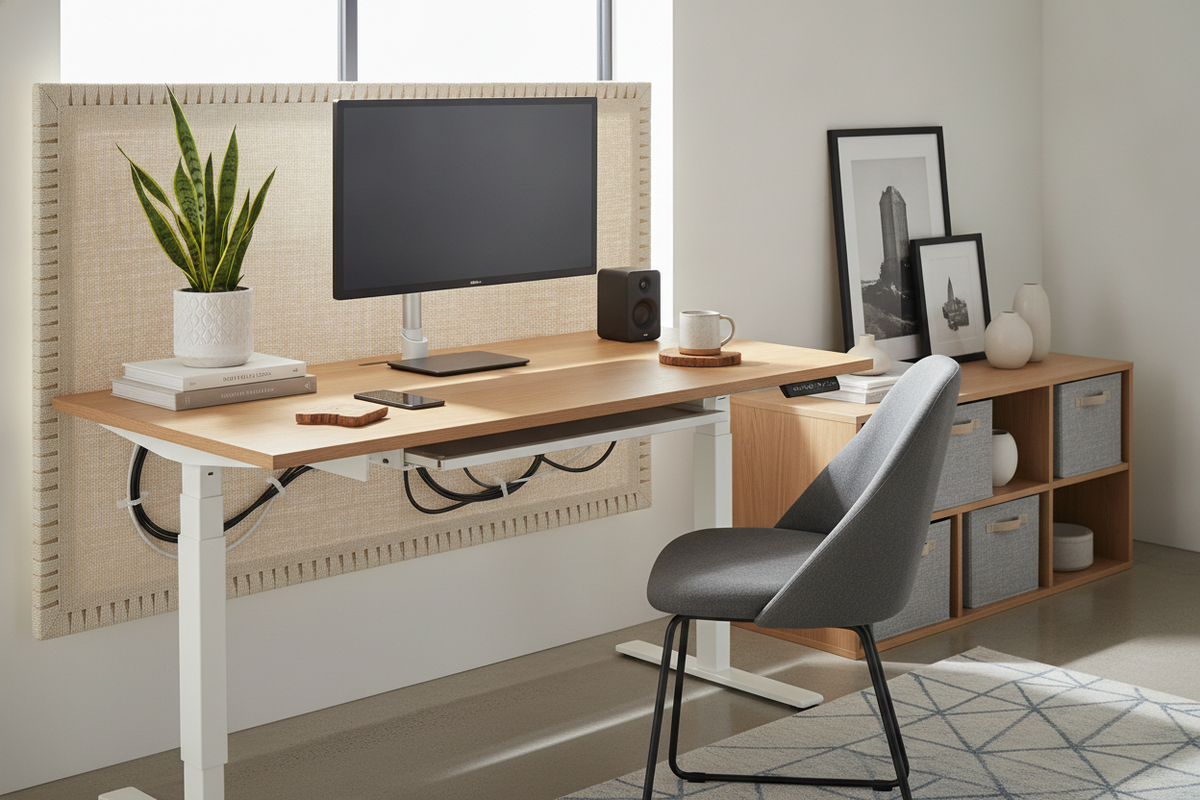
Visual Friction Points: Why Sit-Stand Workstations Lose Aesthetic Balance
Adjustable workstations deliver practical flexibility throughout the workday, yet many homeowners struggle with their visual execution. Because these units rely on motorized lifting columns, dynamic power requirements, and open structural leg frames, they often project an utilitarian, industrial aesthetic rather than fitting into a warm home interior.
The primary issue stems from three visual friction points: exposed hanging wires that shift during movement, wide metal T-frame legs that lack the grounding presence of traditional cabinetry, and bare surface tops that accumulate loose office accessories. Addressing these elements transforms an adjustable workstation from a bare technical tool into an intentional design feature.
Kinetic Cable Discipline: Concealing Wires Across Dynamic Height Ranges
Standard desks allow you to fasten cords tightly against the back panel or wall, but an adjustable desk demands dynamic slack to accommodate sitting and standing heights. When planning designing a standing desk setup that actually looks good, cable concealment requires a structured, multi-tier approach.
- Under-Desk Power Consolidation: Mount a surge protector directly beneath the desktop surface. When all monitor power blocks, laptop chargers, and peripheral hubs plug into a single under-mount tray, only one master power cord travels to the wall outlet.
- Articulated Cable Spines and Vertebrae: Use a flexible, segmented cable chain or a clean fabric sleeve to bundle the single downward power lead. This keeps the drop cord contained in a neat vertical line whether the desk is raised or lowered.
- Magnetic Leg Channels: Route the single drop cable down the inner face of one metal lifting column using magnetic raceways or low-profile adhesive clips to keep lines hidden from view.
Dimensional Sizing and Spatial Proportions: Grounding the Frame in Your Room
A standing desk can look out of place if its proportions clash with the room. In compact layouts, an oversized top can overwhelm the floor plan, while a small unit set against an expansive blank wall can look isolated. Reviewing desk ideas for small apartments helps you balance spatial clearance and functional desk dimensions.
Allow adequate buffer around the workstation perimeter so that artwork, wall shelving, and neighboring furniture do not interfere with the desk during height adjustments. Anchoring the workstation over a textured area rug helps define the zone and softens the metal base of the lifting columns.
Surface Layering and Material Warmth: Elevating the Desktop Aesthetic
Most sit-stand desktops feature flat laminate, solid wood, or engineered surfaces. Adding visual and tactile depth prevents the workspace from looking sparse or clinical. When selecting an adjustable height standing desk with electric lift system, intentional surface curation establishes a refined, cohesive environment.
- Wide Desk Mats: A textured wool felt or full-grain leather desk pad defines the keyboard and mouse zone while introducing organic texture against modern finishes.
- Elevated Monitor Risers: A solid wood or metal desktop shelf lifts screens to comfortable eye levels while creating valuable horizontal storage underneath for notebooks, charging trays, or hard drives.
- Matte and Minimalist Accessories: Replace plastic organizers with ceramic, powder-coated metal, or timber desktop vessels to maintain a curated palette.
Perimeter Storage Synergy: Clearing the Work Surface Without Losing Function
Because sit-stand desks rarely include built-in drawers, clutter easily accumulates on the open top. Pairing your desk with dedicated perimeter storage keeps the workspace clear and visually quiet. Larger models like a 71 w height adjustable standing desk offer ample surface real estate, but active storage pieces provide a dedicated home for files, stationery, and electronics.
Place a low-profile mobile filing pedestal or credenza beneath or beside the frame, making sure the top clear zone allows the desk to lower safely. Flanking the workstation with matching bookcases, wall-hung shelving, or tall storage towers bridges the gap between functional office equipment and residential design.
Ambient Integration: Lighting, Biophilic Accents, and Color Harmonization
Lighting and natural elements bridge the gap between technical equipment and relaxing decor. For expansive options like a super-sized standing desk, lighting creates depth across the extended surface.
Mount a warm-temperature LED light bar behind your monitors to cast soft bias illumination across the back wall. This technique softens high screen contrast while washing the wall in an inviting glow. Adding small potted plants such as trailing pothos, snake plants, or succulents introduces life and color. Matching the desk frame's powder-coat finish to room hardware—such as matte black, brushed steel, or crisp white—ensures the workstation complements your wider interior.
Standing Desk Aesthetic Makeover Checklist
- Power Strategy: Fasten all adapters to an under-desk wire tray with a single vertical umbilical drop.
- Surface Balance: Layer a wide textured mat, an elevated monitor riser, and coordinated storage cups.
- Storage Pairing: Position a complementary mobile pedestal or credenza adjacent to the frame.
- Lighting & Life: Integrate warm rear bias lighting and biophilic potted greenery.
- Hardware Coordination: Align frame powder-coating and tabletop tones with surrounding room finishes.

Dejar un comentario
Este sitio está protegido por hCaptcha y se aplican la Política de privacidad de hCaptcha y los Términos del servicio.