










I spent three years working at a desk that was exactly two inches too high. I didn't realize it at the time, but those two inches were the reason I had a permanent knot under my right shoulder blade and a collection of physical therapy bills. Most people think any customizable standing desk is a win, but if you don't spec it correctly, you're just buying a more expensive way to be uncomfortable.
The truth is, the furniture industry loves a 'one size fits all' approach because it's cheaper for them. But 'standard' height is usually based on a 6-foot tall man from the 1950s. If you aren't that guy, you're fighting your furniture every single day. Here is how I learned to stop settling for the 'off-the-shelf' garbage and start building a workspace that actually fits.
- Programmable presets are the only way you'll actually use the standing feature.
- Desktop width is more important for productivity than fancy wood finishes.
- Dual motors are non-negotiable for stability and longevity.
- Avoid the 'tech' add-ons like built-in chargers that will be obsolete in two years.
Why 'Off-the-Shelf' Desks Fail Most of Us
Most fixed-height desks sit at 29 inches. For a huge portion of the population—especially anyone under 5'4"—that is an ergonomic disaster. Your shoulders end up hunched toward your ears, and your wrists take the brunt of the pressure. Even most basic standing desks don't go low enough for a proper sitting position for shorter users. Choosing a standing desk custom to your height ensures you can actually drop the surface low enough to keep your elbows at a 90-degree angle.
On the flip side, if you're over 6'2", a cheap standing desk will feel like a card table in a windstorm when it's fully extended. The wobble is real. When you buy a generic model, you're getting a frame designed for the 'middle' of the bell curve. If you're on the edges of that curve, you need to be able to pick your own height range and motor strength.
The 3 Custom Upgrades You Should Actually Pay For
When you start clicking through a configurator, it's easy to see the price tag jump from $500 to $1,200 in about thirty seconds. I've built dozens of these, and I can tell you that 80% of the options are fluff. You want to put your money where the mechanical parts are. If the motor fails or the frame shakes, it doesn't matter how pretty the tabletop is.
1. Programmable Memory Presets Are Non-Negotiable
If you buy a desk with a simple 'up/down' button, you will stop standing after a week. I guarantee it. Manually holding a button and trying to eyeball your perfect height every morning is a chore no one wants. You need a controller that lets you save your exact sitting and standing heights to the millimeter.
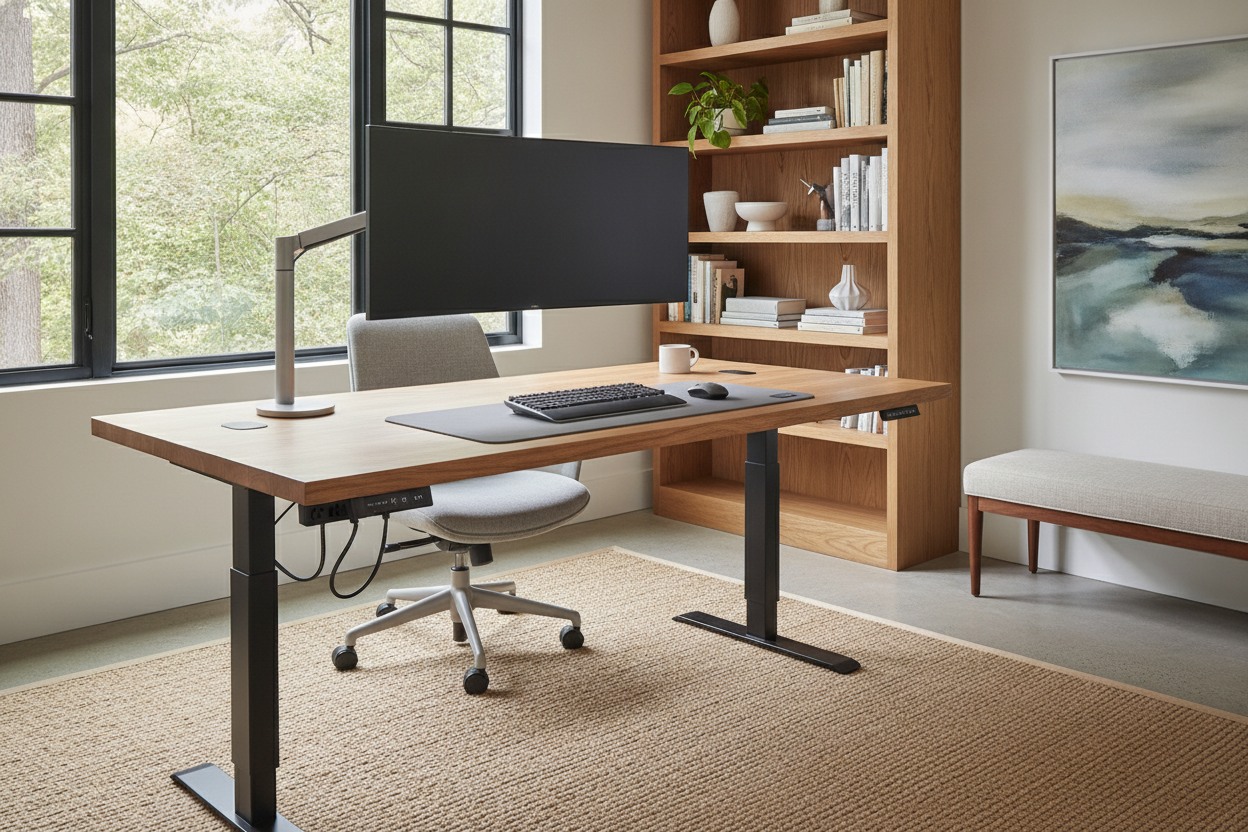
When you finally find that sweet spot where your neck feels loose and your monitors are at eye level, you want to hit one button and walk away to grab a coffee. I usually suggest a 54-inch desk with memory presets as the baseline for a serious home office. It’s the sweet spot where you have enough room for a laptop and a second screen without the desk taking over the entire room.
2. Maxing Out Your Desktop Width
Depth is great, but width is where the productivity happens. If you have the floor space, go as wide as you can afford. I’ve never heard anyone complain that their desk was 'too wide,' but I’ve heard plenty of people complain about their monitors being too close together. A wider top allows you to spread out your peripherals and keep your tower off the floor where it collects dust.
If you’re running two 27-inch monitors and a laptop stand, a 71 W height adjustable standing desk is the gold standard. It gives you enough room to have a notebook on one side and a cup of coffee on the other without feeling like you're playing a game of Tetris just to move your mouse.
3. Heavy-Duty Lifting Columns
This is the 'engine' of your desk. Cheap desks use a single motor and a hex rod to turn the other leg. They are loud, slow, and prone to breaking. You want dual motors—one in each leg. These are usually called '3-stage' columns, and they offer a wider range of motion and much better stability at high altitudes.
I once tested a single-motor frame that struggled so hard to lift my dual-monitor setup that it smelled like burning electronics. If you plan on mounting a heavy PC tower to the underside of your desk or using heavy gas-spring monitor arms, don't skimp here. Look for a weight capacity of at least 300 lbs. It’s not that you’ll ever put 300 lbs of gear on it, but a motor rated for that weight will run much smoother with a 50 lb load.
The 'Premium' Add-Ons That Are Total Scams
Here is where I get cynical. Desk companies love to sell you 'integrated' tech. Built-in wireless chargers are the biggest offender. They charge slowly, they generate heat right under your expensive desktop, and the second you upgrade your phone, the coils probably won't align anymore. Buy a $15 Anker charger and move on.
Then there are the proprietary cable management trays. Some brands want $100 for a piece of bent sheet metal that only fits their specific desk. Go to a hardware store or Amazon and buy a generic J-channel or a mesh wire basket for $15. It does the exact same thing. Also, skip the 'smart' apps that remind you to stand. Your body will tell you when it's time to move; you don't need a Bluetooth-enabled desk to send a notification to your phone.
Getting the Look Right Without Going Broke
You don't need a $2,000 solid walnut slab to have a nice office. In fact, solid wood can be a headache for standing desks because it's heavy and can warp over time. High-quality laminates or bamboo are often more stable and significantly cheaper. I prefer a matte finish; glossy desktops reflect your monitor glare and show every single fingerprint and coffee ring.
For the frame, stick to neutral powder coats like black, white, or grey. They blend into the background. If you want to make the space feel intentional, check out these designer ideas for standing desk layouts. Adding a rug or some plants around the desk does more for the 'vibe' than paying a $400 markup for a 'designer' leg color.
When to Skip the Customizations Entirely
I'll be honest: not everyone needs a 3-stage, dual-motor, 72-inch beast. If you only sit at your desk for an hour a day to check emails and pay a few bills, you are over-engineering your life. High-end standing desks are tools for people who live at their workstations for 8 to 10 hours a day.
If you're a casual laptop user, a basic writing computer desk is a much better investment. It’s easier to assemble, costs a fraction of the price, and won't have any mechanical parts that can fail in five years. Don't buy a Ferrari if you're just driving to the end of the driveway to get the mail.
FAQ
Does a standing desk wobble at full height?
Cheap ones do. If you buy a 2-stage frame without a crossbar, it will shake when you type. If you want zero wobble, look for a 3-stage frame with heavy steel feet and a weight capacity over 300 lbs.
Can I use my own tabletop with a custom frame?
Absolutely. Most standing desk frames are width-adjustable. You can buy a high-end frame and screw it into an old dining table top or a piece of butcher block from a home improvement store to save money.
How long does assembly take?
If you're doing it alone, budget about 45 minutes to an hour. Most of that time is spent cable managing. Pro tip: Use your own screwdriver with a good grip rather than the tiny Allen wrench they provide.

Dejar un comentario
Este sitio está protegido por hCaptcha y se aplican la Política de privacidad de hCaptcha y los Términos del servicio.