










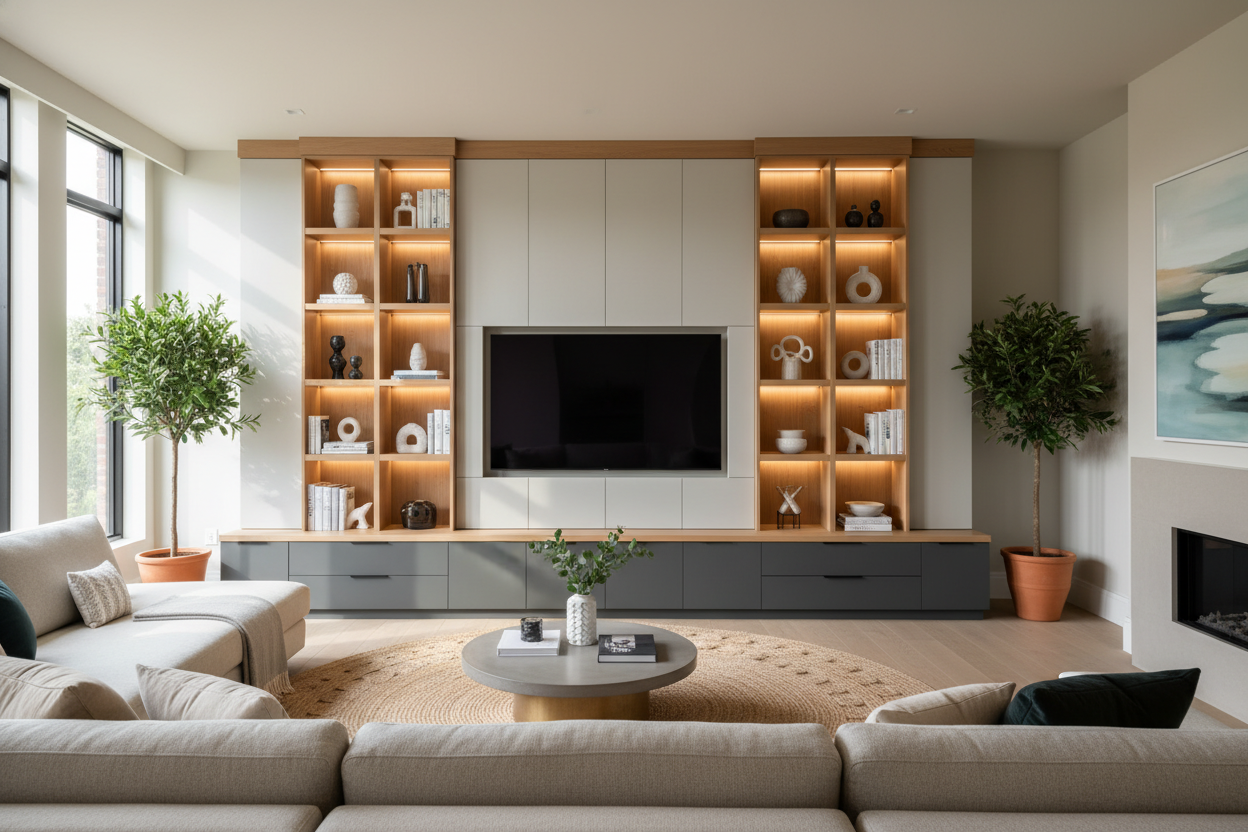
I remember the day the delivery guys hauled that 75-inch box into my living room. I was excited for movie night, but once the screen was mounted, I realized I had just installed a massive, 65-pound slab of obsidian that sucked the soul out of my decor. When it is off, a wall unit for 75 inch tv is the only thing standing between your living room and a tech-heavy void.
Quick Takeaways
- Scale is everything; never put a 75-inch TV on a stand that is narrower than the screen itself.
- Verticality helps the screen feel like part of the architecture, not an intruder.
- Cable management is the difference between a 'curated look' and a dorm room.
- A floating unit can keep a massive setup from feeling like it is eating your floor space.
The Problem With Giant Screens (They Ruin Everything)
A 75-inch TV is roughly 65 inches wide. That is a lot of real estate. In a medium-sized room, it is not just a TV; it is a lifestyle choice that you have to live with 24/7. The problem is that we only love these things when they are on. When the screen is dark, it is a giant, lifeless black void. I spent weeks trying to ignore it, but every time I walked into the room, my eyes went straight to the dead zone. It felt like I was living in a sports bar that had not opened for the day yet.
This visual shock is real. You spend all this time picking out the perfect rug and the right shade of oatmeal for your sofa, only to have a giant rectangle of plastic and glass dominate the entire vibe. It ruins the 'flow' because it creates a massive focal point that offers zero aesthetic value for 90% of the day. Without some kind of framing, that 75-inch screen just floats there, looking awkward and unfinished.
Why a Basic Stand Just Doesn't Cut It Anymore
I tried my old mid-century console first. It was a beautiful piece of kiln-dried walnut, but it looked like it was being crushed by the weight of the tech. Most standard Tv Stands are designed for 55-inch screens at most. When you put a 75-inch beast on a low-profile console that is only 60 inches wide, the proportions are comical. It looks top-heavy, like a bodybuilder who skipped leg day.
You need architectural scale to balance a screen this large. A basic stand leaves too much empty wall space around the TV, which actually makes the 'black hole' effect worse. You need something that extends at least 8 to 10 inches past the screen on both sides to provide visual grounding. If the stand is too small, the TV looks like it is about to tip over, creating a sense of visual anxiety that nobody wants in their relaxing space.
Finding the Right Wall Entertainment Center for 75 Inch TV
I eventually realized I needed height and breadth. A wall entertainment center for 75 inch tv works because it frames the screen with shelving, closed cabinets, and vertical elements. By surrounding the TV with books, ceramics, and art, you are essentially camouflaging the tech. It stops being a 'TV on a wall' and starts being a 'media library.'
I looked for something with modularity. The Wide Tv Stand Entertainment Stand Adjustable Tv Stand For Living Room is a great example of how to handle this. It gives you the necessary width—which is non-negotiable for a 75-inch screen—while allowing you to adjust the layout so the screen does not feel cramped. The transition from a solitary piece to a full-scale tv wall unit for 75 inch tv was the moment my living room finally felt like a grown-up space again. It turned the tech into a secondary feature rather than the main event.
Floating vs. Grounded: Picking an Entertainment Wall Unit for 75 Inch TV
There is a big debate here. Grounded units feel permanent and sturdy, which is great if you have high ceilings and a lot of room to play with. However, they can make a smaller room feel crowded very quickly. This is where a entertainment wall unit for 75 inch tv needs to be chosen based on your floor's 'breathing room.'
Personally, I am a fan of the 'airy' look. A Floating Tv Stand Wall Mounted Media Console Entertainment Center is my go-to for modern spaces. It keeps the floor clear, which tricks the eye into thinking the room is bigger than it is. Just a word of caution: make sure you are hitting studs and using heavy-duty toggles. A 75-inch TV plus a solid media unit is a massive amount of weight. I once saw a DIY drywall-only installation end in a very expensive disaster involving a shattered screen and a lot of tears. If you want that floating look, do it right or don't do it at all.
How to Style a TV Wall Unit for 75 Inch TV So It Looks Intentional
Styling is where you actually 'cure' the void. For my wall unit entertainment center for 75 inch tv, I used what I call the 'Distraction Method.' I placed a tall, architectural plant—a Fiddle Leaf Fig or a large Monstera—on one side to break up the hard horizontal lines. On the shelves, I mixed matte-textured ceramics with stacks of books to offset the shiny, reflective surface of the screen.
I also added dimmable LED bias lighting behind the unit. It reduces eye strain during movie marathons and makes the unit glow, which softens the transition between the dark screen and the wall. If you are struggling with the transition from a minimal setup to a larger unit, you are not alone. I Traded My Vintage Credenza for a Wall Mount TV Entertainment Unit and I never looked back because the functionality finally matched the scale of my life. Use your shelves for items that have soul—vintage finds, travel photos, and real books—and suddenly that 75-inch black rectangle just looks like a part of your personal gallery.
FAQ
Does the unit need to be wider than the TV?
Yes, absolutely. Aim for at least 10-20% wider than the screen. If the TV is wider than the furniture beneath it, it looks unstable and cheap.
How high should I mount a 75-inch TV?
The center of the screen should be at eye level when you are sitting on your sofa. For most people, that is about 42 inches from the floor. Please avoid the 'TV too high' trap.
Can I put a 75-inch TV on a 65-inch unit?
You can physically do it, but it will look like the TV is eating the furniture. It is a proportions nightmare. Always size up your furniture to match your tech.


Dejar un comentario
Este sitio está protegido por hCaptcha y se aplican la Política de privacidad de hCaptcha y los Términos del servicio.