










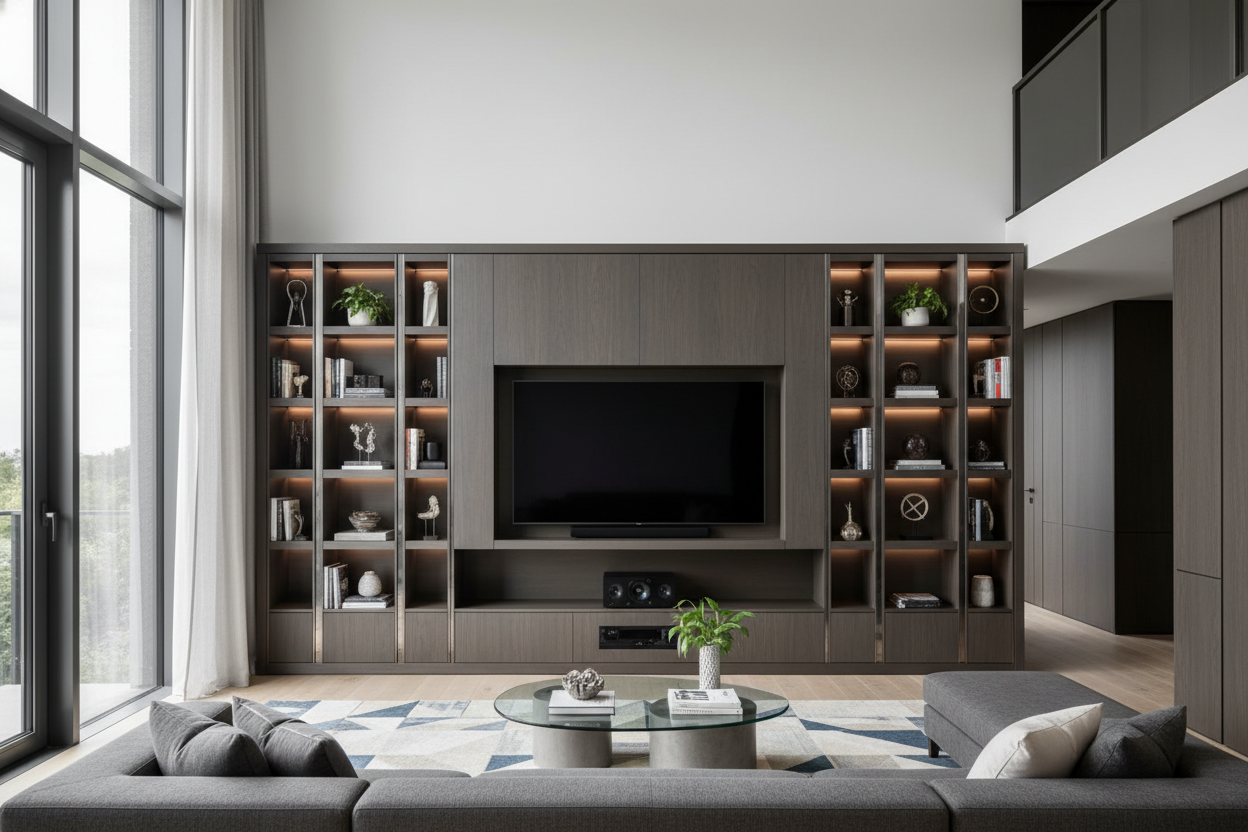
I've walked into hundreds of living rooms where the new 75-inch TV looks like it's about to topple off a flimsy stand. You spent good money on that screen, but your setup feels precarious and cluttered. A proper entertainment units large enough for the job solves this. It's not just furniture; it's the foundation for your movie nights, game days, and family time.
Quick Takeaways
- Measure your wall and TV first. Your unit should be at least 6-12 inches wider than your TV screen.
- Prioritize cable management. Look for units with built-in channels or rear access panels.
- Match the unit's depth to your components. A standard AV receiver needs about 18 inches of depth.
- Consider weight capacity. A large media center for an 85-inch TV must support 150+ pounds safely.
Why Size Matters: The Case for Large Entertainment Centers
When your TV is 65 inches or larger, a small stand creates visual imbalance. The screen dominates, and everything else looks insignificant. An oversized entertainment center provides a grounded, intentional look. It improves viewing by letting you position the TV at the correct height—the center of the screen should be at seated eye level, roughly 42 inches from the floor.
Functionally, a large entertainment center with storage hides the chaos. You get dedicated spaces for gaming consoles, soundbars, media players, and all their cables. Open-back panels or strategic cut-outs allow for airflow and easy access. I always remind clients that investing in a quality piece, like considering Is A Tv Stand And Entertainment Center Worth The Space, pays off in daily use and long-term durability.
Measuring Up: Finding the Right Fit for Your Space
Grab your tape measure. First, measure the wall where the unit will go. Leave at least 24 inches of clearance on each side for traffic flow and other furniture, like a sofa. For the unit itself, the width is key. If you have a 75-inch TV, look for a large tv entertainment unit that's between 81 and 87 inches wide. This creates a balanced frame.
Depth is crucial for components. Measure your deepest piece of equipment, usually an AV receiver or center channel speaker. Add 2-3 inches for cable clearance. Standard depths range from 18 to 24 inches. Don't forget height. A low-profile TV bench around 20 inches high creates a modern, floating look, while a taller hutch over 60 inches adds vertical storage and presence.
Design Styles for Large Entertainment Units
The style of your big screen entertainment center should complement your room's aesthetic. It's a major visual anchor. From my experience, browsing a curated Entertainment Center collection helps visualize how different styles work with large screens.
The Modern Minimalist Approach
This style uses clean lines, often in matte black, white oak, or walnut veneers. Look for large media centers with flat-panel doors, integrated handles, and a low silhouette. Storage is maximized but concealed. I specify units with full-extension, soft-close drawers for media and adjustable shelves behind doors for components. The goal is to make the TV the star while the unit disappears into the architecture.
Traditional Media Centers with Character
Here, the unit itself is a statement. Think of a big tv entertainment unit with raised-panel doors, corbel details, or turned legs. Materials like cherry or distressed oak add warmth. These designs often include open shelving or glass-front cabinets for displaying books, art, or collectibles. They work well in rooms with other classic furniture pieces, providing ample storage without looking utilitarian.
Storage Solutions: More Than Just TV Space
A large entertainment cabinet is your living room's command center. Beyond the TV, plan for everything else. Dedicate a deep, ventilated shelf for your game console and its power brick. Include at least one compartment with a removable back panel for router and modem access.
For media, I recommend a mix of open and closed storage. Use adjustable shelves behind doors for binders of DVDs or board games. Shallow drawers are perfect for remote controls and charging cables. As discussed in Tv Entertainment Storage Unit What Designers Actually Think, the best designs anticipate tech evolution, with spaces that can adapt from Blu-ray players to future streaming devices.
Material Matters: Building for Durability
What's it made of? For a large entertainment center that will hold thousands of dollars in electronics, construction is non-negotiable. Solid wood frames (like kiln-dried maple) are the gold standard for strength and longevity, but they are heavy and expensive. High-quality plywood with a thick veneer is a excellent, stable alternative for most homes.
Avoid particleboard for the main load-bearing structure, especially in oversized units. Check the joinery—dovetail or mortise-and-tenon joints are signs of quality. For shelves holding heavy components, ensure they are at least 3/4 inch thick and have sturdy center supports to prevent sagging over time.
Installation and Placement Tips
Positioning is everything. Never push a large media center tight against the wall if it has rear ports. Leave a 3-4 inch gap for cable management and airflow. Always anchor tall units, especially those over 60 inches, securely to the wall studs using the provided anti-tip hardware. It's a simple step that prevents serious accidents.
Center the unit on your main viewing wall. If you have a fireplace on the same wall, placing the TV above it often puts it too high. In that case, I prefer placing a low-profile option like the Tv Bench Large Entertainment Center on an adjacent wall. For rooms needing maximum storage, a vertical solution like the Tv Hutch Large Entertainment Center can house everything without consuming too much floor space.
Personal Experience: The Downside of Going Big
In my early days, I specified a massive, beautiful walnut unit for a client's open-concept loft. It looked stunning in the showroom. Once delivered, it overwhelmed their space, making the room feel cramped and the traffic flow awkward. We had to exchange it. The lesson? The biggest unit isn't always the best. You must balance scale with proportion. Always check the unit's depth against your room's walkways—you need at least 36 inches of clear passage.
FAQ
How much should a large entertainment center cost?
For a well-built, sizable unit (70+ inches wide) in materials like veneered plywood or solid wood, expect to invest between $1,200 and $3,000. Custom builds will be higher.
Can I put a 85-inch TV on a large TV stand?
Yes, but verify the stand's weight capacity and top surface dimensions. The TV's feet should rest fully on the surface with several inches to spare on each side. For very large TVs, a media center designed for wall-mounting with a pass-through for brackets is often safer.
What's the ideal height for the TV on the unit?
Sit on your sofa and look straight ahead. That spot, typically 40-45 inches from the floor, should be the center of your TV screen. Choose a unit height that positions your TV accordingly.
How do I hide all the wires?
Choose a unit with a cable management system—a rear channel or knockout holes. Use zip ties to bundle cords together and run them down to a power strip placed in a dedicated compartment at the back of the cabinet.


Dejar un comentario
Este sitio está protegido por hCaptcha y se aplican la Política de privacidad de hCaptcha y los Términos del servicio.