










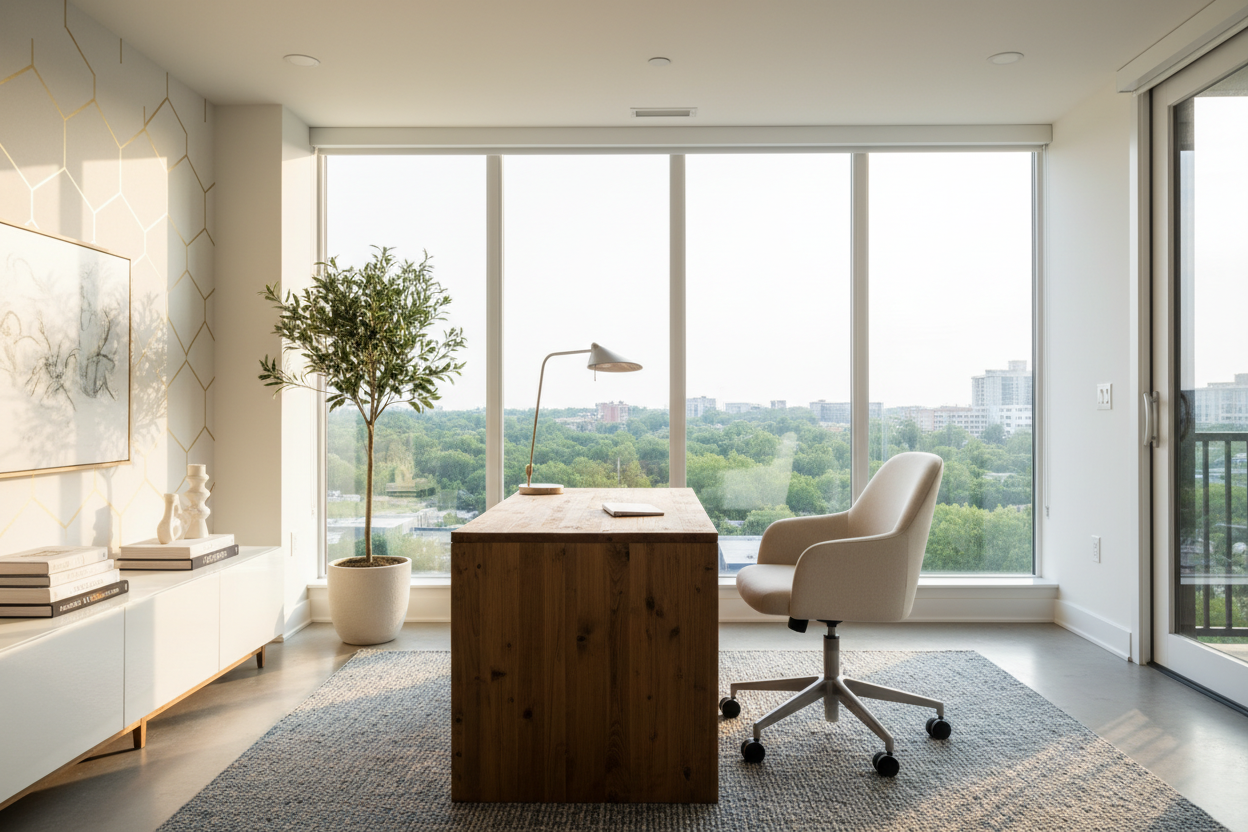
There is nothing quite as uninspiring as staring at a blank wall while trying to work. Yet, when I walk into client homes for initial consultations, this is the most common layout error I see. Homeowners often treat their workspace like a storage unit rather than a functional design studio, shoving furniture into corners to save space. Proper desk placement in home office design is not just about fitting furniture into a room; it is about controlling sightlines, managing light, and establishing a sense of authority over your environment.
Quick Decision Guide: The Golden Rules of Layout
If you are struggling to decide where to position your workstation, consider these four non-negotiable factors before moving heavy furniture:
- The Command Position: Always position your desk so you have a clear view of the door, but are not directly in line with it.
- Light Source Direction: Place the desk perpendicular to windows to avoid direct glare on screens or silhouetting your face during video calls.
- Traffic Flow: Ensure a minimum of 36 to 48 inches of clearance behind your chair to slide back comfortably without hitting a wall or bookshelf.
- Power Accessibility: Verify outlet locations; floating a desk requires floor outlets or safe cord management solutions to avoid trip hazards.
The Command Position: Why Orientation Matters
In design psychology, we often refer to the "Command Position." This is the premier office desk position used by executives and high-end designers. Instead of facing a wall, your desk faces the room. This layout allows you to see anyone entering the space, which subconsciously lowers anxiety and heightens focus. When considering where to put desk in office layouts, orient the chair so your back is protected by a solid wall or sturdy shelving unit.
Floating the Desk
To achieve this look, you will likely need to "float" the desk in the center of the room or off-center. This requires a desk with a finished back—many budget options have unfinished particle board on the reverse side. If your desk has an unfinished back, use a console table or low bookshelf to hide it, creating a sophisticated visual barrier.
Harnessing Natural Light
Lighting is the architect of mood. A common query I receive is where to place computer in room layouts relative to windows. While a view is lovely, facing a window directly often causes eye strain due to the contrast between a bright exterior and a dim screen. Conversely, having a window directly behind you creates a glare on the monitor that makes work impossible.
The best placement for home office desk setups involves placing the desk perpendicular to the window. This allows soft, side-washing light to illuminate your workspace without the harsh contrast. If you are right-handed, try to have the window on your left side so your hand doesn't cast a shadow on your writing surface.
Small Spaces and Nooks
Not every home has a dedicated 200-square-foot study. When determining where to place a desk in a room that serves dual purposes—like a guest bedroom or living area—integration is key. Avoid the "dorm room" look of shoving a desk into a dark corner.
The Alcove Strategy
If you must place a desk against a wall due to space constraints, visual formatting is essential. Install floating shelves above the desk to draw the eye upward and create a vertical zone. This makes the desk position feel intentional rather than accidental. Use a chair that mimics the room's existing furniture style (like a dining chair with casters) rather than a bulky ergonomic unit, helping the office dissolve into the living space when not in use.
My Personal Take on desk placement in home office
I learned a hard lesson about desk positioning in an office during one of my first major residential projects. I designed a stunning layout with a heavy, mahogany executive desk floating in the center of the room. It looked incredible in the renderings. However, once we installed it, I realized I hadn't accounted for the "cable chaos."
Because the desk was floating, every power cord for the lamp, computer, and charger snaked across the Persian rug. It ruined the aesthetic instantly. I had to scramble to install a floor outlet under the rug—a costly renovation change. Now, whenever I advise on how to position desk in home office scenarios, my first question is not about the view, but about the power source. If you plan to float your desk, invest in a cable management spine or a rug large enough to conceal flat-run cables. It’s a gritty detail, but it saves the design.
Frequently Asked Questions
Should my desk face the wall or the room?
Ideally, face the room. Facing a wall can feel restrictive and "cubicle-like." However, if you are easily distracted, facing a wall with a calming piece of art above the desk can sometimes boost productivity, provided you take breaks to look at a distance.
Where is the best place to put a desk in a bedroom?
When deciding where to position desk in home office setups within a bedroom, replace a bedside table with a sleek writing desk. This saves space and keeps the flow open. Alternatively, place it at the foot of the bed if the room depth allows, using the bed frame as a visual divider.
How much space do I need behind my desk?
For proper ergonomics and flow, allow at least 30 inches for the chair to pull out, though 42 to 48 inches is the industry standard for a comfortable walkway behind a seated person.

Dejar un comentario
Este sitio está protegido por hCaptcha y se aplican la Política de privacidad de hCaptcha y los Términos del servicio.