











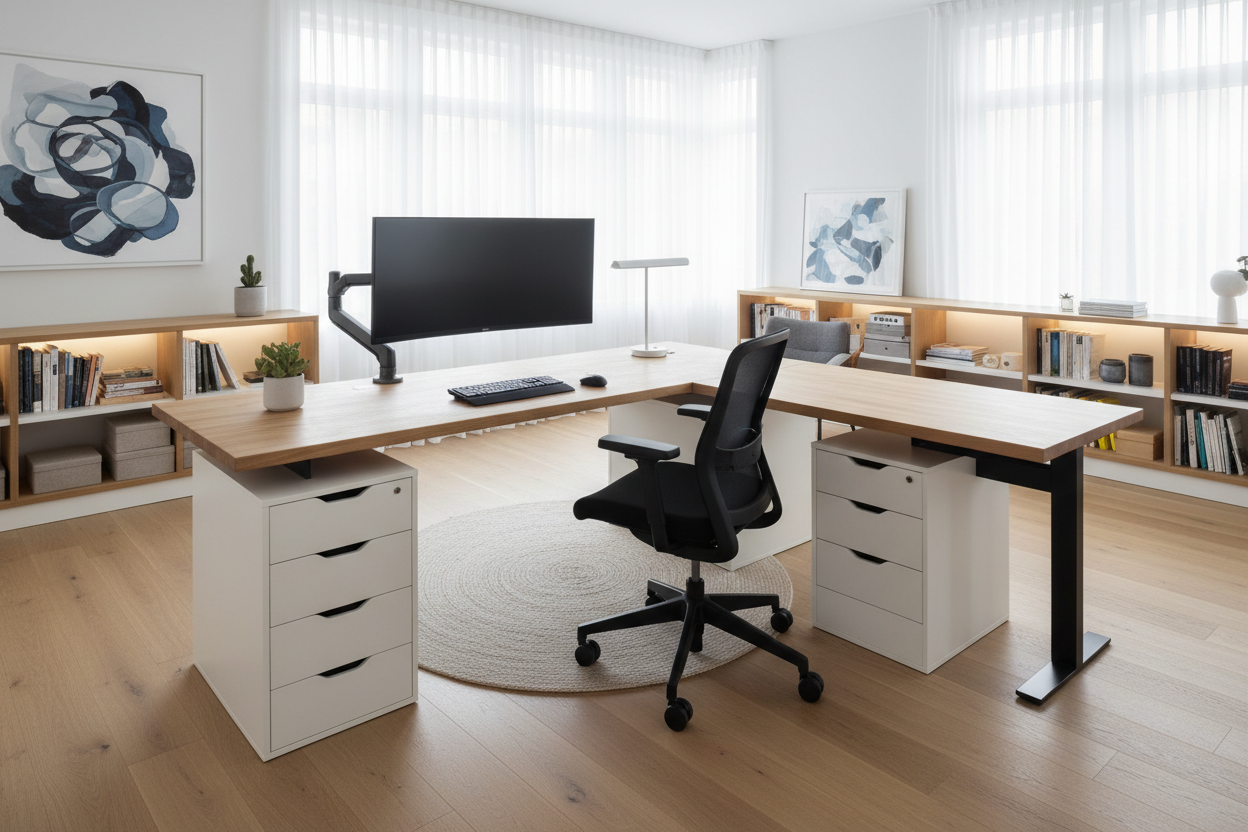
Visual clutter often leads to mental clutter, a reality I see constantly in home office consultations. You start with a modest workspace, but as monitors multiply and peripherals accumulate, that surface area shrinks rapidly. Rather than replacing an entire furniture piece, a strategic ikea desk extension can double your functional zone without disrupting the room's footprint.
Key Features to Consider Before Buying
- Material Core: Distinguish between hollow-core (honeycomb paper fill) and solid wood or particleboard, as this dictates hardware retention.
- Seam Alignment: Ensure the depth of the extension matches your primary desk to avoid awkward jagged edges.
- Leg Support: Determine if the extension requires independent legs (like the OLOV or ADILS) or if it brackets onto the main unit.
- Finish Continuity: Check the specific color code; Ikea's "white" varies significantly between the MALM, MICKE, and LAGKAPTEN lines.
Analyzing Material Integrity and Compatibility
As a designer, my first rule when modifying mass-produced furniture is to understand what lies beneath the veneer. Most standard Ikea tabletops utilize a honeycomb paper filling encased in fiberboard. While lightweight and cost-effective, this composition presents a challenge for any ikea desk extender requiring screws.
If you are attaching a slide-out keyboard extension or a heavy cantilevered shelf, you must locate the solid wood blocks usually situated at the corners of the tabletop. For a linear extension—adding a second tabletop to create an L-shape—I recommend using mending plates underneath, but only if you are working with their solid wood countertops (like the KARLBY) or solid particleboard lines. The hollow tops will not hold a screw tightly enough to prevent wobbling over time.
Creating Visual Flow and Layout
The goal is to make the addition look curated, not cobbled together. When extending a desk, the silhouette is paramount. If you are abutting two tabletops, the legs act as the visual rhythm. Avoid placing a leg right where your knees will naturally swivel.
For a sophisticated, built-in aesthetic, consider using a drawer unit (like the ALEX) as the bridge between your main desk and the extension. This anchors the pieces and masks the seam, making the setup appear as a single, intentional workstation rather than two tables pushed together.
Ergonomics: The Invisible Design Element
An extension isn't just about storage; it is about body mechanics. A common mistake is installing an extension at a slightly different height than the primary surface. Even a millimeter difference creates a "lip" that causes mouse drag or forearm irritation. When selecting adjustable legs for your extension, use a level tool during installation. Your elbows should rest at a 90-degree angle, and the extension should facilitate this posture, not hinder it by forcing you to reach too far for your secondary monitor or documents.
My Personal Take on the Ikea Desk Extension
I learned a hard lesson about these extensions during a project for a graphic designer in a tight loft. We attempted to extend a white LINNMON top with a slightly older white GALANT extension we found. On the showroom floor or online, white looks like white. In the client's home, under 3000K warm lighting, the difference was glaring.
The new top was a crisp, cool white, while the older extension had a creamy, yellow undertone due to UV exposure and different manufacturing batches. It looked like a mistake. Furthermore, the matte finish on the extension showed fingerprint oils relentlessly compared to the semi-gloss of the main desk. Now, I always advise clients: if you can't buy the extension from the exact same batch, use a contrasting color (like a wood grain extension on a white desk) to make it look like an intentional design choice rather than a failed match.
Conclusion
Expanding your workspace doesn't require a full renovation. With the right attention to material density, leveling, and finish matching, you can create a spacious, ergonomic environment. Treat your desk extension as a permanent architectural element, and your productivity will thank you.
Frequently Asked Questions
How much weight can a standard Ikea desk extension support?
This depends heavily on the legs used. A standard hollow-core top supported by ADILS legs can typically hold around 110 lbs (50 kg). However, point loads (heavy monitor arms clamped to one spot) can crush the honeycomb interior.
Can I cut an Ikea tabletop to fit a specific alcove?
If it is a solid wood or particleboard top, yes. If it is a hollow-core top (like LAGKAPTEN), cutting it exposes the cardboard filling, which destroys structural integrity and looks unfinished. You would need to re-edge the cut side, which is difficult to do cleanly.
What is the best way to secure two Ikea tabletops together?
For a seamless connection, flat mending plates screwed into the underside are best, provided the core material is solid. For hollow tops, it is safer to rely on a shared drawer unit underneath to support both tops, using silicone bumpers to prevent sliding.

Dejar un comentario
Este sitio está protegido por hCaptcha y se aplican la Política de privacidad de hCaptcha y los Términos del servicio.