










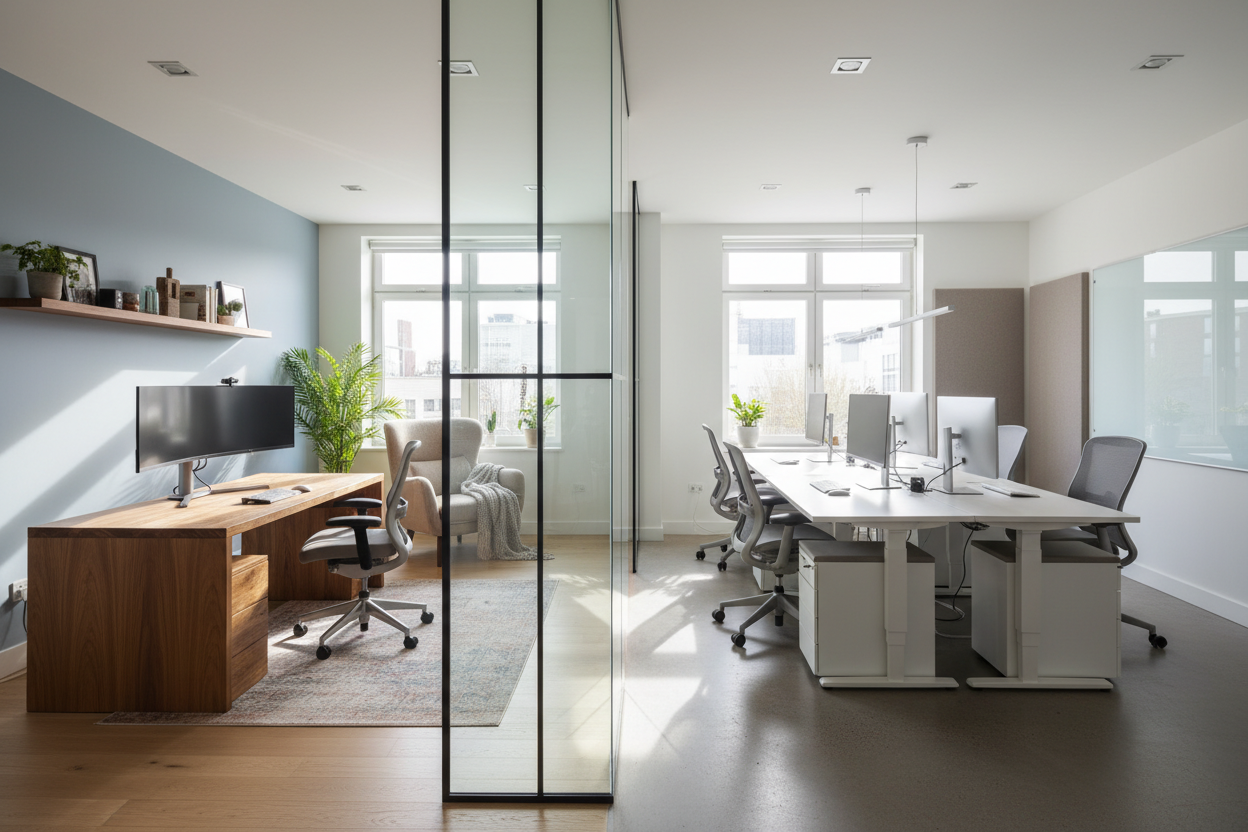
We often treat the debate over location as purely a management issue, ignoring a fundamental truth: our physical environment dictates how we function. As a designer who has planned sprawling corporate HQs and intimate home studies, I have seen firsthand how layout, lighting, and furniture specifications directly influence output. The battle of remote work vs office productivity isn't just about discipline; it is about the tension between commercial-grade ergonomics and residential aesthetic comfort.
Quick Design Factors for Productivity
- Ergonomic Fidelity: Commercial spaces prioritize 8-hour support ratings; home setups often prioritize silhouette over suspension.
- Lighting Temperature: Offices use 4000K-5000K (cool blue) to stimulate alertness, while homes lean toward 2700K (warm yellow) which induces relaxation.
- Acoustic Zoning: Open-plan offices suffer from ambient chatter, whereas homes struggle with lack of transitional boundaries.
- Visual Anchoring: Dedicated work zones reduce cognitive load compared to multi-purpose tables.
The Ergonomic Equation: Task vs. Lounge
When analyzing work from home vs office productivity, the primary differentiator is the seat. Corporate procurement teams spend thousands on chairs with high abrasion ratings and synchro-tilt mechanisms. These aren't just features; they are productivity tools designed to keep blood flowing to the brain.
The "Dining Chair" Trap
In a home setting, the temptation is to select a chair that complements the drapes. However, a rigid timber dining chair or a soft, unstructured velvet armchair lacks the lumbar adjustment necessary for prolonged focus. This physical discomfort creates micro-distractions—shifting weight, stretching, or standing up—which breaks the flow state.
Spatial Planning and Visual Boundaries
In a commercial office, the architecture is designed to signal "work." You cross a threshold, and your brain switches modes. At home, this boundary is often blurred.
Creating a "Commute" at Home
To rival office productivity, residential spaces need distinct zoning. This doesn't require a separate room. It can be achieved through:
- Area Rugs: Using a flat-weave rug to physically demarcate the workspace from the living area.
- Lighting Layers: Installing a high-CRI task lamp that is only turned on during work hours.
- Orientation: Positioning the desk to face a window or artwork, rather than the kitchen or television, to manage visual cues.
Materiality and Sensory Input
Offices are often sterile, utilizing laminates and metals that are durable but cold. This is where the home environment can actually surpass the office. Incorporating natural materials—solid walnut desks, woolen textiles, or leather desk pads—introduces a tactile element that lowers cortisol levels. A calmer nervous system leads to better decision-making capabilities.
Lessons from My Own Projects
I once worked with a client, a high-level fintech trader, who was convinced his productivity was tanking because he wasn't in his downtown high-rise. He wanted me to replicate his glass-and-steel cubicle in his Victorian guest room.
I refused. Instead, we compromised. We kept the focus on high-performance mechanics but changed the aesthetics. I specified a task chair that had the exact suspension mesh of his office chair but was wrapped in a charcoal fabric rather than industrial black plastic. We also swapped his harsh overhead fluorescent lighting for a layered approach using architectural task lighting.
The most telling detail, however, was the desk surface. His office desk was cold laminate. We installed a solid white oak slab with a live edge. Six months later, he told me that the tactile warmth of the wood under his wrists actually kept him at the desk longer than the cold plastic ever did. It was a small sensory detail, but it bridged the gap between comfort and function.
Conclusion
Ultimately, the winner of the remote work vs office productivity debate depends on how intentional you are with your design. You cannot expect executive-level output from a sofa-level setup. By investing in proper ergonomics and respecting the psychology of space, you can curate an environment that works as hard as you do.
Frequently Asked Questions
How much space do I need for a productive home office setup?
Ideally, you need a minimum footprint of 60 inches by 60 inches. This accommodates a standard 48-inch desk and allows for the 30-inch clearance required for a chair to push back fully without hitting a wall, ensuring you don't feel claustrophobic.
Can lighting really affect my productivity levels?
Absolutely. Lighting with a color temperature of 2700K (warm) signals the brain to produce melatonin (sleep/relax), while 4000K+ (cool) suppresses it. For work, aim for a tunable LED bulb set to 4000K during the day to maintain focus.
Is a standing desk worth the investment for home use?
Yes, but only if paired with an anti-fatigue mat. The productivity benefit comes from the ability to change posture, which maintains energy levels. Without the mat, standing on residential hardwood or tile can lead to joint fatigue that distracts from work.

Dejar un comentario
Este sitio está protegido por hCaptcha y se aplican la Política de privacidad de hCaptcha y los Términos del servicio.