










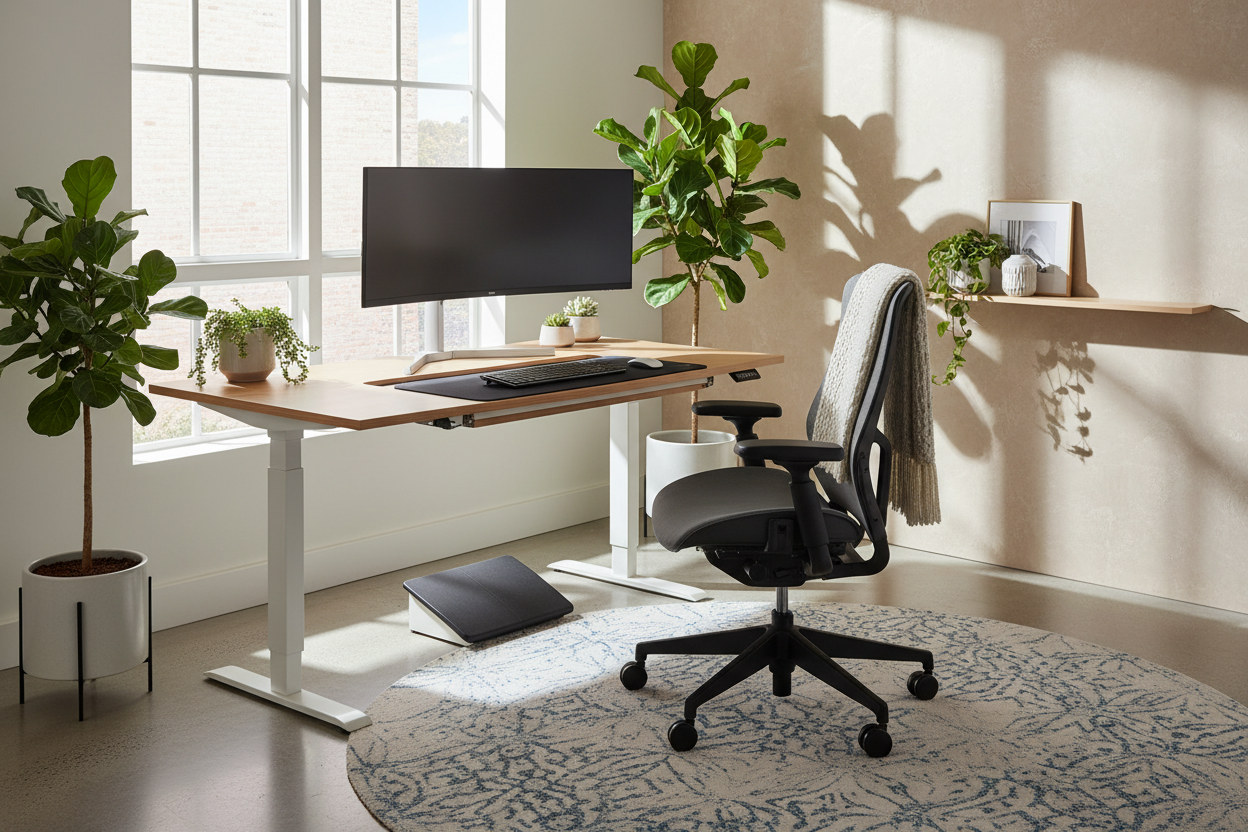
You know that nagging ache between your shoulder blades at 3 PM? It is rarely just fatigue; it is usually a design flaw. As an interior designer, I often see clients invest thousands in high-end mahogany desks or sculptural chairs, only to find themselves working from the sofa a week later because their beautiful office hurts them. Functionality is where true luxury lives. Creating the right ergonomic set up for computer usage is about blending strict biomechanics with sophisticated interior style to create a space that supports your body as well as your workflow.
Quick Decision Guide: Key Features to Look For
- Chair Adjustability: Look for seat tilt, lumbar depth, and armrest height adjustments. A static chair is a design failure for long-term work.
- Desk Depth: Ensure a minimum depth of 24–30 inches to keep monitors at arm's length, preventing eye strain.
- Monitor Height: The top of your screen should be at or slightly below eye level.
- Lighting Layers: Combine ambient overhead light with focused task lighting to reduce glare and visual fatigue.
- Foot Positioning: Feet must rest flat on the floor or a footrest; dangling legs cut off circulation.
The Foundation: Table and Chair Ergonomics
The relationship between your seat and your surface is the core of workstation ergonomics ideal set up. When selecting furniture, we aren't just looking at silhouettes and finishes; we are looking at geometry.
Selecting the Chair: Material and Mechanism
While a velvet tub chair looks stunning in a portfolio, it is rarely the best desk setup for posture. For a home office, I recommend a high-quality task chair with a breathable mesh back or high-grade leather that softens over time. The goal is how to sit ergonomically at your desk without thinking about it. Your elbows should form a 90-degree angle, and your knees should be level with your hips. If you prefer a warmer aesthetic, look for ergonomic chairs that offer fabric upholstery options to soften the "corporate" look.
The Desk Surface: Height and Materiality
Standard desk height is 29 to 30 inches, but this is often too high for the average person, causing shoulder shrugging. A height-adjustable desk is the gold standard for a comfortable desk setup. Regarding materials, consider how the surface feels against your wrists. Solid wood or a high-quality veneer offers a warmer, more tactile experience than glass or cold metal, which can become uncomfortable during long sessions. A matte finish is preferable to high-gloss to prevent overhead lighting glare.
Space Planning: Ergonomic Desk Layout
Once the furniture is selected, the placement of your equipment dictates your health. A common mistake is cluttering the "primary reach zone"—the semi-circle within arm's reach.
Monitor and Peripheral Placement
For an optimal desk ergonomics plan, your monitor is the anchor. It should be directly in front of you, roughly an arm's length away. If you use dual monitors, angle them slightly inward like a cockpit to minimize neck rotation. This ergonomic desk position diagram in your mind should prioritize keeping the neck neutral. Elevating the monitor on a riser or an articulated arm not only aids posture but also clears desk space for a cleaner visual aesthetic.
The Corner Desk Dilemma
An ergonomic corner desk setup requires specific attention to legroom. Often, the support legs or cabinets underneath corner units restrict movement, forcing you to sit off-center. Ensure the knee space is clear so you can face the corner directly without twisting your spine.
Visual Balance and Workflow
How to make your workspace more ergonomic isn't just about physical positioning; it's about reducing cognitive load through design. Visual clutter leads to mental fatigue.
Use cable management solutions to hide cords—visual chaos creates subconscious stress. Incorporate a workstation setup guide philosophy that separates "active work" areas from "storage" areas. Keep your immediate desk surface clear of non-essentials. This minimalist approach allows for smoother mouse movements and prevents awkward reaching that strains the shoulder.
My Personal Take on ergonomic set up for computer
I learned the hard way that "vintage" doesn't always mean "viable." Years ago, I sourced a stunning mid-century modern teak desk for my own home office. It had a beautiful floating top and brass hardware. However, the desk depth was only 20 inches. After two weeks of drafting, I developed severe headaches.
The issue? My monitor was too close to my face because the desk lacked depth. I realized that no amount of styling could fix a fundamental dimension error. I eventually swapped it for a deeper, custom walnut top on sit-stand legs. The lesson was clear: how to make desk ergonomic starts with the tape measure, not the mood board. Also, a quick tip I tell every client: if you buy a laminate top, avoid black. It shows every fingerprint and dust mote, making your workspace feel dirty even when it's clean, which kills the vibe of a luxury space.
Conclusion
Achieving the perfect ergonomic office position is a balance of investing in adjustable furniture and arranging it with intention. Your workspace should be a vessel for productivity, not a source of pain. By prioritizing the relationship between your body and your furniture, you curate a space that is as healthy as it is beautiful.
Frequently Asked Questions
What is the proper ergonomics for sitting at a desk if I am short?
If your feet dangle when your chair is adjusted to the desk height, you absolutely need a footrest. This supports the lower back and ensures circulation isn't cut off at the thighs. Alternatively, use a height-adjustable desk that lowers to 24-25 inches.
How can I make an ergonomic cubicle feel more high-end?
Focus on touchpoints. Swap the standard chair for one with better lumbar support and upgraded fabric. Use a high-quality monitor arm to float the screen, and introduce a desk pad (leather or felt) to define the workspace and provide a softer surface for your wrists.
Is a standing desk necessary for a workstation setup guide?
While not strictly mandatory, the ability to change positions is vital. The best posture is your next posture. If a standing desk isn't feasible, ensure you take micro-breaks every 30 minutes to stand and stretch.



Dejar un comentario
Este sitio está protegido por hCaptcha y se aplican la Política de privacidad de hCaptcha y los Términos del servicio.