










I once spent three hours trying to make a 55-inch TV look like a curated art gallery. By the time I finished, the wall was so cluttered I couldn't even focus on the movie I was trying to watch. It’s a common trap: we treat entertainment center decor like any other shelving unit, forgetting that its primary job is to be a background, not the main event.
The TV is a massive, light-emitting rectangle. When you surround it with dozens of tiny, shiny objects, you aren't 'decorating'—you're creating visual noise. It took me three apartments and a lot of wasted command strips to realize that less isn't just more here; it's a necessity for your sanity. If you want a space that feels intentional rather than messy, you have to change your strategy.
Quick Takeaways
- Go big or go home: Use fewer, larger items to avoid a cluttered look.
- Kill the glare: Choose matte finishes over glass or polished metal to prevent screen reflections.
- Balance the height: Use tall items on the ends to frame the screen rather than competing with it.
- Hide the spaghetti: Cord management is 90% of the styling battle.
The Giant Black Box Problem
Let’s be honest: TVs are ugly. Even the thin ones are just giant black voids when they’re turned off. Most of us overcompensate for this by trying to 'soften' the area with a million tiny trinkets. We want the tech to look cozy, but we end up with a setup that looks like a thrift store shelf exploded around a piece of glass.
The struggle is real because the living room is supposed to be the heart of the home, yet the focal point is a piece of hardware. Decorating around a television feels awkward because you’re trying to balance something industrial with something personal. The key isn't to hide the TV—it's to give the eye a place to rest that isn't the screen, without making the wall feel heavy or distracting during a movie marathon.
Why Standard Bookshelf Rules Fail Here
On a regular bookshelf, we love the 'layered' look. We stack books horizontally, nestle small brass figurines on top, and lean tiny frames in the back. That works for a library. It is a disaster for a media unit. When you use those same decor ideas for entertainment center setups, you create a million tiny points of contrast that your brain has to process while you’re trying to watch a show.
Small knick-knacks are the enemy of the media center. They create a 'bitty' look that feels disorganized. Every time a bright scene flashes on the screen, those little objects catch the light and pull your focus. Visual fatigue is a real thing, and a shelf full of 4-inch-tall figurines is the fastest way to get it. You want your entertainment unit decorating ideas to focus on calm, solid shapes that support the screen rather than screaming for attention.
What to Put on Entertainment Center Shelves Instead
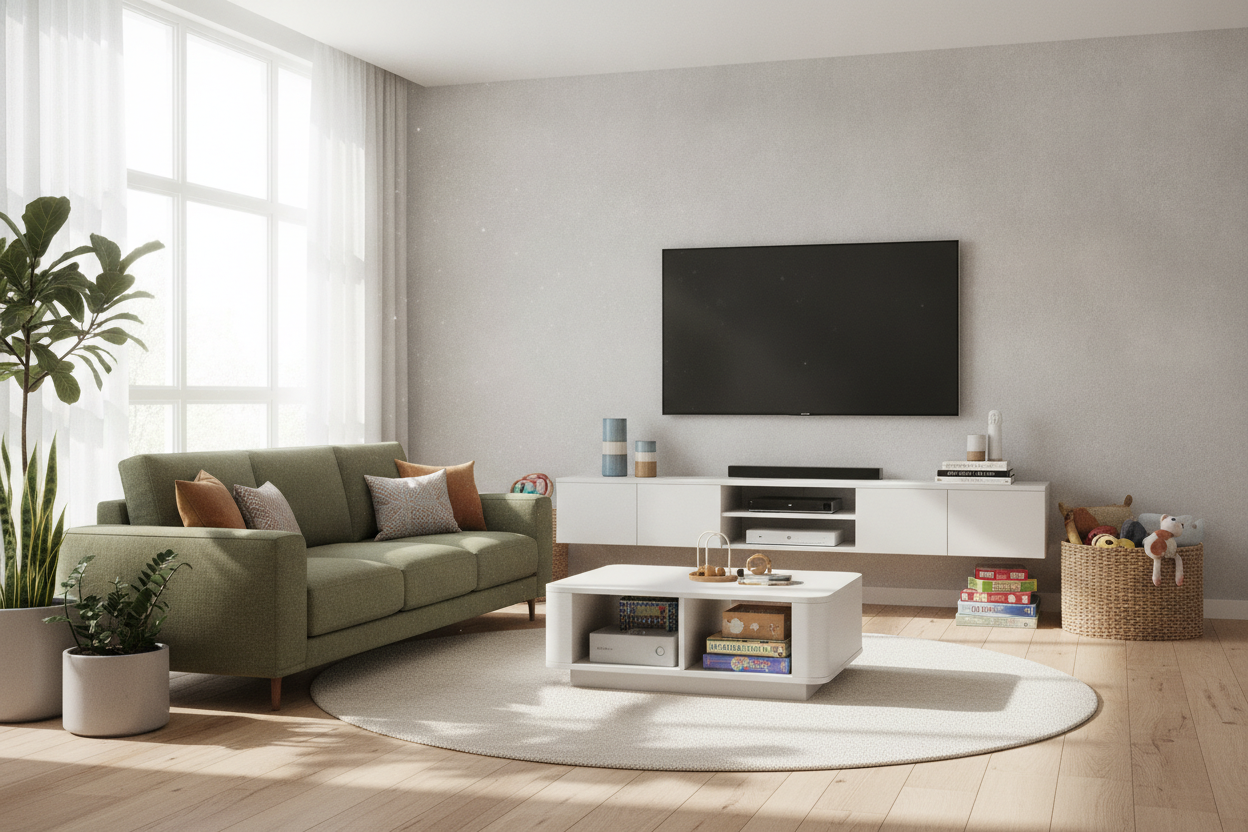
My golden rule? The 'fewer, bigger' approach. Instead of ten small items, pick two large ones. I’m talking about substantial matte ceramics, heavy stoneware vases, or large-scale wooden bowls. These items have enough presence to hold their own against the scale of a 65-inch screen. If you are starting with a sleek modern entertainment center, you need pieces that match its clean lines and substantial footprint.
Texture is your best friend here. Think about light-absorbing materials. Matte black pottery, woven seagrass baskets, and linen-bound coffee table books are perfect. They add warmth and 'coziness' without reflecting the glare of the TV back at you. Baskets are particularly great because they double as storage for those ugly controllers and extra HDMI cables that always seem to multiply. Avoid anything with glass or high-shine chrome; you’ll thank me the next time you’re watching a dark thriller and don't see a lamp reflecting off a silver vase.
How to Handle the Awkward Space Above the TV
The 'decor above entertainment center' search usually leads people to gallery walls. I’m going to be the contrarian here: don't do it. A gallery wall around a TV is a recipe for a headache. It makes the wall feel cluttered and makes the TV look like just another frame, which it isn't. It’s a glowing box. If you have a massive empty space, consider a single, long architectural element like a floating shelf with one or two long, trailing plants—just make sure they don't hang over the screen.
Sometimes, the best move is to let the wall breathe. If you hate the emptiness, a simple picture light mounted high above the TV can add a sophisticated 'built-in' feel without adding clutter. Or, you can bypass the problem entirely. Investing in a 3 piece entertainment center with overhead cabinets naturally fills that vertical space. It frames the TV in a way that feels intentional and architectural, so you don't feel the need to hang random 'Live, Laugh, Love' signs just to fill the gap.
My Foolproof Formula for Media Console Styling
If you’re starting from scratch, here is how I do it. First, clear everything off. Start with the base. If your console is long, place two large, matching items on either end to 'ground' the unit. This could be two tall vases or two stacks of oversized books. This creates a frame for the TV and makes the whole setup feel balanced. Then, add one medium-sized textured item—like a wooden chain or a marble bowl—to one side to break the symmetry just a little.
Next, tackle the shelves. Use the 'rule of three' but keep the items large. One large basket, one stack of books, and one sculptural object. If you have a massive wall-to-wall unit, you’ll need to scale this up significantly. I actually wrote a guide on how to style an 8 foot long entertainment center if you're dealing with that much real estate. Finally, hide those cords. Use zip ties or cable management boxes. No amount of expensive decor can fix the look of a 'cord waterfall' hanging off the back of your stand.
Personal Experience: The Disco Ball Disaster
I once thought it would be 'fun' and 'eclectic' to put a small disco ball on my media console. It looked great in the afternoon sun. But the second I turned on the TV at night? Disaster. Every light from the screen hit those tiny mirrors and sent spinning white dots across my living room. It was like trying to watch a movie inside a blender. I lasted twenty minutes before I moved it to the bedroom. Learn from my mistake: if it’s shiny, keep it away from the TV.
FAQ
How do I decorate around a TV without it looking cluttered?
Stick to the 'rule of three' but use larger items. Avoid anything smaller than a grapefruit. If you have too many small things, group them in a tray to create one single visual unit instead of five separate ones.
Should I put plants on my entertainment center?
Yes, but be careful. Avoid plants that need frequent misting (electronics hate moisture) and make sure they aren't so tall that they block the corner of the screen or the infrared sensor for your remote.
How do I fill the empty space on the sides of the TV?
Tall, narrow items work best. Think floor vases with dried branches, a sleek floor lamp, or even a tall indoor tree like a Fiddle Leaf Fig. This adds height and life without competing with the screen's width.


Dejar un comentario
Este sitio está protegido por hCaptcha y se aplican la Política de privacidad de hCaptcha y los Términos del servicio.