










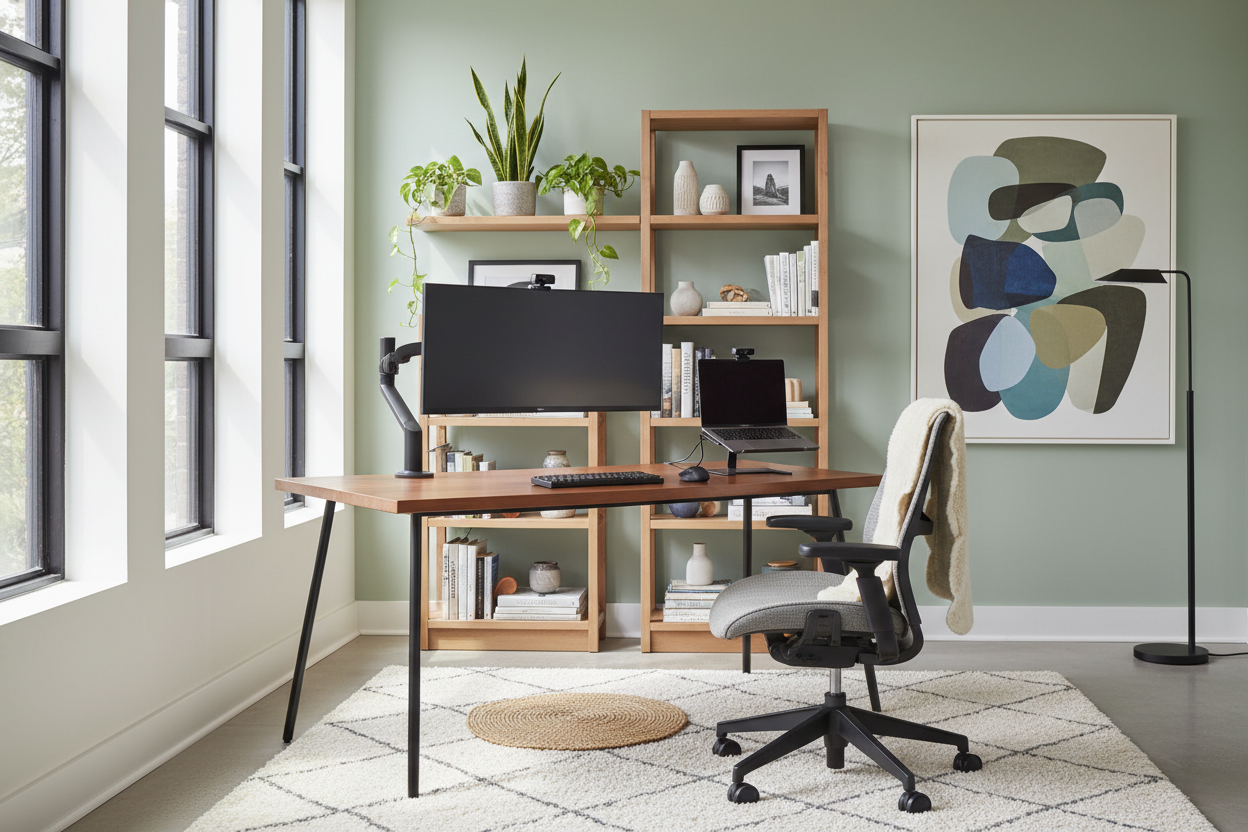
We have all been there—starting the work week at the dining table, moving to the sofa by Wednesday, and ending up with a stiff neck by Friday. Or worse, dragging a bulky, corporate-looking desk into the middle of your carefully curated living room and ruining the room's aesthetic. Creating the best remote work setup is not just about throwing a monitor on a flat surface. It requires a delicate balance of physical support and residential style.
As an interior designer, I constantly see clients struggle to integrate technology into their homes without making their spaces feel like a cubicle. In this guide, I will walk you through exactly how to plan, furnish, and style a workspace that actually feels like a seamless, comfortable part of your home.
Key Takeaways: Quick Decision Guide
- Position your desk perpendicular to a window to minimize screen glare while maximizing your exposure to natural light.
- Choose a desk depth of at least 24 inches if you strictly use a laptop, and 30 inches if you use dual monitors.
- Prioritize an adjustable chair over a static dining chair; look for adjustable seat depth and lumbar support.
- Use cable management trays immediately—visual cord clutter creates unnecessary mental fatigue in a home environment.
Designing the best work from home office layout
Most North American homes were not built with dedicated, fully wired offices in mind. Whether you are tucking a desk into a living room alcove or dedicating a spare suburban bedroom, space planning dictates the flow and feel of the room.
Clearance and Placement Rules
Never push your desk flat against a dark wall if you can avoid it. Floating your desk in the room or facing it out toward the door gives you a commanding view and reduces claustrophobia. You must leave at least 36 inches of clearance behind the desk to push your chair back comfortably without scraping the drywall or hitting other furniture.
The Ergonomics of the best work from home computer setup
The physical details separate a workspace that looks good in photos from one you can actually sit at for eight hours a day without pain.
Finding the Right Desk Height and Proportions
Standard desk height is around 29 to 30 inches, which is actually too high for many people to type comfortably. If your feet do not rest flat on the floor, you need a firm footrest. Furthermore, your monitor should sit at eye level to prevent tech-neck. Articulating monitor arms are crucial here—they free up valuable surface area on your desk and allow infinite height adjustments.
Blending your work setup at home with your decor
You do not have to settle for the standard black-on-black plastic corporate aesthetic. Introduce texture and warmth to soften the visual weight of your technology.
Materials and Visual Weight
A solid walnut or white oak desk grounds the space beautifully, while a chair upholstered in a performance boucle or woven fabric ties the room back to your residential roots. Use negative space wisely; do not crowd the desktop with bulky organizers. Instead, rely on closed storage like a rolling file cabinet tucked neatly out of sight.
A Designer's Honest Take
Five years ago, I fell in love with a sleek, vintage mid-century modern writing desk for my own home office. It had gorgeous tapered legs, a warm teak finish, and a very light visual footprint. It also had zero wire management and a depth of only 20 inches.
After two weeks of my dual monitors hanging precariously off the back edge and a nest of black cords ruining the aesthetic I had worked so hard to create, I realized my mistake. I learned the hard way that a beautiful desk is entirely useless if it fails as a daily tool. I ended up swapping it for a piece with built-in cord routing and a 30-inch depth. It is visually heavier in the room, but the daily comfort and functionality are absolutely worth the trade-off. Never sacrifice ergonomics for a silhouette.
Frequently Asked Questions
What is the best work at home setup for a small apartment?
Look for a wall-mounted floating desk or a leaning ladder desk. These pieces utilize vertical space and have a very light visual footprint, making your room feel larger while still providing a dedicated, sturdy work zone.
What are your top work from home setup tips for hiding cords?
Mount a wire management tray directly to the underside of your desktop. Run a single power strip up to the tray, plug all your monitors and chargers in there, and use a neoprene sleeve to bundle the cables running down the desk leg to the wall outlet.
Can I just use a dining chair for my desk?
Generally, no. Dining chairs lack the seat depth, lumbar support, and tilt mechanisms required for long-term sitting. If you hate the look of traditional office chairs, search for 'management chairs' in leather or performance fabrics—they offer a softer residential look with hidden ergonomic features.


Dejar un comentario
Este sitio está protegido por hCaptcha y se aplican la Política de privacidad de hCaptcha y los Términos del servicio.