










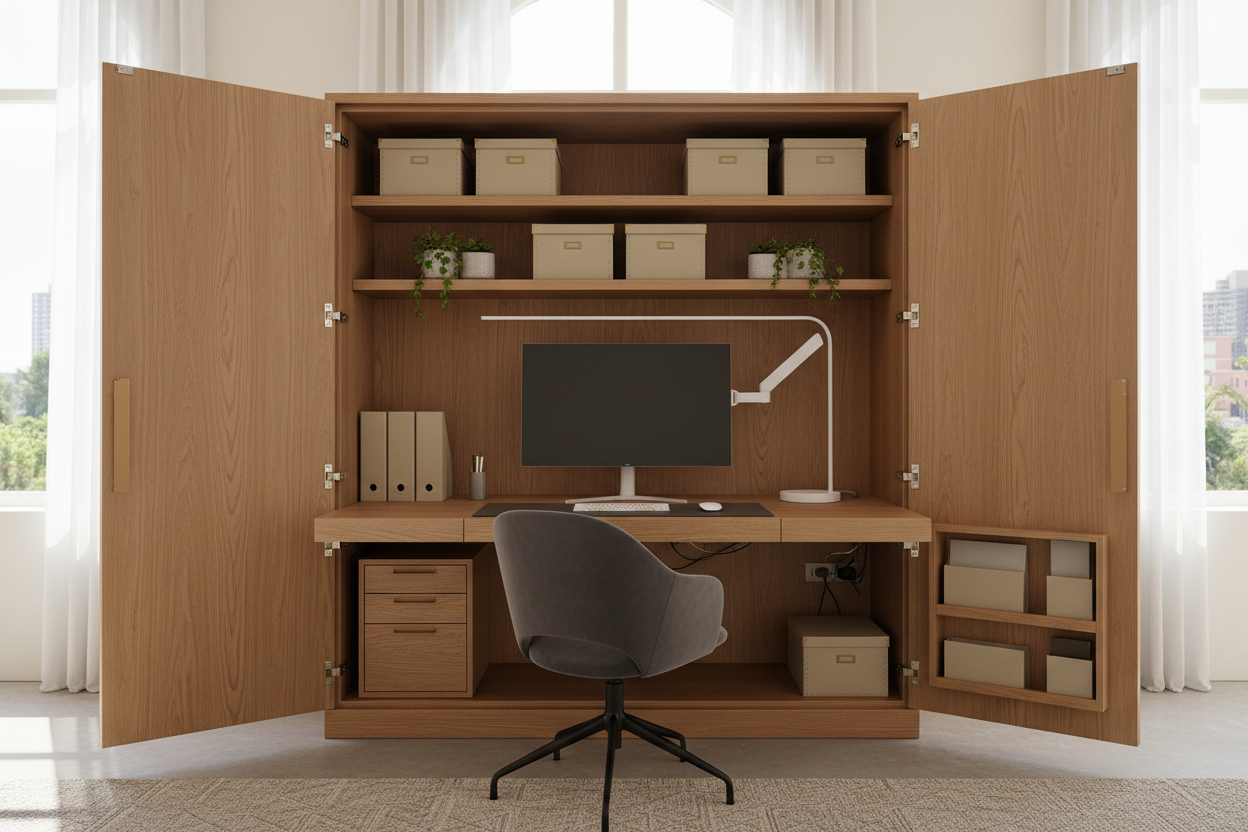
We have all encountered the same visual disruption: a beautifully curated living room or master bedroom interrupted by the chaotic tangle of cords, monitors, and blinking lights of a home office. As our homes increasingly double as workspaces, the challenge isn't just finding a place to work; it is finding a way to make that work disappear when the clock strikes five. This is where the armoire and desk combination becomes a designer’s secret weapon. It offers the architectural weight of a wardrobe with the hidden utility of a command center.
Quick Decision Guide: Key Features to Look For
- Internal Depth: Ensure a minimum interior depth of 22-24 inches to accommodate monitors and keyboard trays without preventing the computer desk doors from closing.
- Hinge Articulation: Look for double-hinged or 270-degree wrap-around hinges so the doors fold flat against the sides, preventing them from blocking natural light.
- Cable Management: A true computer armoire must have pre-drilled grommets and a ventilated back panel to prevent hardware overheating.
- Material Integrity: For heavy daily use, prioritize a solid wood armoire desk over particle board to ensure the hinges don't sag over time.
The Architecture of Concealment: Why Choose an Armoire?
The primary allure of an office in an armoire is psychological as much as it is aesthetic. In open-concept floor plans, seeing your workstation can prevent you from truly relaxing. A computer cabinet desk allows you to physically close the chapter on your workday.
Unlike a standard roll-top, a large armoire desk provides vertical storage. This utilizes the "dead space" near the ceiling, offering shelves for binders and printers that would otherwise clutter a surface. When selecting a computer wardrobe, consider the silhouette. A contemporary armoire desk with clean lines and hidden hardware works best in modern spaces, while a traditional wood computer armoire with crown molding anchors a classic study.
Material Matters: Solid Wood vs. Veneer
When shopping for a desk armoire for sale, the construction material dictates longevity. An armoire desk with doors carries significant weight on its front hinges. I often steer clients toward solid wood armoire desk options because the screws hold tighter in natural timber than in MDF. If you are eyeing a black computer armoire or a painted finish, check the underlying material. A computer cupboard made of composite materials may look sleek initially but often suffers from door misalignment after a year of heavy use.
Ergonomics Inside the Box
The common pitfall with a computer armoire workstation is the lack of legroom or elbow space. To avoid the feeling of working inside a closet, look for a computer armoire with pull-out desk features. A slide-out surface extends your working zone into the room, allowing for proper chair height and knee clearance.
Configuring the Layout
For a fully functional home office armoire workstation, internal organization is paramount. A computer hutch with doors should include adjustable shelving. If you use a tower, ensure the designated CPU cubby in the computer cabinet desk with doors allows for airflow. For laptop users, a laptop armoire or a small computer cabinet with doors might suffice, but ensure there is still a pull-out tray for an external mouse and keyboard to maintain ergonomic health.
Space Planning for the Unit
An office desk armoire is a substantial piece of furniture. When measuring, do not just measure the closed footprint. You must account for the swing radius of the desk with doors. If you are tight on space, consider a computer armoire with fold out desk or a unit with pocket doors that slide back into the cabinet, eliminating the footprint of the open doors entirely. A corner computer armoire can also be a brilliant solution for utilizing awkward angles in a room.
Lessons from My Own Projects: The "Door Swing" Dilemma
I learned the hard way about the importance of hinge quality during a project for a client in a downtown loft. We sourced a stunning, vintage-inspired computer armoire desk with doors. It looked incredible closed. However, once we loaded it with equipment, we realized the standard 90-degree hinges meant the doors stuck straight out when open.
It created a "tunnel vision" effect for the user and blocked the flow of traffic in the room. I had to hire a carpenter to retrofit the piece with articulating hinges that allowed the doors to wrap around the side of the unit. Furthermore, we discovered that the finish on the pull-out tray wasn't cured for heat; the warmth from the client's wrist and laptop caused the finish to get tacky. My advice? Always test the desk with doors that close in the showroom. Sit at it. Check if the doors block your light, and run your hand over the work surface to ensure it feels durable enough for eight hours of daily contact.
Conclusion
Integrating a workstation armoire into your home is about reclaiming your sanctuary. whether you choose a small armoire desk for a guest room or a large computer armoire for the living area, the goal is visual quiet. By investing in a piece that offers robust hardware and thoughtful ergonomics, you create a space that works hard by day and disappears by night.
Frequently Asked Questions
How deep should a computer armoire be?
For a desktop setup, look for a depth of at least 24 inches. This accommodates the monitor stand and allows the computer desk with doors that close to shut fully without crushing cables. For laptops, 18-20 inches is often sufficient.
Can I convert a regular wardrobe into a computer armoire?
Yes, but ventilation is key. A standard wardrobe lacks cable management. You will need to drill grommet holes and potentially add a passive vent at the top or back to prevent heat buildup from electronics inside the computer wardrobe cabinets.
Are armoire desks suitable for dual monitors?
It depends on the width. A standard desk armoire combo is often too narrow for dual 27-inch monitors. Look for "double-width" units or a computer armoire with swing out desk extensions that provide extra lateral space.


Dejar un comentario
Este sitio está protegido por hCaptcha y se aplican la Política de privacidad de hCaptcha y los Términos del servicio.