










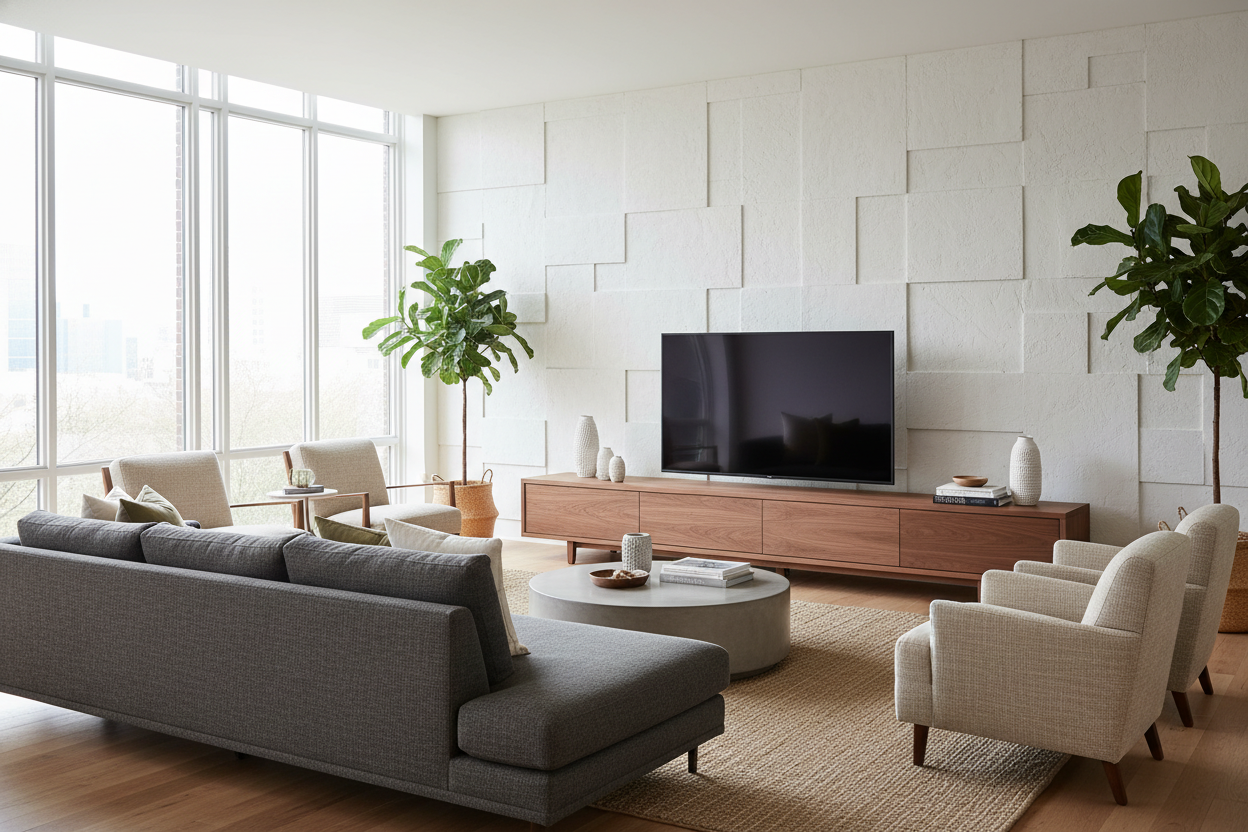
I remember the day I finally upgraded to a massive screen. I felt like a king until I tried to set it on my old media console. It looked like a bodybuilder trying to sit on a toddler's stool. The screen hung off the edges, the cords were a rat's nest, and the whole room felt claustrophobic. Finding tv stands 70 inch tvs won't dominate is harder than it looks.
You aren't just buying a shelf; you're trying to balance a massive black rectangle against the rest of your life. If you get the proportions wrong, your living room stops being a sanctuary and starts looking like a tech warehouse. I've spent enough time staring at 47 browser tabs of consoles to know that the right fit is about more than just weight capacity.
Quick Takeaways
- Your stand should be at least 10 inches wider than the TV screen itself to avoid the 'overhang' look.
- Solid wood or heavy-duty MDF is a must; cheap particle board will bow under the weight of a 70-inch set.
- Look for closed storage in tv stands 70 tv owners recommend to hide the inevitable cable spaghetti.
- Aim for a console height that puts the middle of the screen at eye level when you're seated (usually 20-24 inches).
The Awkward 'Overhang' Problem With Massive Screens
Here is the math nobody tells you: a 70-inch TV is measured diagonally. In the real world, that screen is usually about 61 inches wide. If you put that on a standard 60-inch console, the edges of your TV will literally hang over the sides. It looks unstable, cheap, and quite frankly, it is a tipping hazard if you have kids or a clumsy dog.
I see people make this mistake constantly. They get the big screen home and realize they forgot the 70 inch TV and stand need to actually work together as a unit. A dedicated tv cabinet for 70 inch tv setups needs to be wide enough to provide a visual 'anchor.' Without that extra breathing room on the sides, the room feels top-heavy and stressful.
Why Width is Everything (And the Math Behind It)
The golden rule for a tv unit 70 inch screens can live on? Go wider than the screen. A 70 inch wide tv stand is the absolute bare minimum, but honestly, it still looks a bit cramped. I always tell my friends to look for something in the 75 to 80-inch range to get that high-end, custom look.
That extra five to ten inches on either side creates a 'border' that frames the tech. It allows you to put a small lamp or a ceramic bowl next to the screen so the TV doesn't look like it's eating the wall. If you are tight on space, at least ensure the base of the TV is centered with plenty of clearance from the edge of the furniture to keep the proportions from feeling 'off.'
Where to Actually Hide Your Cords and Consoles
Modern entertainment centers for 70 tv setups aren't just about holding weight; they are about hiding the mess. Between the PS5, the soundbar, and the router, you are looking at a dozen cables. If you buy a stand with open shelving, you are going to spend your life looking at tangled black wires and blinking green lights.
I am a huge advocate for a modern TV stand with cabinets. Doors are your best friend. They hide the clutter and the dust. If you have a lot of media players, look for a console with drop-down doors. It gives you easy access when you need to reset the Wi-Fi but keeps everything looking clean when you are just trying to relax. A tv stand with storage 70 inch capacity should feel like a piece of furniture first and a tech hub second.
The Local Hunt vs. Ordering Online
We've all done it—typed '70 inch tv stand nearby' or 'tv stand for 70 inch tv nearby' into Google Maps and driven to the nearest big-box store. Usually, you are met with three options: a glass-and-metal monstrosity that looks like a 2004 bachelor pad, or a flimsy unit that feels like it's made of cardboard. Searching for tv stands on sale 70 inch models locally is often a race to the bottom in terms of quality.
I have had much better luck browsing stylish living room TV stands online. You get access to better materials like walnut veneers or solid oak, rather than the 'espresso' finished paper you find at the local warehouse. Plus, having an 80-inch box delivered to your door beats trying to strap it to the roof of a sedan any day. If you see a 'tv stand 70 inch nearby' that seems too cheap to be true, it probably is.
Units That Look Like Grown-Up Furniture
Your living room shouldn't look like a dorm room. Avoid the cheap black glass. It shows every fingerprint and every speck of dust. Instead, look for a tv console for 70 inch tv use that has some texture—fluted wood details, mid-century tapered legs, or even a sleek stone top. You want something that balances the coldness of the technology with the warmth of your home.
I finally settled on a piece that actually looks like real furniture, and it changed the whole vibe of my house. It doesn't scream 'I LOVE MOVIES'; it says 'I live here and I have good taste.' Don't settle for a utility shelf when you can have a centerpiece.
Personal Experience: The Bowing Disaster
Three years ago, I bought a 'bargain' 72-inch stand made of honeycomb particle board. It looked fine for a month. Then, I noticed the middle started to sag under the weight of my 70-inch screen. The doors stopped closing properly because the frame was warped. I ended up spending more money replacing it than I would have spent buying a quality solid-wood unit the first time. Check the weight capacity and the material density before you buy—your TV (and your wallet) will thank you.
FAQ
How wide should a stand be for a 70-inch TV?
Aim for at least 72 to 80 inches. Since the TV itself is about 61 inches wide, an 80-inch stand gives you about 9 inches of space on each side for a balanced, high-end look.
Can I use a 60-inch stand for a 70-inch TV?
Physically, maybe—if the TV's legs are narrow enough. Aesthetically? It is a nightmare. It will look cramped and top-heavy, and you will likely have issues with stability and overhang.
What is the best height for a 70-inch TV stand?
Look for a height between 20 and 24 inches. Big screens sit high on their own, so a taller console will force you to crane your neck up, which is a recipe for a headache after a long movie night.


Dejar un comentario
Este sitio está protegido por hCaptcha y se aplican la Política de privacidad de hCaptcha y los Términos del servicio.