










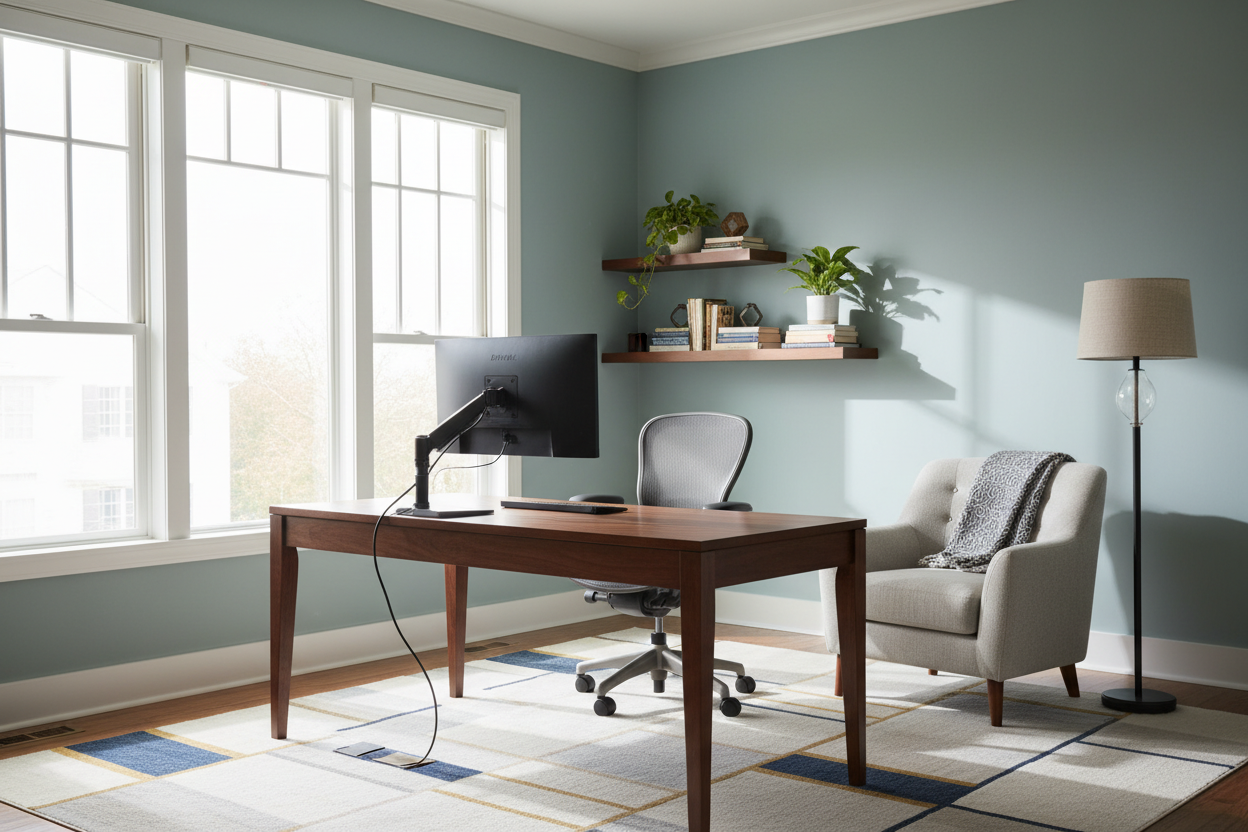
Many of us started working from home using a dining chair and a laptop propped on a stack of books. Fast forward a few years, and that temporary setup has become a permanent pain in the neck—literally. If your workspace feels cluttered, uninspiring, or physically uncomfortable, you need practical tips for home office design that go beyond just buying a nice-looking desk. Over my 15 years designing residential spaces, I have seen countless clients prioritize aesthetics over ergonomics, resulting in beautiful rooms they absolutely hate working in.
In this guide, we are going to break down how to properly scale your furniture, manage visual weight, and create a layout that actually supports your daily workflow. You will walk away knowing exactly how to balance form and function without compromising on either.
Quick Decision Guide: Office Design Essentials
- Float your desk: Whenever possible, position your desk facing the entrance (the 'command position') to reduce subconscious distraction and create a stronger focal point.
- Prioritize the chair: Allocate the largest portion of your budget to an ergonomic chair with adjustable seat depth and lumbar support.
- Control the glare: Position your monitor perpendicular to windows to avoid harsh screen glare and severe backlighting on video calls.
- Balance visual weight: Pair a heavy, solid-wood executive desk with lighter, open-metal shelving to keep the room from feeling bottom-heavy.
Space Planning: Nailing the Layout
The 36-Inch Rule
One of the most common mistakes I see in North American suburban homes is stuffing oversized furniture into a standard 10x10 spare bedroom. You need room to breathe and move. Always leave a minimum of 36 inches of clearance behind your desk for your chair to roll in and out comfortably. If you have a guest chair or a reading nook on the opposite side, ensure there is a clear 30-inch walkway between furniture pieces to maintain a natural traffic flow.
Mastering the Command Position
Pushing a desk flush against a wall is a default move, but staring at blank drywall for eight hours a day restricts your visual horizon and can cause eye strain. If your square footage allows, float the desk in the center of the room facing the door. This layout instantly makes the space feel like a professional suite rather than a makeshift homework station. If you must face a wall, pull the desk out by just three inches to allow for monitor mounts and proper cable drop.
Comfort and Ergonomics
The Truth About Desk Heights
Most standard desks sold today are 29 to 30 inches high. Here is the problem: that height is ergonomically designed for someone who is around 6 feet tall. If you are shorter, working at a standard desk often leads to raised shoulders and upper back tension. The fix? Invest in an adjustable-height desk, or ensure your chair has a wide range of vertical adjustment and pair it with a tilted footrest so your knees remain at a 90-degree angle.
Style and Coordination
Taming the Tech Clutter
Nothing ruins the aesthetic of a carefully curated transitional or mid-century modern office faster than a spaghetti-tangle of black cords. Cable management is not an afterthought; it is a core design element. Look for desks with built-in grommets or wire-management trays. Use closed storage credenzas to house bulky printers, routers, and paper shredders. Keep the surfaces clean so the silhouette of your furniture can actually be seen and appreciated.
Designer's Honest Take: Form vs. Function
A few years ago, I designed my own home office around a stunning, vintage cane-back chair. It had the perfect architectural silhouette and looked incredible in photos. The matte walnut finish paired beautifully with my brass desk lamp. I felt like a design genius.
By week three, my lower back was in agony. The beautiful cane seat offered zero support, and the wooden arms constantly banged into the edge of my desk, chipping the veneer. I learned the hard way that a workspace is a machine for working first, and a gallery second. I ended up swapping it for a highly adjustable, commercial-grade ergonomic chair. It is not as photogenic, but I can actually feel my legs at 5 PM. When clients ask for the best tips home office workers can implement, I always tell them this story: never sacrifice your spine for a Pinterest photo.
Frequently Asked Questions
What size desk do I need for a dual-monitor setup?
If you use two standard monitors, look for a desk that is at least 60 inches wide and 24 to 30 inches deep. Anything shallower than 24 inches will put the screens too close to your eyes, leading to strain and headaches.
How do I set up a home office in a small apartment?
In tight spaces, utilize your vertical real estate. Install a wall-mounted floating desk or a secretary desk that can fold away at the end of the day. This helps create a psychological boundary between 'work mode' and 'home mode' when you lack a dedicated room.
What is the best lighting for video calls?
Avoid sitting with a window directly behind you, which turns you into a silhouette. Instead, rely on soft, diffused front lighting. A pair of warm LED desk lamps placed behind your monitor, angled slightly toward your face, will wash out harsh shadows and provide an even, professional glow.

Dejar un comentario
Este sitio está protegido por hCaptcha y se aplican la Política de privacidad de hCaptcha y los Términos del servicio.