










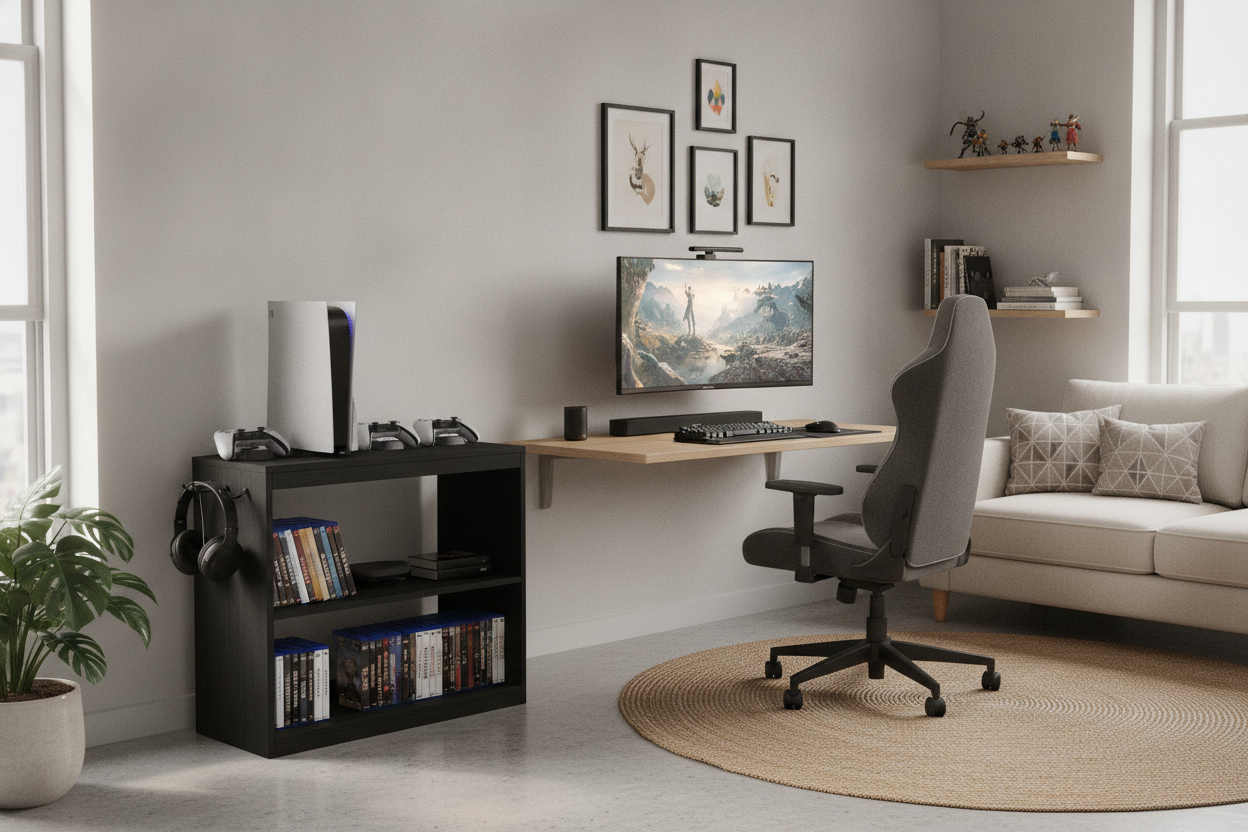
I spent three years staring at my Nintendo Switch dock squeezed between my dual monitors and a half-dead succulent. Every time I reached for my mouse to actually do some work, I would inevitably knock over a Joy-Con or snag a charging cable. It was a mess, and not just visually—it made my brain feel like it had 40 tabs open at once. I finally realized that my desk couldn't be both a high-productivity zone and a gaming hub without some serious boundaries.
The solution was a small game stand that took up less than 14 inches of floor space. Moving the console off the desk and onto its own dedicated piece of furniture didn't just clear the clutter; it reclaimed my mental workspace. Here is why you should stop trying to make your desk do double duty.
- Separation of State: Keeping gaming gear off the desk helps your brain switch from 'work mode' to 'play mode' more effectively.
- Heat Management: Consoles need airflow, and stuffing them behind a monitor is a recipe for a thermal shutdown.
- Cable Sanity: A dedicated stand keeps those thick HDMI and power cables away from your keyboard and mouse.
- Adulting: It looks significantly more intentional than a pile of controllers scattered on a mousepad.
The 'Console on the Desk' Nightmare
For a long time, I thought a dedicated small gaming stand was an indulgence I didn't have room for. My 'office' is really just a corner of my bedroom, so I figured everything had to live on one surface. The result was a cord-heavy disaster zone. I’d be in the middle of a Zoom call, and my cat would decide to rub against the Switch, sending the dock sliding toward the edge. It was constant low-level anxiety.
It is that same frantic energy you feel when your front door opens directly into a pile of shoes and coats. Much like how a small hall stand fixes a wreck of an entry, a dedicated spot for your console fixes the office. When your gaming gear has its own home, your desk suddenly feels twice as big. I stopped hitting my elbows on controllers and started actually having room for a coffee mug.
Why a Small Gaming Stand Actually Makes Sense
I tried repurposing an old IKEA Billy shelf at first, but it was too deep. It stuck out into the walking path and looked like a temporary fix that overstayed its welcome. A purpose-built small gaming stand is usually only 12 to 15 inches deep, which is the sweet spot for a PS5 or a Switch dock without hogging the floor.
Ventilation is the other big factor. Most desks are pushed flush against a wall, trapping heat behind your monitors. A standalone unit allows for 360-degree airflow, which is vital if you don't want your console sounding like a jet engine during a session of Elden Ring. I found that moving my gear to a metal-frame stand with mesh shelving dropped the fan noise significantly. Plus, it’s a lot easier to reach the back ports when you aren't crawling under a heavy mahogany desk.
Features to Look For (Besides Just Being Tiny)
If you are shopping for one, do not just buy the first cheap particle board unit you see. I made the mistake of buying a flimsy $30 rack that wobbled every time I pressed the power button. Look for something with a weighted base or a steel frame. You want it to feel solid, especially if you’re putting a $500 console on it.
Cable management is non-negotiable. Look for built-in grommets or at least a design that lets you zip-tie cords to the legs. I eventually realized I needed a small stand with drawer because seeing the tangle of extra HDMI cables, thumb drives, and physical game cases was half the stress. Having one drawer to shove the 'ugly' stuff into makes the whole room look like an actual adult lives there, rather than a college student in a dorm.
Where to Squeeze It In Without Looking Cluttered
In a small apartment, every inch is a battle. I tucked my stand into that awkward 5-inch gap between the end of my desk and the wall. It’s a space that was previously just collecting dust bunnies, and now it’s a functional tech hub. If you don't have a gap, look for a stand that can slide under a floating shelf or one that is tall and narrow rather than short and wide.
The key is to treat it like a piece of decor. I put a small lamp on the top shelf of mine, which actually helped the lighting for my video calls. It doesn't look like a 'gaming' piece; it looks like a curated part of the room. By choosing a finish that matches my desk—matte black steel and a dark wood top—the stand feels like an extension of the office rather than an intruder.
FAQ
Will a PS5 fit on a small game stand?
Yes, but you need to check the depth. A PS5 is about 15.4 inches tall (or deep, depending on orientation). Look for a stand that is at least 12 inches deep if you're okay with a slight overhang, or 16 inches if you want it fully supported.
Should I get a stand with wheels?
Only if you plan on moving it to the living room for couch gaming. Otherwise, wheels just make the stand less stable and more likely to roll when you're plugging in a controller. I prefer stationary feet with felt pads.
How do I hide the power strip?
The best move is to mount the power strip to the back of the stand using heavy-duty command strips or velcro. This way, only one cord (the main power cable) actually runs to the wall outlet, keeping the floor clean.


Dejar un comentario
Este sitio está protegido por hCaptcha y se aplican la Política de privacidad de hCaptcha y los Términos del servicio.