










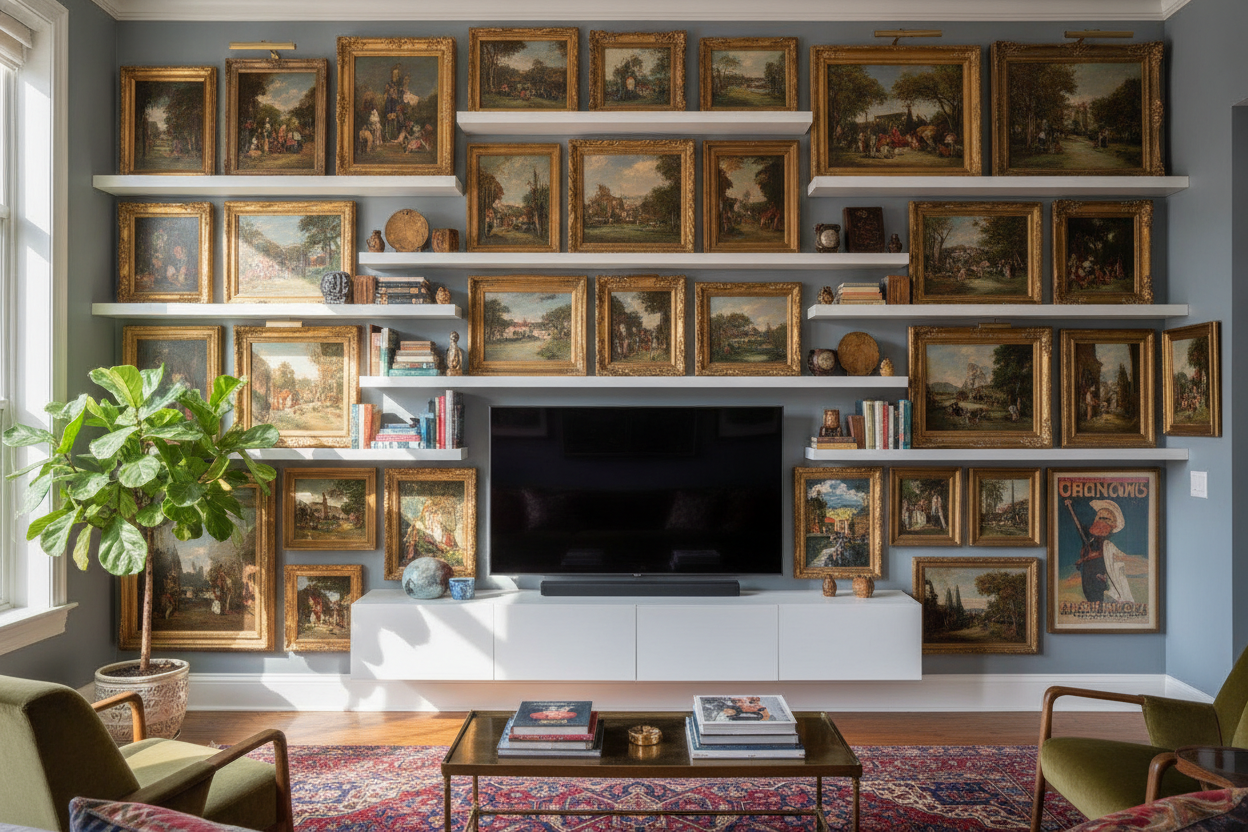
I spent three weeks staring at a 55-inch TV mounted to a stark white wall before I realized it looked like a tech-bro's dormitory. It was just this giant, lonely black rectangle sucking the life out of my living room. I didn't want a massive cabinet that would eat up my floor space, so I started looking into floating tv stand shelves to break up the void and give my eyes something better to look at than a plastic bezel.
Quick Takeaways
- Leave 8 to 10 inches of breathing room between the TV and the shelf to avoid a cramped look.
- Use a mix of frame textures—think thrifted gold leaf next to matte black wood.
- Always mount into studs; drywall anchors are a heartbreak waiting to happen.
- Cable management isn't optional; if the wires are visible, the 'floating' magic is gone.
The 'Floating Black Box' Problem (And Why Walls Feel Empty)
There is a specific kind of sadness that comes from a TV mounted perfectly in the center of a large, blank wall. It turns the television into a weird, tech-heavy shrine. Instead of a cozy living room, you end up with a space that feels like a waiting room at a high-end dental office. The black screen becomes a visual vacuum, pulling all the energy out of the room.
When you have a wall shelves entertainment center, the goal is to integrate the technology into your life, not highlight it like a museum artifact. I found that by surrounding the screen with art, the TV finally stopped being the loudest thing in the room. It becomes just another rectangular frame in a larger, more interesting story.
Why I Skipped the Floor Cabinet for a Hovering Setup
In a small apartment, floor space is more valuable than gold. I spent hours trying to browse different TV stands, but every traditional model I found felt like a heavy, wooden anchor. They cut the room in half and made my 12x14 living area feel like a closet. A floor-mounted unit also creates a 'dust bunny graveyard' underneath that I was tired of chasing with a vacuum.
By choosing a hovering setup, the floor remains visible all the way to the baseboard. This is an old designer trick—if you can see the floor, the room feels larger. It also allowed me to tuck a small Moroccan leather pouf underneath for extra seating, which you just can't do with a bulky credenza sitting on 4-inch legs.
The 3 Rules for Mixing Screens With Vintage Art
Mixing a 4K screen with 19th-century oil paintings feels risky, but it works if you follow a few basic rules. First, don't center the TV in your gallery wall. Offset it slightly or build the art around it asymmetrically so the screen doesn't look like the 'boss' of the wall. Second, use a sleek wall mounted media console as your grounding visual anchor. This horizontal line balances the verticality of the frames.
Third, vary your frame sizes. If all your art is the same size as the TV, the wall will look like a grid. I used a mix of tiny 4x6 sketches and one oversized landscape to break up the lines. The floating tv unit shelves act as the stage for this whole performance, providing a solid base that keeps the eclectic mix from looking like a cluttered mess.
Rethinking the Wall Shelves Entertainment Center Look
The biggest mistake people make with floating tv stand shelves is using them only for gear. If your shelf is just a graveyard for your router, a dusty Xbox, and three remotes, it’s going to look clinical. I treat my media shelving like a curated bookshelf. I keep my tech hidden in a mesh-front box and use the rest of the surface for brass objects, a stack of linen-bound books, and a trailing pothos plant.
I actually took some inspiration from the look of a rustic entertainment center with shelves. Even though my setup is modern, adding those organic textures—like a piece of reclaimed wood or a ceramic vase—warms up the cold, hard plastic of the electronics. It makes the whole setup feel intentional and lived-in rather than just 'installed.'
Is a Gallery Wall Around Your TV Actually Distracting?
I get this question every time someone comes over for movie night. People worry that the art will compete with the screen. Honestly? After five minutes, you don't even notice the frames. What you do notice is that when the TV is off, your living room doesn't look like a dead zone. It looks like a gallery.
If you're really worried about distraction, keep the art closest to the screen more muted. I put my high-contrast, colorful pieces on the outer edges and kept the sketches with plenty of white matting closer to the TV. It creates a soft visual buffer that actually makes the room feel cozier during a Netflix binge.
Personal Experience: The Stud Finder Lesson
I’ll be honest: I ruined my first attempt at this by being lazy. I tried to mount a 60-inch shelf using only heavy-duty drywall anchors because I couldn't find the studs through my thick plaster walls. Three days later, I woke up to the sound of my favorite ceramic bowl shattering as the shelf sagged at a 15-degree angle. Learn from my pain. Buy a real stud finder, hit the wood, and use 3-inch lag bolts. If you can't find the studs, don't hang the shelf.
FAQ
How high should I mount my floating shelf?
Your TV should be at eye level when you're sitting on your sofa. Usually, that means the bottom of the TV is about 24 to 30 inches off the floor. I place my shelf about 8 inches below the TV to leave room for a few decor items without blocking the screen.
How do I hide the wires in a floating setup?
If you own your home, run the wires behind the drywall using an in-wall cable routing kit. If you're renting, buy a paintable cable channel. Paint it the exact same color and finish as your wall, and it virtually disappears.
Can a floating shelf hold a heavy receiver?
Most floating shelves have a weight limit between 30 and 70 pounds if mounted into studs. If you have a massive, old-school home theater receiver, check the specs of your shelf carefully. I switched to a smaller digital amp to save weight and space.

Dejar un comentario
Este sitio está protegido por hCaptcha y se aplican la Política de privacidad de hCaptcha y los Términos del servicio.