










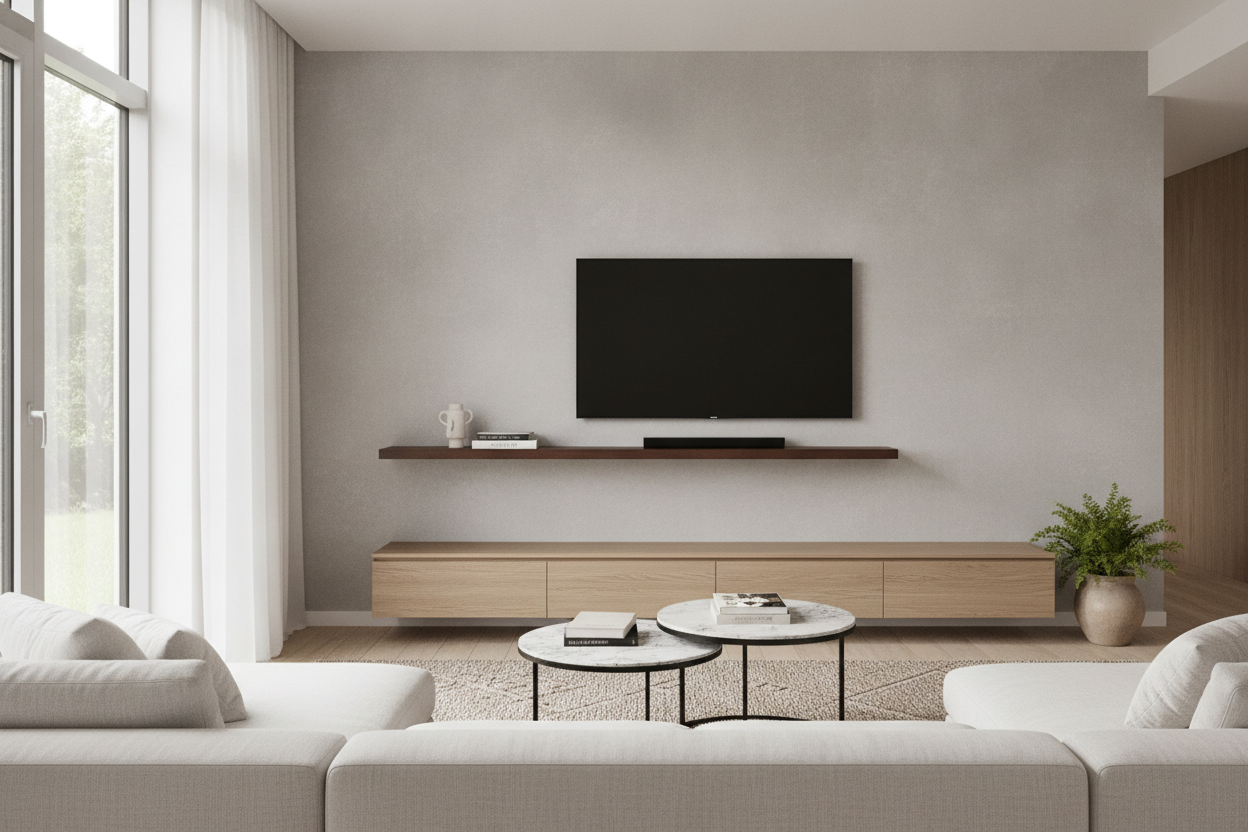
I spent three hours last Saturday staring at my living room wall, convinced my 65-inch screen was slowly winning a fight against the laws of physics. It looked like a giant black brick hovering over a toothpick. If you’ve ever installed a floating shelf tv setup only to feel like the room is tipping forward, you aren’t crazy. It’s a math problem most people ignore until the drill holes are already in the drywall. We focus so much on the 'hovering' aesthetic that we forget about visual gravity.
Quick Takeaways
- Your shelf should be at least 20% wider than your TV to prevent a 'top-heavy' look.
- Aim for a 4-to-8 inch gap between the bottom of the TV and the top of the shelf.
- Thicker shelves (3+ inches) provide better visual anchoring for large screens.
- If your wall is narrow, a grounded console is almost always a better design choice.
The 'Looming Screen' Problem Everyone Ignores
The biggest mistake I see in modern living rooms is what I call the 'Anvil Effect.' You’ve got a massive, 75-inch black rectangle mounted to the wall, and beneath it, a single, spindly piece of MDF that’s barely wider than the screen itself. Visually, that TV looks like it’s about to crush the shelf. It creates a sense of subconscious anxiety in the room because the proportions are upside down. In design, heavy things belong on the bottom, or at least need to look like they are being supported by something substantial.
Visual weight isn't the same as what the scale says. A TV is dark, glossy, and dense. To balance that out, the mounted tv floating shelf needs to act as a visual foundation. When the shelf is too thin or too short, the TV dominates the entire vertical plane, making the rest of your furniture look like dollhouse accessories. I’ve tested setups where a 2-inch shelf felt like it was sagging even when it was bolted into three studs—not because of the weight, but because the scale was just wrong.
How Wide Should Your Ledge Actually Be?
If you want your living room to look like a professional designed it, you need to stop matching the shelf width to the TV width. I follow the 'Rule of 1.2.' Take the width of your TV and multiply it by 1.2. That is your minimum shelf length. For a standard 55-inch TV (which is actually about 48 inches wide), you want a shelf that is at least 58 to 60 inches long. This extra 'overhang' on the sides creates a buffer zone that lets the eye rest. It makes the mounted tv with floating shelf look intentional rather than cramped.
I learned this the hard way in my last apartment. I tried to save space by using a shelf that was exactly the same width as my screen. It looked sterile and awkward, like a hotel room designed by someone who hates joy. Everything changed when I replaced my bulky console with a floating wooden TV shelf that extended a full foot past the TV on either side. Suddenly, the wall felt wider, the ceiling felt higher, and the TV didn't look like a giant black hole sucking the life out of the room. Texture matters here too—reclaimed wood or a thick oak slab adds 'heft' that white laminate just can't provide.
The Golden Rule for the Gap Between Screen and Shelf
The 'void' is where most DIY setups go to die. If you mount the TV too high above the shelf, they look like two unrelated objects that happen to be sharing a wall. If you mount it too low, you can't actually put anything on the shelf without blocking the screen. The sweet spot is almost always between 4 and 8 inches. This range is tight enough to keep the two pieces connected as a single visual unit, but wide enough to allow for a soundbar or a few low-profile decor items.
I usually aim for 6 inches. This allows the TV to be at a comfortable eye level (please, stop mounting your TVs near the ceiling) while leaving just enough room for the remote signals to hit the sensor. When the gap exceeds 10 inches, you start to see too much of the wall cords—even if they are hidden behind the drywall—and the composition breaks apart. You want the shelf to feel like a pedestal for the TV, not a separate zip code.
Styling the Gap to Bridge the Distance
If you find yourself stuck with a gap that feels a little too wide, you can fix it with styling. Don't just line up three tiny candles and call it a day. You need items with varying heights to 'bridge' the space between the ledge and the screen. A stack of horizontal coffee table books with a small bowl on top can fill 4 inches of that void perfectly. A leaning piece of art on one side can also break up the hard horizontal lines of the TV and shelf.
Be careful not to over-clutter. If you have a lot of media components or gaming consoles, move them to nearby adjustable shelf storage instead of cramming them all onto the floating ledge. The whole point of a floating setup is to embrace negative space. If the shelf is covered in wires and controllers, you’ve lost the battle. Keep the ledge for one or two high-quality objects—a ceramic vase or a single trailing plant—and let the minimalist design do the heavy lifting.
When to Admit Defeat and Go Back to the Floor
Not every wall is meant for a floating setup. I’ve walked into homes where people have tried to force a floating shelf onto a narrow 4-foot wide bump-out between two windows. It never works. Because you need that extra width (the 1.2 rule) to make the proportions look right, a narrow wall will always make a floating shelf look 'chopped off.' If you can't fit a shelf that is significantly wider than your TV without hitting a corner or a window frame, you need to pivot.
In those cases, a grounded piece of furniture is your best friend. A traditional TV stand with an adjustable center shelf provides the physical weight needed to anchor a narrow space. It fills the gap from the floor up, which tricks the eye into seeing the entire vertical section as a solid, stable unit. Don't let the 'minimalist' trend talk you into a floating setup that makes your room feel flimsy. Sometimes, the most sophisticated move is knowing when to stay grounded.
FAQ
How high should my floating shelf be?
Most people mount them too high. Your TV should be at eye level when you are seated. Usually, this means the shelf will sit about 24 to 30 inches off the floor, depending on the height of your sofa and the size of your TV.
Can a floating shelf hold a soundbar?
Yes, but check the depth. Most soundbars are 3 to 5 inches deep. Make sure your shelf is at least 10 inches deep so the soundbar doesn't hang over the edge, which looks cheap and unfinished.
Do I really need to drill into studs?
Absolutely. Do not trust drywall anchors with a shelf that lives under an expensive TV. If your studs aren't perfectly centered, use a mounting rail or a thick backer board to ensure that shelf isn't going anywhere.

Dejar un comentario
Este sitio está protegido por hCaptcha y se aplican la Política de privacidad de hCaptcha y los Términos del servicio.