










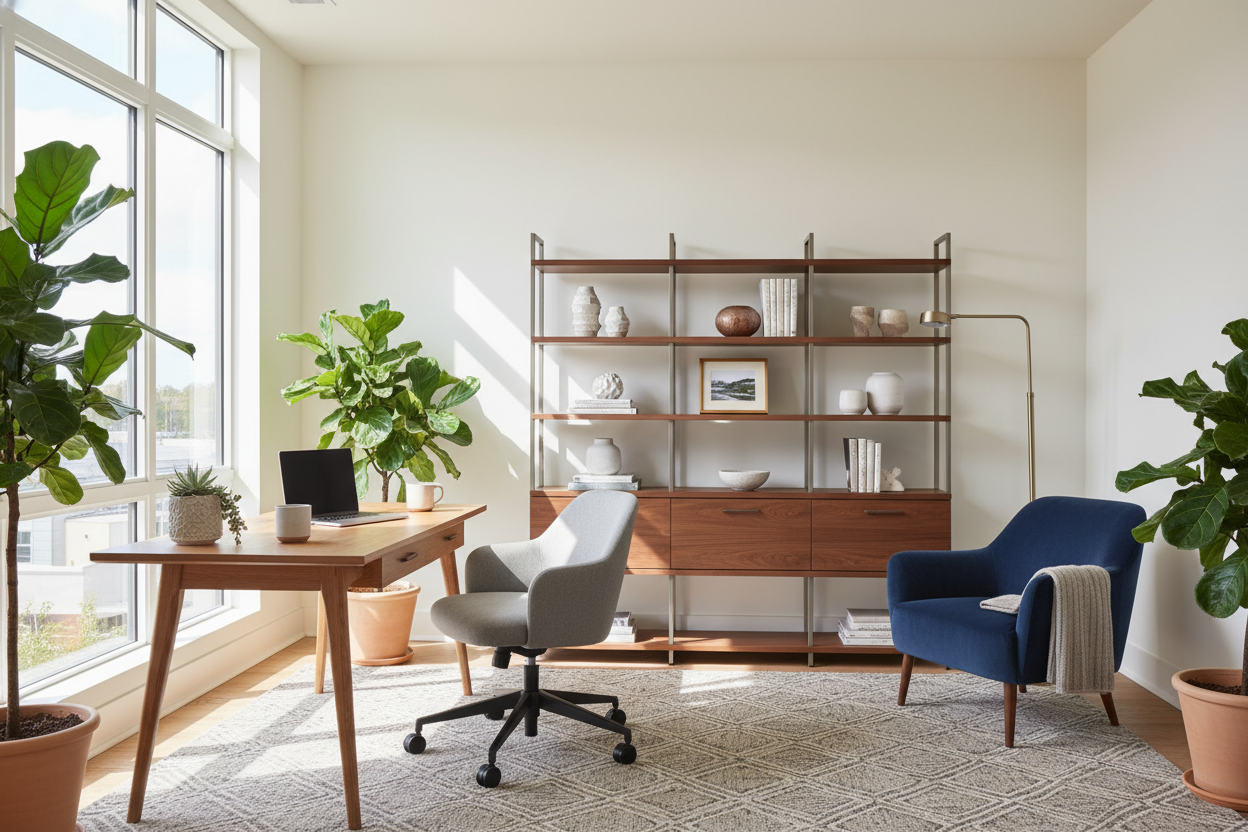
Many clients come to me with a spare bedroom or an awkward alcove, unsure how to furnish it for their daily 9-to-5. Whether your setup is for work at home or work from home, the reality is that your residential space now has to support serious professional demands. If your current office consists of a laptop balanced on a dining table surrounded by visual clutter, you already know how quickly that impacts your focus and your home's overall aesthetic.
In this guide, we will break down how to design a workspace that matches your specific remote lifestyle. You will walk away knowing exactly how to balance beautiful furniture silhouettes with the strict ergonomic requirements of a daily workspace.
Quick Decision Guide
- Identify your work style: A permanent home business requires different space planning and storage than a hybrid corporate schedule.
- Respect the clearance zones: Always leave at least 36 to 42 inches of empty space behind your desk so your chair can roll back comfortably.
- Prioritize ergonomics over aesthetics for seating: A trendy dining chair will cause back pain within a week; invest in a highly adjustable chair with proper lumbar support.
- Manage visual weight: If your room is small, choose a desk with open metal or wood legs to preserve negative space and keep the room feeling airy.
Defining Your Space: The Terminology Breakdown
Before buying furniture, we need to define how you actually use the space. In the design industry, the terminology you align with dictates the floor plan.
Work at Home vs Work From Home
While often used interchangeably, there is a distinct spatial difference when comparing work at home vs work from home. 'Work at home' typically implies running a permanent home-based business. This requires heavy-duty space planning: dedicated filing systems, commercial-grade storage, and sometimes even seating for visiting clients. 'Work from home' usually denotes a remote corporate employee. Here, the focus shifts to high-speed tech integration, dual-monitor setups, and creating a clean, professional focal point for daily video calls.
Work From Home vs Work From Anywhere
If you have a highly flexible schedule, you might be weighing work from home vs work from anywhere. Designing for 'work from anywhere' means prioritizing mobility within your house. Instead of a massive executive desk, I recommend a smaller, lightweight writing desk paired with a mobile storage pedestal. This allows you to easily shift your setup from the guest room to the living room depending on your household's daily traffic.
Space Planning & Layout for Remote Work
The biggest mistake I see in North American homes is ignoring proportion. People buy massive, heavy desks that swallow a standard 10x10 foot spare bedroom. When deciding whether to build a permanent work from home or work at home station, measure your room's footprint carefully.
If your office shares space with a guest room, try to position the desk facing the door rather than pushing it against a blank wall. This 'command position' not only looks better on Zoom calls but also creates a distinct psychological boundary between the work zone and the resting zone. Use a textured area rug to anchor the desk and visually define the workspace.
Comfort, Ergonomics, and Materials
A desk might look stunning online, but if the material cannot handle daily use, it is a poor investment. Solid wood or high-quality wood veneer offers excellent durability and a warm, organic feel. However, avoid highly textured reclaimed wood for your primary work surface, as it makes writing on paper impossible without a thick desk pad.
Pay close attention to desk height. The standard North American desk is 29 to 30 inches high, which is actually too tall for many people unless they use a keyboard tray. Your feet should rest flat on the floor, with your knees at a 90-degree angle. If you are petite, consider a height-adjustable standing desk to achieve the perfect ergonomic fit.
Designer's Honest Take
Early in my career, I designed a stunning mid-century modern office for a client transitioning to permanent remote work. I sourced a gorgeous vintage teak desk with a slim, elegant silhouette. It looked incredible in the portfolio photos.
However, I learned the hard way that vintage desks rarely accommodate modern dual-monitor clamp mounts or under-desk ergonomic keyboard trays. The negative space underneath was so tight that the client's high-end ergonomic chair couldn't even tuck in properly. The matte finish also showed every single fingerprint and coffee cup ring. We had to swap the desk out six months later for a modern, commercial-grade piece. Always measure your technology footprint and clearance needs before falling in love with a desk's aesthetic.
Frequently Asked Questions
What is working from home is known as in real estate listings?
When browsing floor plans, what working from home is known as typically translates to terms like 'flex space', 'den', or 'bonus room'. These are spaces that lack the closet required to be legally called a bedroom, making them perfect candidates for a dedicated office.
How do I make my home office look professional on video calls?
Focus on the wall directly behind your chair. Create a curated focal point using a bookshelf styled with a mix of books, plants, and sculptural objects. Avoid sitting with your back to a bright window, as the backlighting will turn you into a dark silhouette on camera.
Can I use dining furniture for my home office?
I strongly advise against it for full-time use. Dining tables are often 30 inches high and dining chairs lack the seat depth, adjustability, and lumbar support required for eight hours of sitting. If you must use a dining table temporarily, invest in an ergonomic seat cushion and a laptop riser to protect your posture.


Dejar un comentario
Este sitio está protegido por hCaptcha y se aplican la Política de privacidad de hCaptcha y los Términos del servicio.