










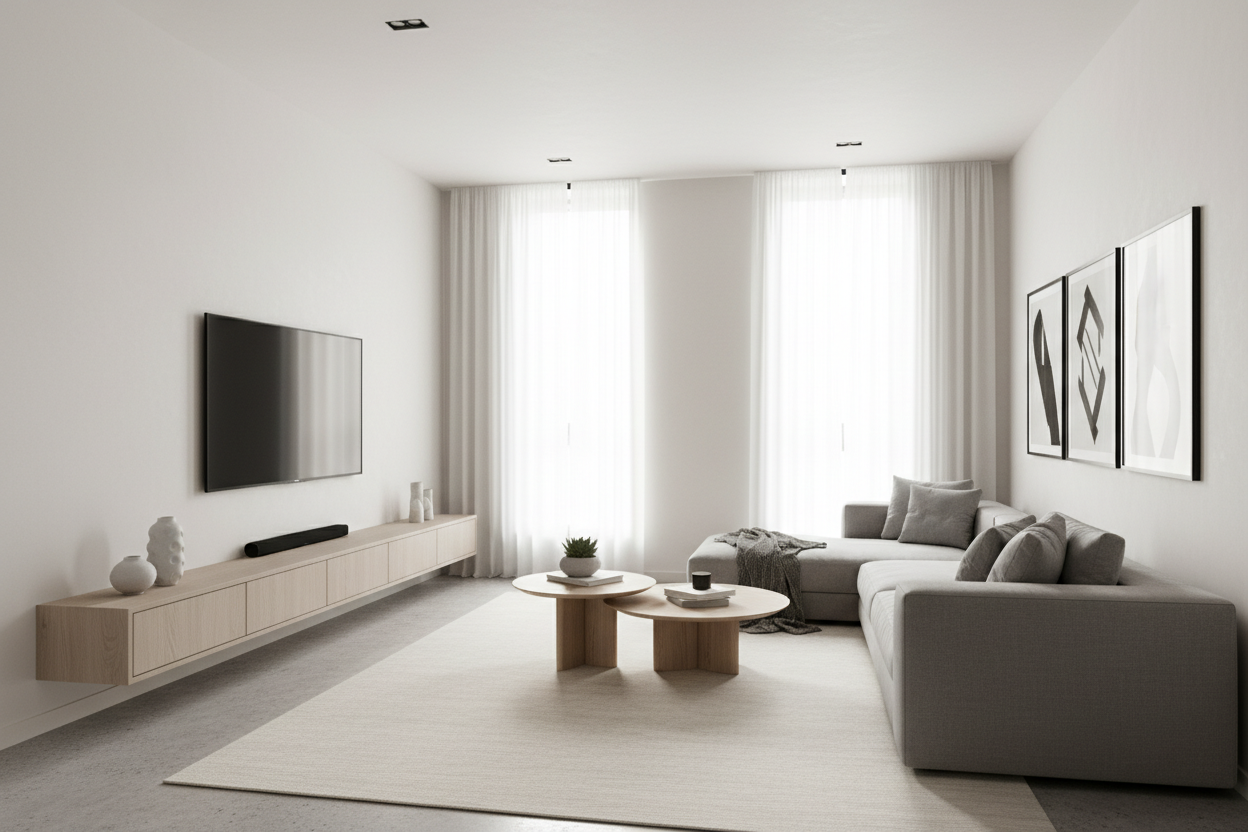
I spent $1,600 on a TV that is thinner than my smartphone, then spent $40 on a mounting bracket that makes it stick out like a sore thumb. I walked into my living room from the kitchen and saw a mechanical mess of black steel and tangled HDMI cables. It looked like a robot was trying to escape from behind my drywall. If you are obsessed with clean lines, a minimal tv wall mount is the only way to go.
Quick Takeaways
- Articulating arms add 4-6 inches of unnecessary depth to your TV setup.
- A true minimal mount sits less than 1 inch from the wall.
- 90% of people never actually swivel their TV once it is installed.
- Cable management is the 'final boss' of flush mounting—plan for recessed outlets.
The 'Side Profile' Test: Why Bulky Mounts Ruin the Room
We spend hours picking out the right sofa and the perfect rug, but we ignore the side view of the television. Most standard mounts are designed for 'utility,' which is code for being ugly. They use heavy-duty scissor arms that are built to hold 200-pound plasma TVs from 2008. Your modern LED weighs 40 pounds. You do not need a bridge-building crane to hold it up.
When you use a bulky mount, you create a 'shadow gap.' This is that dark, dusty void behind the screen where cords hang like vines in a jungle. It breaks the illusion of the screen being part of the architecture. A sleek room should feel intentional, and a screen that looks like it is hovering 6 inches off the wall feels like a temporary fix, not a design choice.
What Actually Qualifies as a Minimal TV Wall Mount?
In the world of hardware, 'low profile' is a loose term. Some brands call a 2-inch depth 'slim.' It is not. A true minimal tv wall mount should put your screen 0.5 to 0.75 inches from the drywall. We are talking about the thickness of a deck of cards.
There are two main types: fixed 'picture frame' mounts and 'no-gap' mounts. The picture frame style uses a thin rail and a wire system—literally like hanging a piece of art. The no-gap mounts are often proprietary (looking at you, Samsung Frame), where the mount actually sits inside a recessed cutout on the back of the TV itself. If you want that built-in look, every fraction of an inch matters.
But Wait, Don't I Need to Angle My Screen?
This is the biggest lie the big-box stores tell you. They sell you on the 'flexibility' of a full-motion swivel. Unless you are mounting your TV in a corner or high above a fireplace (which is a whole other ergonomic disaster), you do not need to tilt it. You sit on the couch. The TV is at eye level. It stays there.
I have owned three articulating mounts in ten years. Do you know how many times I swiveled them? Twice. Once when I installed it, and once when I was trying to find a lost remote behind the couch. By giving up the swivel, you gain a rock-solid, level installation that doesn't sag over time. Cheap articulating arms use plastic washers that eventually compress, leaving your TV permanently tilted 2 degrees to the left. It will drive you insane.
The Catch: Hiding Cords When You Have Zero Wall Clearance
Here is the honest truth: flush mounting is a commitment. When your TV is hugging the wall, there is no room for a standard power plug or a thick HDMI cable to stick straight out of the back. You need side-facing ports on your TV and a recessed media box in the wall. This box houses the outlet and the cable heads so they sit flush with the studs.
If you aren't ready to cut a hole in your drywall, you can still make it work with a slim cord cover painted the same color as your wall. I recently saw a setup where someone paired a flush-mounted screen with a wall mount tv entertainment unit. By routing the cables through the wall to the floating console below, the entire wall looked like a custom built-in. It hides the 'tech' and keeps the focus on the design.
Grounding the Setup: Furniture That Fits the Vibe
A TV floating on a blank wall can look a bit 'hospital waiting room' if you aren't careful. It needs something to ground it. Even if your TV is mounted, a piece of furniture underneath provides a visual anchor and a place for your soundbar or a few curated books.
For a truly seamless look, a wall mounted media console is the move. It mirrors the 'floating' effect of the TV and keeps the floor clear, which makes small rooms feel significantly larger. If you prefer a more traditional footprint, look for minimalist TV stands that are wider than the TV itself. A good rule of thumb: your console should be at least 10-12 inches wider than your screen to keep the proportions from looking top-heavy.
Personal Experience: My Sagging Mistake
I once bought a $150 heavy-duty articulating arm for a 65-inch OLED. It was rated for double the weight. Within six months, the weight of the screen caused the arm to slightly 'bow.' No matter how much I tightened the tension bolts, the TV looked crooked. I swapped it for a $30 fixed slim mount, and the room instantly felt more expensive. Sometimes, less metal is just better engineering.
FAQ
Can I still reach my HDMI ports with a flush mount?
It is tight. I recommend plugging in your cables before you hook the TV onto the wall bracket. If your ports face the wall instead of the side, you will need 90-degree HDMI adapters.
Do minimal mounts work on plaster walls?
Yes, but you must hit the studs. Because minimal mounts have a smaller 'footprint' on the wall, they put a specific type of tension on the fasteners. Do not trust drywall anchors for this—find the wood.
What if my wall isn't perfectly flat?
This is the one downside. A flush mount will reveal if your wall has a bow in it. If your house was built in the 1920s and the walls are wavy, a slightly deeper mount might actually be more forgiving.


Dejar un comentario
Este sitio está protegido por hCaptcha y se aplican la Política de privacidad de hCaptcha y los Términos del servicio.