










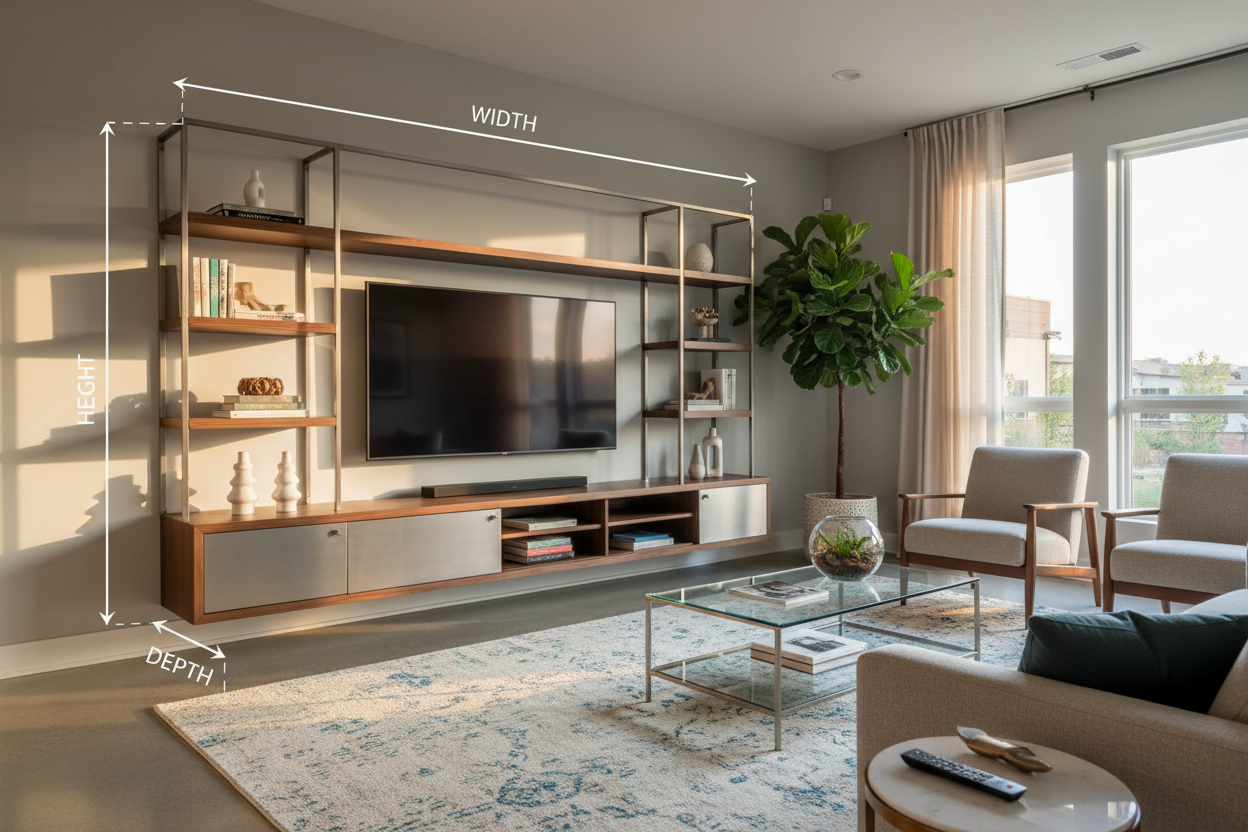
I spent three hours last Saturday staring at a friend's new living room setup, and it took everything in me not to tell him his TV was too high and his console was too low. It looked like a wall mounted entertainment center that was slowly sliding down the wall. We've all been lured in by those Pinterest photos of sleek, floating media setups, but the reality involves a lot more math than the glossy ads suggest.
Buying a wall mounted entertainment center is about more than just matching your wood grain to your coffee table. If you don't account for the physical reality of your walls and the sheer bulk of your gear, you're going to end up with a sagging shelf and a mess of dangling wires. I've learned the hard way that 'eyeballing it' is the fastest route to a weekend spent patching drywall holes.
- Stud spacing is non-negotiable for safety.
- Internal depth determines if your PS5 will actually fit.
- Floor clearance dictates the visual weight of the room.
- Always measure your longest cable before mounting.
The Floating Furniture Trap (And Why Most People Get It Wrong)
People treat a mounted entertainment center like a piece of wall art. It's not. It’s a heavy piece of cabinetry that you’re asking a few screws to hold against the relentless pull of gravity. I’ve seen beautiful walnut units literally rip chunks of drywall out because the owner thought toggle bolts were 'good enough.' They aren't.
The trap is buying based on the exterior width without looking at the structural requirements. A 72-inch console looks great on a 10-foot wall, but if the mounting brackets don't align with your home’s studs, you're looking at a disaster. You need a tv wall mount entertainment center that plays nice with your home's skeleton, not just your floor plan. If you ignore the physics of the mount, your wall mount entertainment system will eventually start to pull away from the wall.
Measurement 1: The 'Stud-to-Stud' Reality Check
Standard American homes usually have studs spaced 16 inches apart. Most hanging entertainment center designs have specific mounting points. If those points don't line up with your studs, you’re in trouble. I always tell people to find their studs first, then buy the furniture. It sounds backward, but it saves you from having a wall hung media cabinet that’s awkwardly off-center just because that’s where the wood was.
When you're looking at a high-end modern entertainment center wall unit, the weight capacity is usually significant. We're talking 50 to 100 pounds before you even put a TV or a soundbar on it. Drywall anchors are for picture frames, not for a media console wall. If the unit doesn't offer a French cleat or adjustable brackets that span at least two studs, keep looking. Your floor (and your electronics) will thank you.
Measurement 2: Internal Usable Depth (The Tech Killer)
This is where the marketing photos lie to you. A wall mounted media center might claim to be 16 inches deep, but once you subtract the thickness of the back panel and the door hinges, you're looking at 14 inches of actual space. My old AV receiver was 15 inches deep. I spent $600 on a wall mount entertainment shelf only to realize I couldn't close the doors because the HDMI cables stuck out too far.
Before you browse entertainment centers, measure your deepest piece of gear. Then add two inches for cable management. Modern gaming consoles like the Xbox Series X or PS5 are notoriously bulky. If you’re shopping for wall mount entertainment shelves, check if the back panel is recessed. A recessed back gives you a 'pocket' for cables to live in so your gear can sit flush against the front of your wall mounted media cabinets.
Measurement 3: The 'Knee Clearance' Ratio
A wall hanging entertainment center should typically sit between 10 and 15 inches off the floor. Any higher and it looks like it’s trying to escape; any lower and you might as well have just bought a standard floor unit. I like to aim for the 'knee height' rule—if I’m sitting on my sofa, the bottom of the wall mount entertainment cabinet should be roughly level with my knees.
This creates a sense of 'airiness' that makes small rooms feel bigger. If you mount a wall hung entertainment cabinet too close to the TV, the whole setup looks cramped. You want at least 6 to 8 inches of 'white space' between the top of the console and the bottom of your TV. This gap is crucial for an entertainment wall mount setup to feel balanced rather than cluttered. Without that gap, the two pieces of furniture just look like one giant, heavy blob on the wall.
My Go-To Fixes for Awkward Wall Layouts
If your studs are in weird places, look for a modern wall mount entertainment center with a rail-based mounting system. These allow you to slide the unit left or right even after the rail is bolted to the studs. I’m also a big fan of slatted doors. They allow infrared signals from your remote to pass through while hiding the clutter inside your wall hung entertainment center.
For tight spaces, I often recommend a floating tv stand wall mounted media console with an open-shelf component. It keeps the profile slim while giving you a spot for a soundbar. Remember, a wall-mounted unit is a permanent commitment to that spot on the wall. Take the extra twenty minutes to tape out the dimensions with painter's tape before you pick up the drill. It’s the only way to catch a layout mistake before it becomes a permanent hole in your wall.
Can I mount a media console on metal studs?
You can, but you'll need specialized toggle bolts or 'snap toggles' designed for metal. Standard wood screws will just strip the thin metal and fall out. If the unit is heavy, I usually suggest adding a plywood backer board for extra security.
How do I hide the wires?
The cleanest way is to run them through the wall using an in-wall cable routing kit. If you're renting, use a paintable cable raceway that runs vertically from the unit to the floor. It’s not invisible, but it’s a lot better than a 'cable waterfall' hanging off your console.
Is my TV too big for a floating console?
The general rule is that your console should be at least 6 to 10 inches wider than your TV. If the TV is wider than the console, it looks top-heavy and unstable, even if everything is safely mounted to the wall.


Leave a comment
This site is protected by hCaptcha and the hCaptcha Privacy Policy and Terms of Service apply.